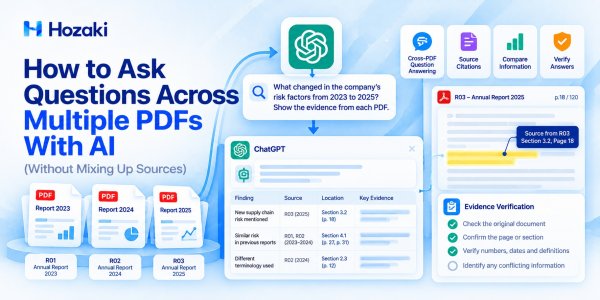
You have five PDF reports, each containing useful information about the same subject. You want to know what changed, where the documents agree, and which findings are supported by the evidence.
Reading every file from beginning to end may take hours. AI can help you ask questions across multiple PDFs, locate relevant passages, and organize the answers.
But there is a problem: a convincing AI answer is not necessarily an accurate one.
When several PDFs contain similar terms, overlapping findings, or conflicting numbers, an AI system may combine information incorrectly. It might attribute a claim to the wrong document, overlook a qualification, or report a page reference that does not support the answer.
The solution is not simply to upload more files or write a longer prompt.
You need a repeatable workflow that connects each question to the relevant documents, extracted evidence, and verification results.
This guide explains how to ask questions across multiple PDFs with AI using tools such as ChatGPT or NotebookLM, how to prevent source confusion, and how to check answers before relying on them.
What Does It Mean to Ask Questions Across Multiple PDFs?
Cross-PDF question answering means using information from two or more PDF documents to answer a specific question.
For example, imagine you have three annual reports from the same company.
You might ask:
-
Which risks were mentioned in all three reports?
-
What changed in the company's revenue breakdown?
-
Which new commitments appeared in the latest report?
-
Do the documents use the same definition of operating profit?
-
Which conclusions are supported by more than one report?
These questions require more than finding a keyword in a single document.
The system must identify relevant passages, preserve their source information, compare the evidence, and construct an answer.
Cross-PDF Question Answering vs. Summarization
Summarization asks:
What does each document say?
Cross-document question answering asks:
What do the documents collectively tell us about a specific question?
The distinction matters.
A summary may describe five reports separately without explaining where they agree or conflict.
A cross-PDF answer should connect the relevant findings while preserving the differences between sources.
If your main objective is to summarize an entire collection of documents, see How to Summarize Multiple PDFs With AI Without Losing Important Details.
What Makes a Cross-PDF Answer Reliable?
A useful answer should satisfy five conditions:
-
It addresses the actual question.
-
It identifies which document supports each claim.
-
It preserves important numbers, dates, definitions, and qualifications.
-
It distinguishes agreement from disagreement.
-
It clearly identifies information that could not be verified.
A polished response that fails these checks should not be treated as reliable evidence.
How to Prepare Multiple PDFs for Accurate AI Answers
Document preparation is often more important than the choice of prompt.
Before uploading files, make sure you understand what each PDF contains and whether its text can be processed.
Step 1: Check Whether Each PDF Is Searchable
Open each file and try selecting a sentence or searching for a distinctive phrase.
If text is selectable and searchable, the PDF probably contains a usable text layer.
If the document consists primarily of scanned page images, you may need optical character recognition (OCR).
However, selectable text does not guarantee accurate extraction. Multi-column layouts, tables, footnotes, and unusual fonts can still create problems.
For scanned documents, follow a dedicated OCR workflow before relying on extracted content.
Read How to OCR a PDF and Make Scanned Documents Searchable for a practical introduction.
Step 2: Give Every Document a Unique Identifier
Avoid uploading files with ambiguous names such as:
-
report.pdf
-
report-final.pdf
-
new-report.pdf
-
document2.pdf
Instead, use meaningful names:
-
R01_Company_Annual_Report_2023.pdf -
R02_Company_Annual_Report_2024.pdf -
R03_Company_Annual_Report_2025.pdf
A unique identifier makes it easier to track evidence and reduces the chance of confusing similar files.
For large projects, keep the identifiers in a separate document register.
Step 3: Record Basic Metadata
Create a simple source table.
| Document ID | Title | Year | Document Type | Notes |
|---|---|---|---|---|
| R01 | Company Annual Report | 2023 | Financial report | Earlier reporting period |
| R02 | Company Annual Report | 2024 | Financial report | Middle reporting period |
| R03 | Company Annual Report | 2025 | Financial report | Latest reporting period |
These are fictional example documents, not actual company reports.
Useful metadata includes the publication date, version, publisher, reporting period, and whether the file is complete.
This becomes important when two documents use the same title but contain different revisions.
Step 4: Check Document Completeness
Before analysis, confirm that:
-
All expected pages are present.
-
Tables and appendices have not been omitted.
-
The PDF is not corrupted.
-
Relevant figures are readable.
-
The document version is known.
-
Important pages are not password-protected or otherwise inaccessible.
If the file is incomplete, the AI system may produce an answer that appears complete even though it has not seen all the necessary evidence.
Step 5: Review Upload Permissions
Do not upload confidential reports, unpublished research, personal records, or restricted documents unless the service and organizational policies permit it.
Check the relevant data-handling settings and access controls before using cloud-based AI tools.
Which AI Tools Can Answer Questions Across Multiple PDFs?
Several AI tools support document question answering, but they differ in how documents are organized, processed, and referenced.
The most appropriate choice depends on the workflow.
ChatGPT
ChatGPT can work with uploaded PDFs and help users analyze information across files.
It is useful for tasks such as:
-
Comparing findings.
-
Building evidence tables.
-
Explaining conflicting statements.
-
Extracting structured information.
-
Drafting a synthesis from verified evidence.
Its PDF processing capabilities depend on the plan, available tools, and upload context.
Do not assume that every embedded chart or scanned page is fully interpreted in every workflow.
NotebookLM
NotebookLM is designed around user-provided sources and source-grounded exploration.
Users can add supported source materials and ask questions about them.
This can be helpful when the main goal is exploring a defined collection of research documents and following source references.
However, source citations still require review, especially when a conclusion combines multiple passages.
Adobe Acrobat
Adobe Acrobat also offers AI-assisted document question answering, and PDF Spaces supports multi-source workflows in eligible products.
Acrobat may be particularly relevant when document analysis needs to remain connected to PDF reading, annotation, editing, or management.
How to Choose
Ask three questions:
-
Do I mainly need research analysis or PDF document operations?
-
Can the tool clearly distinguish my source files?
-
Can I verify important answers against the original PDFs?
For a detailed research-focused comparison, see NotebookLM vs ChatGPT for PDFs: Which Should You Use?.
For PDF editing and AI analysis workflows, see ChatGPT vs Adobe Acrobat for PDF Workflows: Which Should You Use?.
Important Notes About PDF Processing and Feature Availability
AI tools do not necessarily process every PDF in the same way. In ChatGPT, support for interpreting charts, diagrams, and other visuals embedded in PDFs depends on the plan and upload context. OpenAI documents PDF Visual Retrieval as an Enterprise capability, while other workflows may rely on extracted text.
Adobe Acrobat's PDF Spaces supports asking questions across multiple sources and reviewing cited passages, but available features may depend on the product, subscription, and platform.
Before relying on any tool for high-stakes analysis, confirm that it can access the relevant document content, including scanned pages, tables, figures, and appendices. Always verify important findings against the original files.
How to Ask Questions Across Multiple PDFs: Step by Step
The following workflow can be adapted to ChatGPT or another AI tool that supports multiple document sources.
Interface steps and limits may differ between products and plans.
Step 1: Upload a Manageable Document Set
Start with a small group of related PDFs.
For example, use three annual reports rather than uploading an entire archive immediately.
A smaller collection makes it easier to detect missing information, source confusion, and processing problems.
If your project involves dozens of PDFs, consider organizing them into topic-based batches.
Step 2: Ask the AI to Identify the Available Sources
Before asking analytical questions, request a source inventory.
Prompt:
Review the uploaded documents and create a source inventory.
For each PDF, list:
File name.
Document ID.
Document title.
Publication or reporting year.
Main subject.
Any visible limitations affecting analysis.
Do not infer missing metadata.
If a file cannot be processed reliably, identify it.
Compare the inventory with your own document register.
If a file is missing or incorrectly identified, resolve the issue before continuing.
A correct inventory is a useful preliminary check, but it does not prove that every page or table was processed accurately.
Step 3: Ask One Specific Question
Avoid beginning with a broad request such as:
Analyze all these PDFs and tell me everything important.
Instead, ask:
Across R01, R02, and R03, what changes occurred in the company's reported cybersecurity risks?
Identify the relevant statements from each report.
Keep the reporting years separate.
Do not assume that a risk disappeared merely because it is not mentioned in one extracted passage.
Specific questions reduce ambiguity and make verification easier.
Step 4: Require Document-Level Attribution
Ask the AI to identify the source for every important statement.
Prompt:
Answer the question using only the uploaded PDFs.
For each factual claim, provide:
Document ID.
Document title.
Relevant page or section, if available.
Supporting quotation or concise evidence description.
Any important qualification.
If the source cannot be located, mark the claim as unverified.
Do not invent page numbers or quotations.
This creates an audit trail.
However, AI-generated citations should still be checked against the originals.
Step 5: Separate Evidence From Interpretation
A useful answer distinguishes what the document explicitly states from what the AI infers.
For example:
Document evidence: The 2025 report includes a new paragraph describing third-party cybersecurity exposure.
Interpretation: This may indicate increased attention to supplier-related cyber risks.
The second statement is not necessarily an explicit conclusion from the company.
The distinction should be visible in the answer.
Step 6: Request a Cross-Document Comparison
Once the relevant evidence has been collected, ask for a comparison.
Prompt:
Compare the verified evidence from R01, R02, and R03.
Identify:
Findings shared by all documents.
Findings appearing in only some documents.
Changes in wording or emphasis.
Conflicting statements or values.
Questions that cannot be resolved from the available evidence.
Preserve document-specific definitions and reporting periods.
Do not merge contradictory statements into a single conclusion.
Step 7: Review the Final Answer
Before using the answer in a report, check whether each important claim is supported.
If the result will be published or used for a significant decision, perform an additional review appropriate to the risk involved.
Prompt Templates for Cross-PDF Question Answering
Different questions require different evidence structures.
The following templates can be reused with a collection of PDFs.
Template 1: Find a Specific Fact Across Documents
Search the uploaded PDFs for information about [TOPIC].
Return a table with:
Document ID.
Relevant statement.
Exact value or wording.
Source location.
Verification status.
Include documents where the information was not found.
Do not treat absence from the retrieved text as proof that the information is absent from the complete document.
Template 2: Compare Findings Across Research Papers
Compare how the uploaded research papers address [RESEARCH QUESTION].
For each paper, identify:
Study objective.
Research method.
Sample or dataset.
Relevant findings.
Limitations.
Source location.
Distinguish direct evidence from interpretation.
Do not combine findings from different studies without identifying their sources.
Template 3: Identify Contradictions
Examine the uploaded PDFs for conflicting claims about [TOPIC].
For each potential conflict, report:
Claim from source A.
Claim from source B.
Exact source locations.
Differences in dates, definitions, scope, or methodology.
Whether the statements are genuinely contradictory.
What additional evidence is needed.
Do not force a resolution when the evidence is insufficient.
Template 4: Build a Source-Grounded Answer
Answer this question: [QUESTION].
Use only evidence from the uploaded PDFs.
Structure the response as:
Short answer.
Supporting evidence by document.
Important differences.
Limitations and uncertainties.
Verification checklist.
Do not fabricate citations, page numbers, or missing information.
Template 5: Identify Unanswered Questions
Review the uploaded documents in relation to [RESEARCH QUESTION].
Identify:
Questions answered directly.
Questions answered only partially.
Questions with conflicting evidence.
Questions that remain unanswered.
Explain what additional source material would be required.
Do not use general knowledge to fill gaps unless I explicitly request external information.
These templates work best when combined with a structured source register and manual verification.
How to Build an Answer Table With Source References
A single narrative answer is often difficult to audit.
For complex questions, use an evidence matrix.
| Question | Claim | Source | Location | Status |
|---|---|---|---|---|
| What changed? | Risk category added | R03 | Section 3.2 | Needs verification |
| What remained consistent? | Risk category appears in all reports | R01–R03 | Relevant sections | Needs verification |
| What was removed? | Category no longer reported | Unresolved | — | Insufficient evidence |
All entries are fictional examples.
The matrix should distinguish three things:
The claim: What the AI says.
The evidence: What the document actually contains.
The verification result: Whether the evidence supports the claim.
Recommended Verification Statuses
Use consistent labels:
-
Verified: The source was inspected and supports the claim.
-
Partially Verified: Some supporting information was confirmed, but the claim needs qualification.
-
Needs Review: The source has not been fully checked.
-
Unsupported: The available evidence does not support the claim.
-
Unresolved: The question cannot be answered confidently from the available material.
Avoid using a simple yes/no field for every claim.
Some findings require more nuanced treatment.
How to Verify Answers Against Original PDFs
Source verification is the most important part of reliable cross-document question answering.
An AI-generated reference is a starting point, not a final guarantee.
Check 1: Is the Correct Document Referenced?
Confirm that the answer points to the intended PDF.
Documents with similar titles or reporting periods are easy to confuse.
Check 2: Does the Referenced Passage Exist?
Open the original document and locate the cited passage.
If the AI provides a page number, check whether it refers to the PDF viewer's page count or the page number printed inside the document.
These may differ.
Check 3: Is the Extracted Information Accurate?
Compare the AI's statement with the original.
Pay particular attention to:
-
Numbers.
-
Percentages.
-
Dates.
-
Units.
-
Negative values.
-
Footnotes.
-
Definitions.
-
Conditional language.
Check 4: Does the Evidence Support the Conclusion?
A relevant quotation may not prove the conclusion.
For example, a report discussing increased cybersecurity investment does not necessarily establish that cybersecurity incidents increased.
The statement and the interpretation must be evaluated separately.
Check 5: Is Important Context Missing?
Read the surrounding paragraph or section.
A statement may be qualified by assumptions, exceptions, or methodological limitations.
Check 6: Are Multiple Sources Being Combined Correctly?
When an answer combines findings from several documents, check each source independently.
Do not assume that identical terms have identical definitions.
For a more detailed citation-checking process, read How to Verify Citations With AI Without Missing Fake or Misleading References.
How to Handle Conflicting Answers From Different PDFs
Conflicting information is not always evidence of an error.
Different documents may report different results because they use different periods, populations, definitions, or methods.
Example: Conflicting Revenue Figures
Imagine that two fictional reports contain these statements:
Report A: Revenue was $18 million.
Report B: Revenue was $21 million.
At first glance, the figures conflict.
But further inspection reveals:
-
Report A covers the calendar year.
-
Report B covers a fiscal year ending three months later.
The numbers may both be correct within their respective reporting periods.
A Practical Conflict-Resolution Workflow
First, extract the exact claims.
Next, identify the reporting periods, units, definitions, and scope.
Then determine whether the statements actually address the same question.
Finally, classify the result as:
-
Compatible.
-
Different but explainable.
-
Genuinely conflicting.
-
Unresolved.
Do not ask AI to choose whichever figure appears more frequently.
Frequency does not establish correctness.
Conflict-Resolution Prompt
Review the conflicting statements from the uploaded PDFs.
Do not decide which statement is correct immediately.
First compare:
Source identity.
Publication date.
Reporting period.
Definitions.
Measurement units.
Methodology.
Relevant qualifications.
Explain whether the conflict is real, apparent, or unresolved.
If the evidence is insufficient, identify the missing information.
What to Do When AI Cannot Find an Answer
A missing answer can mean several different things.
The information may not exist in the documents.
It may exist but be inaccessible because of OCR or extraction problems.
It may be hidden in an appendix, footnote, chart, or table.
Or the question may use terminology different from the source.
Step 1: Rephrase the Question
Try related terms, acronyms, or the exact terminology used in the documents.
Step 2: Search the PDFs Directly
Use the PDF viewer's search function.
Look for distinctive terms, values, or headings.
Step 3: Check Tables and Appendices
Important information may appear outside the main narrative.
Step 4: Review Extraction Quality
If the relevant pages are scanned or poorly formatted, correct the OCR or extraction problem.
Step 5: Record the Outcome Accurately
Use a statement such as:
The answer could not be verified from the available document content.
Do not automatically write:
The documents contain no information about this topic.
The second statement requires a more complete examination of the source collection.
Common Cross-PDF Question Answering Mistakes
Mixing Up Source Documents
Similar filenames and overlapping subject matter can cause incorrect attribution.
Use unique document IDs and check citations.
Combining Incompatible Metrics
Two documents may use the same label for different measurements.
Check definitions and units before comparing values.
Assuming All Uploaded Content Was Processed
Successful upload does not prove that every page, table, chart, or image was fully processed.
Inspect source coverage when accuracy matters.
Trusting Page Numbers Without Verification
PDF viewer page numbers may differ from printed page numbers.
Always confirm the referenced passage.
Treating Missing Information as a Negative Finding
Failure to retrieve a statement does not prove it is absent from the entire document.
Using One Broad Prompt for Every Task
A vague request may produce a polished but incomplete answer.
Break complex questions into smaller evidence-gathering steps.
Ignoring Contradictions
An AI-generated synthesis may smooth over meaningful disagreements.
Require a separate conflict log.
Uploading Restricted Documents
Do not assume every AI service is approved for confidential or regulated materials.
Check permissions and applicable policies.
Practical Example: Answering Questions Across Three Reports
The following fictional example demonstrates how the workflow can be applied.
Assume you have three annual reports:
-
R01: 2023 Annual Report.
-
R02: 2024 Annual Report.
-
R03: 2025 Annual Report.
Your question is:
How did the company's reported cybersecurity risks change between 2023 and 2025?
Stage 1: Prepare the Sources
Check that each report is complete and searchable.
Assign unique document IDs.
Record the reporting periods.
Stage 2: Locate Relevant Passages
Ask the AI to identify sections discussing cybersecurity, information security, supplier risks, and incident response.
Require document-specific references.
Stage 3: Extract Evidence
Suppose the initial AI output identifies the following statements:
| Source | Hypothetical Finding | Verification |
|---|---|---|
| R01 | Cybersecurity appears as a general operational risk | Not yet verified |
| R02 | Third-party exposure receives additional discussion | Not yet verified |
| R03 | A new incident-response initiative is described | Not yet verified |
These are invented example findings, not claims about real reports.
Stage 4: Verify the Passages
Open each original PDF.
Check whether the relevant statements exist and whether the AI described them correctly.
Stage 5: Compare the Verified Evidence
Only after verification should you write a synthesis.
For example:
Across the three fictional reports, the discussion appears to move from general cybersecurity exposure toward more specific third-party risks and response measures.
This conclusion would be acceptable only if the underlying source passages actually supported it.
Stage 6: Record Uncertainty
If one report contains a scanned appendix that cannot be read reliably, record that limitation.
Do not silently exclude the inaccessible material.
Stage 7: Produce the Final Answer
A reliable final response should include:
-
A concise answer.
-
Source-specific evidence.
-
Relevant differences.
-
Unresolved issues.
-
A verification status for important claims.
The purpose is not to make AI appear certain.
It is to make the reasoning traceable.
Frequently Asked Questions
Can ChatGPT answer questions across multiple PDFs?
Yes. ChatGPT supports working with uploaded files and can help analyze information across multiple documents, subject to plan, tool, and file-processing limits. Important answers should be verified against the originals.
Can I chat with multiple PDFs at once?
Some AI tools support asking questions about multiple uploaded PDFs or sources in a shared workspace. File limits and processing capabilities vary by product and subscription.
Which AI tool is best for multiple PDF question answering?
The best choice depends on your requirements. ChatGPT is useful for flexible analysis, NotebookLM focuses on source-grounded research workflows, and Acrobat offers document-centered AI capabilities. Evaluate citation quality, source organization, and your specific task.
How do I stop AI from mixing up PDF sources?
Use unique document identifiers, require source references for each claim, separate evidence by document, and manually check important citations.
Can AI provide exact page citations for multiple PDFs?
Some tools can provide page or passage references, but availability and reliability vary. Check the original documents because references may be missing, inaccurate, or based on different pagination systems.
What if two PDFs provide different answers?
Compare the publication dates, reporting periods, definitions, methods, and scope. The disagreement may be explainable or may remain unresolved.
Can AI answer questions about scanned PDFs?
This depends on the tool's visual-processing and OCR capabilities. A dedicated OCR step may be necessary, and important extracted information should be checked against the original images.
Is cross-PDF question answering the same as comparing two PDF versions?
No. Cross-PDF question answering gathers evidence to answer a question across documents. Version comparison focuses on identifying changes between document versions.
For the latter task, see How to Compare Two PDFs With AI Without Missing Important Changes.
Final Checklist: Before You Trust an AI Answer
Before using an AI-generated answer based on multiple PDFs, confirm the following:
-
Every source has a unique identifier.
-
The relevant documents were accessible and processed adequately.
-
The question is specific.
-
Important claims have document-level references.
-
Page or section references have been checked.
-
Numbers and definitions match the originals.
-
Contradictions have been examined.
-
Unsupported claims have been identified.
-
Missing information has not been invented.
-
The final answer distinguishes evidence from interpretation.
Conclusion
AI can make it much easier to ask questions across multiple PDFs, but reliable results require more than uploading files and accepting the first answer.
A strong workflow starts with well-prepared documents, uses focused questions, keeps evidence connected to its source, and treats verification as a necessary step.
When documents disagree, preserve the disagreement until the underlying reasons are understood.
When evidence is missing, record the limitation rather than filling the gap with an unsupported conclusion.
The goal is not simply to get an answer faster.
It is to produce an answer that another person can trace, inspect, and trust.
Comments 0