Research projects rarely become difficult because of a single document. The real challenge appears when dozens of PDFs, reference records, research notes, spreadsheets, and AI-generated summaries accumulate across different folders and applications.
A paper you downloaded last month may have an unclear file name. An important quotation may be buried in a note without a page reference. An AI-generated summary may look useful, but you cannot remember which source it came from.
These problems slow down literature reviews and make research findings harder to verify.
Organizing research materials with AI can help, but the solution is not to upload every document to a chatbot and expect it to remember everything.
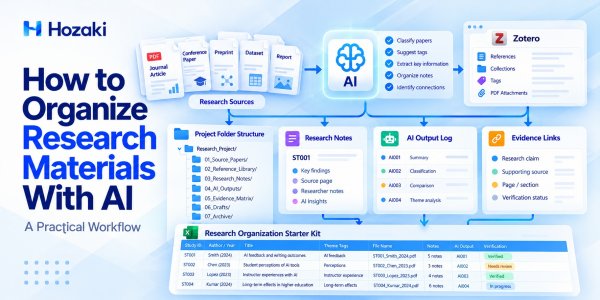
A reliable system needs clear file structures, consistent source identifiers, searchable references, connected notes, and a way to distinguish verified evidence from AI-generated interpretations.
This guide explains how to build that system step by step using ordinary folders, a reference manager such as Zotero, spreadsheets, and AI tools where they provide practical value.
Quick Answer: How to Organize Research Materials With AI
To organize research materials efficiently:
-
Create a consistent folder structure for your research project.
-
Assign each source a unique Study ID.
-
Use standardized file names for PDFs and supporting documents.
-
Store and maintain bibliographic information in a reference manager.
-
Use AI to suggest categories, tags, and summaries based on supplied source material.
-
Connect research notes and AI outputs to their original sources.
-
Make scanned PDFs searchable when necessary.
-
Maintain a source register and an AI output log.
-
Track document versions and verification status.
-
Back up the system and review it regularly.
The central principle is source traceability: every important research note, quotation, or AI-generated finding should lead back to an identifiable original document.
Why Research Materials Become Difficult to Manage
Research materials often accumulate faster than researchers can organize them.
A typical project may involve journal articles, conference papers, preprints, datasets, interview notes, bibliographic records, draft manuscripts, and AI-generated analyses.
Without a consistent system, several problems appear.
Duplicate Files and Confusing Versions
The same article may be downloaded several times under different names.
A preprint and a published version may also be stored as if they were identical, even when the content differs.
This makes it difficult to know which version was used for a particular analysis.
Notes Become Disconnected From Sources
Researchers may copy useful findings into a notebook or document without recording the original page, table, or section.
Later, they may remember the conclusion but not where the evidence appeared.
AI Outputs Become Difficult to Verify
AI tools can produce summaries, classifications, and comparisons, but those outputs may contain errors or unsupported interpretations.
When the original source is not recorded, checking the output becomes unnecessarily difficult.
Research Materials Become Scattered Across Applications
PDFs may be stored in local folders, citations in Zotero, notes in another application, and AI conversations in separate services.
Using several tools is not inherently a problem. The problem is having no consistent way to connect their records.
What Should a Research Organization System Include?
A practical research organization system should manage five connected elements.
| Element | What It Stores | Why It Matters |
|---|---|---|
| Source files | PDFs, documents, datasets | Preserves original materials |
| Reference records | Authors, titles, dates, DOIs | Supports identification and citation |
| Research notes | Summaries, observations, quotations | Captures useful information |
| Evidence links | Study IDs, pages, tables, sections | Makes claims traceable |
| AI output records | Summaries, classifications, prompts | Supports review and correction |
These elements do not need to live in the same application.
What matters is that they can be connected through stable identifiers and consistent records.
Use a Unique Study ID
Assign each research source an identifier such as:
-
ST001
-
ST002
-
ST003
Use the same identifier in your source register, file names, notes, evidence matrix, and AI output log.
A Study ID should remain stable even if you rename a file or move it to another folder.
For projects involving multiple versions of one publication, decide whether versions share a parent record with separate version identifiers or receive distinct source records. Apply the rule consistently.
Step 1: Create a Research Folder Structure
Start with a predictable folder structure.
For a single research project, the following arrangement is a useful starting point:
Research_Project/
├── 01_Source_Papers/
├── 02_Reference_Library/
├── 03_Research_Notes/
├── 04_AI_Outputs/
├── 05_Evidence_Matrix/
├── 06_Drafts/
└── 07_Archive/
What Each Folder Should Contain
01_Source_Papers
Store original PDFs and other source documents. Keep an unchanged copy of important originals.
02_Reference_Library
Store exported reference records or related metadata files when needed. If Zotero manages the library, do not manually reorganize files inside its managed storage directory.
03_Research_Notes
Keep reading notes, source summaries, quotations, and methodological observations.
04_AI_Outputs
Store AI-generated summaries, suggested tags, comparison tables, and other outputs that may require verification.
05_Evidence_Matrix
Keep literature review matrices, evidence extraction tables, and verification logs.
06_Drafts
Store manuscript drafts, outlines, and writing plans.
07_Archive
Keep superseded files and completed working materials that must be retained.
Avoid Excessively Deep Folder Hierarchies
A structure with many nested levels may become harder to navigate than a simple project directory.
Use folders for broad organization and metadata or tags for more detailed classification.
For example, a paper may relate to both "AI feedback" and "writing assessment." Tags can represent both themes without creating duplicate PDF copies.
Keep a Project Readme
Create a README.md or README.txt file that explains:
-
The purpose of the project.
-
The folder structure.
-
The file naming convention.
-
The Study ID system.
-
Where references and evidence records are maintained.
-
How backups are handled.
This makes the system easier to understand when returning to the project months later or sharing it with collaborators.
Step 2: Standardize Research PDF File Names
Descriptive file names make research materials easier to identify without opening every document.
A useful naming convention is:
StudyID_FirstAuthor_Year_ShortTitle_Version.pdf
For example:
ST001_Smith_2024_AIWritingFeedback_v1.pdf
This is an illustrative file name, not a reference to a verified publication.
Why Each Component Matters
Study ID: Connects the file to your research register.
First author: Helps identify the publication.
Year: Provides bibliographic context.
Short title: Makes the subject recognizable.
Version: Distinguishes different file states or publication versions.
Handle Unknown Publication Details Carefully
If the publication year is uncertain, do not invent one.
Use a temporary value such as YearUnknown and mark the metadata record for review.
Similarly, avoid assigning an author name based only on an AI guess.
Distinguish Preprints From Published Versions
A preprint and the final published article may differ in wording, analysis, or results.
Consider file names such as:
ST001_Smith_2024_AIWritingFeedback_Preprint.pdf
ST001_Smith_2025_AIWritingFeedback_Published.pdf
These names are illustrative.
If both versions are retained, record which version supports each extracted finding.
Avoid Renaming Files Managed by Zotero
Zotero can manage attachment storage and may provide attachment-renaming functionality.
Do not manually rename or move files inside Zotero's managed storage directory because doing so can break attachment references or synchronization.
Use Zotero's supported features when changing managed attachments.
Step 3: Organize References With Zotero
A reference manager helps maintain bibliographic records independently of the physical folder structure.
Zotero is one option for collecting, organizing, annotating, and citing research sources.
Official resource: Zotero Documentation
Import Research Papers
You can add sources using supported browser capture features, identifiers, or local files.
After importing, inspect the reference record.
Check:
-
Title.
-
Author names.
-
Publication year.
-
Journal or conference information.
-
DOI or other identifiers.
-
Attached file.
Imported metadata may be incomplete or incorrect.
Create Collections
Use collections to organize references by project, research question, or workflow stage.
For example:
Research Project
├── Background Literature
├── Methods
├── Core Studies
└── Additional Reading
A Zotero item can belong to multiple collections without requiring duplicate bibliographic records.
Use Tags Consistently
Possible tags include:
-
AI feedback.
-
Higher education.
-
Experimental study.
-
Qualitative research.
-
Needs verification.
Avoid creating many near-duplicate tags such as AI-feedback, AI Feedback, and ai_feedback unless your workflow deliberately distinguishes them.
Connect Zotero Records to Study IDs
Keep the Study ID in an appropriate note or project register.
The purpose is to connect Zotero references to your external spreadsheets and research notes.
If you use Zotero's own item identifiers or citation keys, maintain a clear mapping rather than assuming they are interchangeable with your Study IDs.
Verify References Before Citing Them
A reference manager organizes records, but it does not automatically establish that every record is accurate or that a paper supports a particular claim.
For a detailed verification process, see How to Verify Citations With AI Without Missing Fake or Misleading References.
Step 4: Use AI to Classify Research Materials
AI can assist with classification when you provide enough information about the documents.
Useful classification tasks include:
-
Suggesting research themes.
-
Identifying broad methodological categories.
-
Grouping papers by research population.
-
Highlighting potential duplicates.
-
Suggesting consistent keywords.
-
Identifying records that need closer inspection.
Start With a Controlled Tag List
Before asking AI to classify papers, define a manageable set of categories.
For example:
Research themes
-
AI-assisted feedback.
-
Learning outcomes.
-
Student perceptions.
-
Instructor experiences.
Study designs
-
Experimental.
-
Observational.
-
Qualitative.
-
Mixed methods.
-
Review.
The categories should match your actual research question.
Prompt: Classify Research Papers
You are helping organize a research library.
I will provide bibliographic records and verified summaries.
Assign each study to the most appropriate categories from the following controlled vocabulary:
[Insert approved categories]
For each study, return:
Study ID.
Suggested category.
Supporting evidence from the provided material.
Confidence or uncertainty explanation.
Fields requiring manual review.
Do not invent missing metadata.
Do not create new categories unless you identify a clear need and label them as suggestions.
Review AI-Suggested Tags
AI may group papers together because they share terminology, even when they address different research questions.
Check the actual research objective, methods, and findings before accepting a classification.
For example, a study of students' attitudes toward AI is not necessarily evidence about AI's effect on academic performance.
Keep Classification Reversible
Treat AI-generated tags as editable suggestions.
A researcher should be able to correct or remove them without losing the underlying source record.
Step 5: Connect Research Notes to Original Sources
Research notes become much more useful when they retain evidence locations.
A note should not simply state:
"AI feedback improves writing."
That statement is too broad and lacks a source.
Instead, record the study, the specific finding, the outcome measure, and the location of the evidence.
Recommended Research Note Structure
Study ID:
Full Citation:
Research Question:
Study Design:
Key Finding:
Source Page / Section:
Important Qualification:
Researcher Interpretation:
Verification Status:
Separate Findings From Interpretations
Use distinct fields for:
Reported finding
What the original authors actually reported.
Researcher interpretation
What you think the finding means for your research question.
AI-generated suggestion
A possible interpretation or comparison proposed by an AI tool.
These should not be treated as equivalent evidence.
Record Precise Source Locations
Useful references include:
-
Page number.
-
Section heading.
-
Table number.
-
Figure number.
-
Appendix identifier.
If an AI tool provides a page number, verify that it matches the actual document.
PDF page numbering can differ from the printed page numbers shown in the publication.
Prompt: Create Source-Linked Notes
Create structured research notes from the supplied paper.
Use the following fields:
Study ID, research question, methods, key findings, limitations, and source locations.
Separate statements directly supported by the paper from your interpretations.
If an important detail cannot be located, mark it "Needs verification."
Do not generate quotations that are not present in the source.
Step 6: Make Research PDFs and Notes Searchable
A well-organized folder is less useful if the documents cannot be searched.
Check Whether PDFs Contain Selectable Text
Open a PDF and try selecting a sentence.
If the text cannot be selected or searched, the file may be image-based.
Optical character recognition (OCR) can help convert scanned pages into searchable text.
For detailed instructions, see How to OCR a PDF and Make Scanned Documents Searchable.
Verify OCR Results
OCR can introduce errors involving:
-
Numbers.
-
Symbols.
-
Equations.
-
Tables.
-
Column order.
-
Footnotes.
Do not assume a searchable PDF is perfectly accurate.
Use Multiple Search Methods
Depending on your setup, you may search through:
-
Operating system file search.
-
Reference manager search.
-
PDF text search.
-
Research note indexes.
-
AI tools that support uploaded source analysis.
For source-based research exploration, see How to Use NotebookLM for Research: A Practical Workflow.
Avoid Treating AI Search Results as Final Evidence
An AI answer may omit context or misunderstand the relationship between passages.
Use it to locate potentially relevant material, then inspect the original source.
Step 7: Organize AI-Generated Research Outputs
AI outputs can become another source of information overload if they are not managed carefully.
A project may accumulate dozens of summaries, comparison tables, classifications, and draft paragraphs.
These outputs should be stored as working materials, not as substitutes for original research sources.
Create an AI Output Log
A useful log includes:
| Field | Purpose |
|---|---|
| Output ID | Unique record identifier |
| Date | When the output was created |
| Tool | AI tool used |
| Source Study IDs | Documents involved |
| Task | Summary, classification, comparison, etc. |
| Output File | Saved result |
| Verification Status | Review progress |
| Reviewer Notes | Corrections or limitations |
Use Descriptive Output Names
For example:
AI001_ST001_Summary_2026-10-21.md
AI002_ST001-ST004_ThemeComparison_2026-10-21.xlsx
These are illustrative names.
Preserve Relevant Context
When practical, retain the prompt, the source version, and the output together.
This makes it easier to understand how an AI-generated statement was produced.
Do Not Mark AI Outputs as Verified Automatically
An AI-generated result should be marked verified only after the relevant claims have been checked against the source material.
Useful status values include:
-
Not checked.
-
Needs review.
-
Verified.
-
Corrected.
-
Rejected.
Prompt: Audit AI Research Outputs
Review the following AI-generated research notes against the supplied source excerpts.
Identify unsupported statements, missing qualifications, incorrect study attribution, and inconsistencies.
Return a table with:
Output ID.
Statement.
Source Study ID.
Supporting source location.
Issue identified.
Recommended correction.
Verification status.
Do not mark a statement verified unless the supplied evidence supports it.
If the available source material is insufficient, mark it "Needs review."
Download the Research Organization Starter Kit
Want to build a research organization system without starting from scratch?
Download the Hozaki Research Organization Starter Kit, an editable Excel workbook designed to help you manage research papers, source records, notes, AI-generated outputs, and evidence verification.
The workbook includes seven worksheets covering source registration, file naming, research notes, AI output tracking, evidence links, maintenance tasks, and reusable AI prompts.
Download the Research Organization Starter Kit: [Insert your verified Hozaki-hosted XLSX download URL here.]
The sample research records are fictional educational examples and should not be cited as published research.
Step 8: Maintain Versions, Backups, and Data Privacy
A research organization system must remain reliable as the project changes.
Preserve Original Source Files
Keep an unchanged original copy of important source documents.
If you annotate or process a PDF, consider retaining the original and the working version separately.
Use Version Control for Drafts
For manuscripts and research documents, descriptive versions can help:
LiteratureReview_Draft_v01.docx
LiteratureReview_Draft_v02.docx
For collaborative projects, a document system with version history may be preferable to manually creating many files.
Avoid Ambiguous Final File Names
Names such as:
final.docx
final_new.docx
final_revised_latest.docx
quickly become confusing.
Use dates, version numbers, or a controlled version-history system.
Back Up Important Materials
A common backup approach is the 3-2-1 principle:
-
Maintain three copies of important data.
-
Use two different storage types or locations.
-
Keep one copy off-site.
The exact implementation depends on your institution's policies, available infrastructure, and data sensitivity.
Synchronization is not necessarily a complete backup strategy because accidental deletion or corruption may propagate between synchronized devices.
Protect Sensitive Research Data
Before uploading research materials to an AI service, check:
-
Institutional research policies.
-
Participant consent and data-use restrictions.
-
Copyright and licensing conditions.
-
Confidentiality agreements.
-
Service data handling and retention settings.
-
Whether the material contains personal or sensitive information.
When necessary, use approved institutional tools or keep restricted materials within authorized systems.
Do not upload confidential interview transcripts, unpublished manuscripts, or restricted datasets merely because an AI tool supports file uploads.
Practical Example: Organizing a Research Project With AI
Consider a fictional project investigating AI-assisted feedback in undergraduate writing courses.
The following example is synthetic and does not represent actual published research.
Phase 1: Collect Sources
The researcher identifies four relevant papers and assigns them Study IDs:
| Study ID | Focus | Status |
|---|---|---|
| ST001 | Writing outcomes | Collected |
| ST002 | Student perceptions | Collected |
| ST003 | Instructor experiences | Collected |
| ST004 | Longer-term learning effects | Collected |
Phase 2: Register the Files
Each paper receives a descriptive file name and a corresponding source-register entry.
The researcher records the citation, publication version, and file location.
Phase 3: Classify the Materials
AI suggests categories based on supplied source descriptions.
The researcher checks whether the categories accurately represent the study questions and methods.
Phase 4: Create Research Notes
For each study, the researcher records methods, key findings, limitations, and source locations.
Any unverified extraction remains clearly marked.
Phase 5: Connect Notes to a Literature Matrix
The verified study records are transferred into a literature review matrix.
The matrix allows comparisons across research methods, participants, findings, and limitations.
For a detailed example of this next step, see How to Create a Literature Review Matrix With AI.
Phase 6: Prepare for Writing
The researcher uses the matrix to organize a literature review around themes rather than writing isolated summaries of each paper.
AI may help suggest an outline, but the final synthesis must remain grounded in the verified studies.
A Weekly Research Organization Routine
Even a well-designed system requires maintenance.
A short weekly review can prevent small problems from accumulating.
1. Process New Files
Move newly downloaded research materials into the correct project location.
Assign Study IDs and update the source register.
2. Check Bibliographic Metadata
Review newly imported reference records for missing or incorrect details.
3. Review AI-Suggested Categories
Approve, correct, or reject suggested tags.
4. Resolve Unverified Notes
Check important findings that remain marked "Needs review."
5. Update the Evidence Matrix
Add verified information to the relevant matrix or synthesis worksheet.
6. Check Backups and Versions
Confirm that important files are backed up and that the latest working version is identifiable.
This routine is more useful than repeatedly reorganizing the entire project from scratch.
Common Research Organization Mistakes
Mistake 1: Organizing Only by Folder
Folders alone cannot easily represent papers that belong to several research themes.
Better approach: Combine folders with metadata, tags, and source identifiers.
Mistake 2: Using File Names as the Only Identifier
File names may change over time.
Better approach: Maintain stable Study IDs in a separate source register.
Mistake 3: Assuming Imported Citations Are Correct
Reference managers can import incomplete or inaccurate metadata.
Better approach: Check bibliographic records against authoritative sources.
Mistake 4: Saving AI Summaries Without Sources
A summary that cannot be traced to its original document is difficult to verify.
Better approach: Record source IDs, source locations, and verification status.
Mistake 5: Creating Too Many Tags
An uncontrolled tag system becomes inconsistent.
Better approach: Maintain a limited, documented vocabulary and expand it only when necessary.
Mistake 6: Confusing Synchronization With Backup
A synchronized deletion may affect every connected device.
Better approach: Maintain independent backups and test recovery procedures.
Mistake 7: Uploading Restricted Research Data Without Checking Permissions
Convenient AI features do not remove confidentiality or data protection obligations.
Better approach: Confirm institutional and contractual requirements before uploading.
Frequently Asked Questions
What is the best way to organize research papers?
A practical approach combines a reference manager, stable source identifiers, searchable PDFs, structured research notes, and a consistent folder or project system. The best setup depends on project size and institutional requirements.
Can AI automatically organize research PDFs?
AI can suggest categories, tags, file names, and summaries when suitable source information is available. However, the results may require manual review, and the AI tool may not have permission or technical access to rename or move files.
Should I use Zotero or folders to organize research?
They serve different purposes. Zotero helps manage bibliographic records and attachments, while folders can organize project documents, drafts, and other materials. Many workflows use both.
How do I connect research notes to citations?
Assign each source a unique identifier and include that ID, the bibliographic record, and a source location in relevant notes.
How can I find information across multiple research PDFs?
Use searchable PDFs, reference manager search, structured indexes, or source-based AI tools. Verify important results in the original documents.
Is NotebookLM useful for organizing research?
NotebookLM can assist with exploring and analyzing uploaded source materials. It should not automatically be treated as a replacement for a reference manager, file storage system, or independent backup.
How should I organize AI-generated research summaries?
Store them separately from original source files and record the source IDs, task, date, output location, and verification status.
What should I do with duplicate research papers?
Compare the bibliographic records and file versions before removing anything. Some apparent duplicates may be different publication versions containing meaningful changes.
Conclusion: Build a Research System That Keeps Evidence Connected
Organizing research materials with AI is not simply about sorting PDFs into folders.
A reliable research workflow connects original documents, bibliographic records, notes, evidence locations, AI-generated outputs, and manuscript drafts.
AI can help classify sources, summarize documents, and identify useful relationships, but it cannot replace careful source verification or responsible data management.
The most practical workflow is:
Collect → Identify → Organize → Classify → Verify → Connect → Maintain.
Start with a simple folder structure and a source register. Add a reference manager, source-linked notes, and an AI output log as the project grows.
The goal is not to build the most complicated research system. It is to create one that allows you to find, understand, verify, and reuse your research materials when you need them.
Comments 0