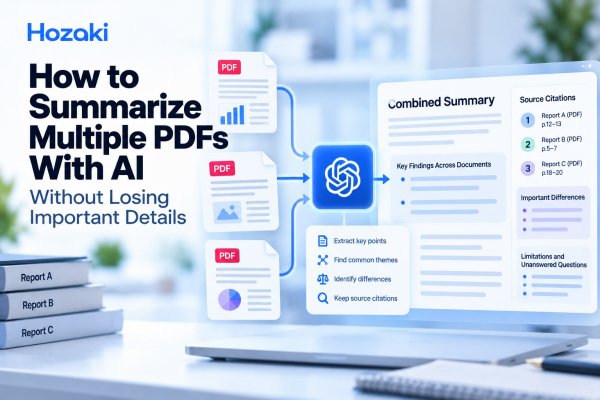
Summarizing one PDF is relatively straightforward. Summarizing five, ten, or twenty PDFs is a different problem.
You need to understand each document, identify overlapping information, preserve important differences, and produce a combined summary without confusing the sources.
AI can help with that work. Tools such as ChatGPT and NotebookLM can assist with document analysis, structured extraction, and cross-document synthesis.
But asking AI to "summarize all these PDFs" in a single prompt can produce a polished answer that leaves out important details. It may overlook a document, merge findings from different sources, misinterpret numerical data, or remove disagreements to create a cleaner narrative.
The better approach is to summarize each PDF separately, organize the results in a shared structure, and then create a verified cross-document synthesis.
This guide explains how to summarize multiple PDFs with AI, including a practical workflow, comparison matrix, reusable prompts, and a worked example.
Quick Answer: How to Summarize Multiple PDFs With AI
To summarize several PDFs with AI:
-
Define your goal. Decide what information you need from the documents.
-
Prepare the files. Check readability, completeness, and document versions.
-
Assign source IDs. Label each PDF so its information remains traceable.
-
Summarize each PDF separately. Extract the main points, findings, numbers, and limitations.
-
Build a cross-document matrix. Organize the same information fields across all PDFs.
-
Identify shared and unique findings. Group overlapping themes without losing document-specific details.
-
Create a combined summary. Organize it around your research question or decision-making needs.
-
Verify the result. Check source attribution, numerical values, omissions, and apparent contradictions.
For important research or business decisions, keep the original PDFs available throughout the process.
The objective is not merely to produce a shorter document. It is to create a summary that accurately represents the entire source collection.
Why Summarizing Multiple PDFs Is Different From Summarizing One
A single-document summary focuses on understanding one source.
A multi-document summary requires an additional layer of analysis: determining how the sources relate to one another.
Consider three reports about workplace AI adoption.
One might describe adoption rates, another might focus on employee training, and a third might examine implementation costs.
A combined summary should explain how these topics connect without pretending that all three reports measure the same things.
The main challenges
Source attribution
A finding from PDF A may accidentally be attributed to PDF B.
Incomplete coverage
An AI response may emphasize some documents while giving others little attention.
Repeated information
Several PDFs may describe the same background facts, creating unnecessary repetition.
Different definitions
Two reports may use the same term but define it differently.
Conflicting conclusions
Documents may reach different conclusions because of their methods, populations, or reporting periods.
Lost qualifications
A combined summary may omit limitations that were clearly stated in individual documents.
Numerical inconsistencies
Percentages, currencies, units, dates, and sample sizes may be mixed together incorrectly.
These risks are why multi-PDF summarization should be treated as a structured process rather than a one-step command.
If you are working with only one document, start with How to Summarize Any PDF With AI Without Missing the Important Parts.
Step 1: Define What You Need From the PDFs
Before uploading your files, decide what the final summary should accomplish.
Different objectives require different extraction methods.
Choose a specific output
For example:
| Goal | Appropriate summary |
|---|---|
| Understand several research papers | Thematic research synthesis |
| Review annual reports | Financial and operational comparison |
| Analyze industry reports | Decision brief organized by trends |
| Study course materials | Topic-based study guide |
| Review policy documents | Requirements and differences matrix |
| Examine project reports | Status, risks, and action items |
A vague request such as "summarize these documents" gives AI little guidance about what matters.
A more useful request is:
Summarize the main findings across these reports, focusing on adoption trends, implementation barriers, and evidence limitations. Preserve important disagreements and identify the source of each claim.
Define the intended audience
A summary for a student may need definitions and explanations.
A summary for a manager may prioritize decisions, risks, and supporting evidence.
A technical summary may need detailed methods, measurements, and qualifications.
Decide who will read the result before generating it.
Decide what must not be omitted
Create a list of essential information.
For an industry research project, that might include:
-
Reporting year and geographic coverage.
-
Study population or dataset.
-
Key numerical findings.
-
Definitions of important terms.
-
Main conclusions.
-
Limitations and uncertainty.
-
Differences between sources.
-
Questions that remain unanswered.
This list becomes your extraction checklist.
Step 2: Prepare and Label Your PDF Files
AI cannot reliably summarize information it cannot access or interpret correctly.
Before processing several PDFs, check the documents individually.
Confirm that the files are readable
Open each PDF and inspect:
-
Whether the text is selectable.
-
Whether pages are missing.
-
Whether tables and figures are legible.
-
Whether important content appears in scanned images.
-
Whether footnotes or appendices contain essential information.
-
Whether the document is password-protected or restricted.
Some AI workflows may have difficulty interpreting scanned pages, complex layouts, or tables.
If important material is missing from the extracted text, correct that problem before summarization.
For troubleshooting, see Why ChatGPT Misreads PDFs and How to Fix It.
Give every PDF a unique identifier
Avoid relying only on filenames such as report-final.pdf or document2.pdf.
Create a source inventory.
| Source ID | Document | Date or version | Status |
|---|---|---|---|
| PDF-01 | Industry Report A | Version to verify | Ready |
| PDF-02 | Industry Report B | Version to verify | Ready |
| PDF-03 | Industry Report C | Version to verify | Ready |
The report names above are illustrative placeholders.
For actual research, record the verified title, author or organization, publication date, and version.
Remove duplicates and outdated versions
If two files contain the same report, including both may give repeated findings disproportionate attention.
Similarly, an outdated draft and a final published version should not automatically be treated as independent sources.
Decide which version is authoritative and document your choice.
Protect sensitive information
Before uploading confidential PDFs, review applicable privacy policies, organizational requirements, and the AI service's current data-handling terms.
Do not upload restricted financial records, personal information, unpublished research data, or confidential contracts without appropriate authorization.
Step 3: Summarize Each PDF Separately
This is the most important part of the workflow.
Even when your AI tool accepts multiple documents, begin by extracting information from each PDF independently.
Doing so makes it easier to identify missing details and trace every important claim to its source.
Use the same extraction fields for every PDF
For each document, collect:
-
Document title and source ID.
-
Purpose and scope.
-
Main topics.
-
Important findings.
-
Relevant numbers and dates.
-
Limitations and qualifications.
-
Unique information.
-
Supporting page, section, or table references.
-
Information that could not be verified.
The fields can be adjusted for your task, but consistency matters.
Prompt: Summarize each PDF independently
Analyze each uploaded PDF separately.
For every document, provide:
Source ID and document title
Main purpose
Key topics
Important findings
Relevant numerical data
Limitations and qualifications
Information unique to this document
Supporting page or section references, where verifiable
Do not combine findings across documents yet.
If information is missing or cannot be verified, label it "Not verified."
Do not invent citations, numbers, or document details.
Check the individual summaries
Before moving to the next step, review the output for every source.
Ask:
-
Does every PDF have a separate summary?
-
Are the main sections represented?
-
Are important tables and figures covered?
-
Are numerical values accurate?
-
Are the limitations preserved?
-
Does the summary identify information that was not accessible?
A document may be processed only partially even when the generated answer looks complete.
If the extraction appears incomplete, break the document into smaller sections and verify them separately.
Record coverage status
Use a simple tracking table.
| Source | Text checked | Tables checked | Key findings verified |
|---|---|---|---|
| PDF-01 | Pending | Pending | Pending |
| PDF-02 | Pending | Pending | Pending |
| PDF-03 | Pending | Pending | Pending |
Do not mark a source as verified merely because AI generated a summary.
Verification requires checking the original document.
Step 4: Build a Cross-Document Summary Matrix
Once the individual summaries are checked, combine the extracted information into a structured matrix.
This makes the relationships between documents easier to inspect.
Multi-PDF summary matrix template
| Dimension | PDF-01 | PDF-02 | PDF-03 |
|---|---|---|---|
| Purpose | Extracted purpose | Extracted purpose | Extracted purpose |
| Main topics | Extracted topics | Extracted topics | Extracted topics |
| Key findings | Verified findings | Verified findings | Verified findings |
| Important numbers | Verified data | Verified data | Verified data |
| Limitations | Reported limits | Reported limits | Reported limits |
| Unique information | Source-specific points | Source-specific points | Source-specific points |
| Evidence location | Page or section | Page or section | Page or section |
The matrix should preserve missing information instead of filling every cell with a guess.
Use labels such as:
-
Not reported.
-
Not applicable.
-
Not verified.
-
Requires manual review.
These labels mean different things.
For example, "not reported" means the document does not appear to provide the information. "Not verified" means the information has not yet been confirmed.
Prompt: Create a cross-document matrix
Using the verified individual summaries, create a cross-document comparison matrix.
Include these dimensions:
Document purpose
Main topics
Key findings
Important numerical data
Limitations
Unique information
Supporting source locations
Keep information from each document in its own column.
Identify missing or incompatible information explicitly.
Do not infer values that are absent from the source documents.
Why this step matters
Without a matrix, AI may generate a narrative that emphasizes repeated information while overlooking unique findings.
A structured comparison gives each document a visible place in the analysis.
It also makes the final summary easier to audit.
Step 5: Combine the Findings Into One Summary
Now you can move from individual document summaries to a cross-document synthesis.
The goal is not to concatenate the separate summaries.
Instead, organize the information according to the question you are trying to answer.
Group information by theme
Suppose your PDFs discuss enterprise AI adoption.
Useful themes might include:
Adoption patterns
What the documents report about the use of AI.
Common applications
Which business activities are discussed.
Implementation barriers
What challenges organizations face.
Measurement differences
How the reports define adoption, use, or effectiveness.
Evidence limitations
Which findings are uncertain or difficult to compare.
This structure helps readers understand the combined evidence.
Separate shared findings from unique findings
A shared finding appears in more than one document.
A unique finding appears in only one source within your collection.
Neither is automatically more important.
For example, one report may contain a detailed analysis of implementation costs that the others do not discuss.
That information should not disappear merely because it is unique.
Preserve disagreements
If two reports reach different conclusions, do not automatically average them or choose the more confident-sounding result.
Check whether they use:
-
Different populations.
-
Different time periods.
-
Different definitions.
-
Different data collection methods.
-
Different outcome measures.
-
Different analytical assumptions.
An apparent disagreement may reflect differences in what the documents actually studied.
Prompt: Create the combined summary
Using only the verified individual PDF summaries and the cross-document matrix, create a combined summary.
Organize it into:
Executive overview
Main themes shared across the documents
Important findings supported by multiple sources
Findings unique to individual documents
Apparent disagreements or inconsistencies
Differences in definitions, methods, or reporting periods
Limitations and unanswered questions
Include Source IDs for important claims.
Do not remove meaningful disagreements to make the summary appear more consistent.
Do not introduce facts that are absent from the verified source material.
Write a useful executive summary
A good executive summary should answer:
-
What do the documents collectively suggest?
-
What are the most important findings?
-
Where do the sources disagree?
-
Which conclusions are limited by the evidence?
-
What should the reader investigate next?
It should not imply certainty where the underlying documents do not support it.
Step 6: Verify Sources, Numbers, and Missing Details
A combined AI summary should be treated as a draft until it has been checked.
Multi-document summaries require particular attention because errors can spread from the individual extraction stage into the final synthesis.
Check source attribution
For each major claim, identify the original PDF.
If a statement combines information from multiple documents, confirm that each source supports its assigned part.
Check numerical values
Verify:
-
Percentages and percentage points.
-
Sample sizes.
-
Dates and reporting periods.
-
Currencies.
-
Units of measurement.
-
Absolute versus relative changes.
-
Whether numbers refer to the same population or metric.
For example, two reports might provide different percentages because one measures organizations that have tested AI while another measures organizations using AI regularly.
Those values should not be presented as directly comparable without explaining the difference.
Check omissions
Review each source's extraction record and ask whether any important findings were excluded from the final summary.
Pay particular attention to:
-
Exceptions.
-
Negative findings.
-
Qualifications.
-
Methodological limitations.
-
Unique findings.
-
Uncertainty.
-
Important tables or appendices.
Check citations and page references
An AI-generated page reference may be incorrect.
Verify the supporting passage in the original PDF, including its context.
If the source location cannot be confirmed, do not present it as verified.
Prompt: Audit the final summary
Audit the combined summary against the original PDFs.
Check whether:
Every source was included.
Important findings were omitted.
Numerical values and units are accurate.
Claims are attributed to the correct documents.
Important qualifications or limitations were lost.
Apparent contradictions were oversimplified.
Source references can be located and verified.
Return a table containing:
Claim or issue
Source ID
Supporting evidence location
Verification status
Recommended correction
Do not invent missing evidence or page references.
The audit prompt can help identify potential problems, but it does not replace manual verification.
How to Summarize Multiple PDFs With ChatGPT
ChatGPT can assist with multi-document summarization when the relevant file-analysis capabilities are available in your account.
The exact upload limits, supported formats, and processing behavior may depend on the product and plan.
A practical ChatGPT workflow
1. Start with a clear task.
Explain what the combined summary should cover.
2. Add the PDFs.
Use the file-upload options available in your ChatGPT interface.
3. Provide a source inventory.
Identify each file using a stable Source ID.
4. Request separate summaries.
Do not immediately ask for a combined conclusion.
5. Verify the extraction.
Check key numbers, source attribution, and document coverage.
6. Request the comparison matrix.
Use consistent fields across the documents.
7. Generate the combined summary.
Organize it by theme or decision-making objective.
8. Audit the output.
Check the final summary against the original PDFs.
What if you have too many PDFs?
Do not assume that uploading more files will produce a more complete analysis.
If the source collection is large, use batches.
For example:
-
Batch A: PDF-01 to PDF-05.
-
Batch B: PDF-06 to PDF-10.
-
Batch C: PDF-11 to PDF-15.
These are illustrative batch sizes, not product limits.
Extract the same fields from each batch, verify the records, and then combine the structured results.
If the source material is too large for the available processing capacity, use a persistent spreadsheet or database to preserve verified extraction records between stages.
Watch for incomplete extraction
Long PDFs, scanned pages, and complex tables may cause problems.
A fluent answer does not prove that the entire document was analyzed.
For further troubleshooting, see Why ChatGPT Misreads PDFs and How to Fix It.
How to Use NotebookLM for Multiple PDF Summaries
Google NotebookLM is designed around working with a collection of selected sources.
This makes it a useful option for exploring relationships between several documents.
A practical NotebookLM workflow
1. Create a notebook.
Use a descriptive project name.
2. Add your PDFs as sources.
Check the currently supported source options and limits.
3. Ask for source-by-source extraction.
Request the purpose, main findings, limitations, and important data from each document.
4. Compare sources.
Ask questions about shared themes, unique findings, and differences.
5. Inspect source citations.
Confirm that cited passages support the claims.
6. Organize verified notes.
Preserve findings and source locations for later synthesis.
When NotebookLM may be useful
NotebookLM can be particularly helpful when you expect to return to the same collection of sources repeatedly.
For example, you may need to ask several rounds of questions about methods, findings, and evidence limitations.
However, source-grounded responses still require checking.
A cited answer can omit context or misinterpret the original material.
For a detailed workflow, read How to Use NotebookLM for Research: A Practical Workflow.
ChatGPT or NotebookLM?
Neither tool automatically guarantees a complete or accurate multi-PDF summary.
Choose based on your task, current available features, and how easily you can verify the original evidence.
A source-focused workflow may be convenient for repeated document exploration.
A flexible document-analysis workflow may be useful when you need specific output formats or transformations.
The verification process remains essential in both cases.
Worked Example: Summarizing Three Industry Reports
Let's walk through a realistic scenario.
The following example is fictional and intended only to demonstrate the method. It does not represent actual industry reports, verified market statistics, or firsthand product testing.
The task
An analyst needs to prepare a decision brief about enterprise AI adoption.
They have three PDFs:
PDF-01: Enterprise AI Adoption Overview
Focuses on how organizations describe their use of AI.
PDF-02: Employee AI Training Report
Focuses on training needs and employee readiness.
PDF-03: AI Implementation Challenges
Focuses on costs, governance, and implementation barriers.
Stage 1: Create individual summaries
The analyst first extracts each report's purpose, scope, findings, and limitations.
For the fictional exercise, the summaries might look like this:
| Source | Main focus | Illustrative finding | Limitation |
|---|---|---|---|
| PDF-01 | AI adoption | Organizations describe different levels of AI use | Adoption definitions vary |
| PDF-02 | Employee training | Training needs differ across employee roles | Self-reported responses |
| PDF-03 | Implementation barriers | Governance and integration challenges are discussed | Limited organizational coverage |
These are invented teaching examples, not claims about real-world AI adoption.
Stage 2: Identify shared themes
The analyst asks AI to identify relationships between the reports.
Potential themes include:
-
AI adoption and organizational readiness.
-
Employee training requirements.
-
Governance and implementation challenges.
The analyst then checks whether each theme is actually supported by the corresponding source.
Stage 3: Preserve differences
The analyst notices that PDF-01 discusses adoption while PDF-02 discusses training.
These topics are related but not interchangeable.
The final summary should not claim that training causes higher adoption unless the underlying evidence supports that relationship.
Stage 4: Draft the combined summary
An appropriate illustrative synthesis might read:
The three fictional reports examine different aspects of enterprise AI implementation. One focuses on adoption, another on employee training, and the third on organizational barriers. Together, they suggest several areas for further investigation, but their different scopes do not support a single quantitative conclusion about adoption outcomes.
This is a more defensible summary than inventing an overall adoption rate or claiming a causal relationship.
Stage 5: Prepare the decision brief
The final document could include:
Executive overview
What the source collection covers.
Key themes
Adoption, training, and implementation barriers.
Important differences
Definitions, populations, and reporting scope.
Evidence limitations
Where the documents do not support a direct comparison.
Questions for further research
What additional evidence would help inform decisions.
This structure turns separate document summaries into a useful research product without overstating the evidence.
Best AI Prompts for Summarizing Multiple PDFs
The following prompts can be adapted to research, business, education, and document-review tasks.
Prompt 1: Check document coverage
List every PDF available for this task.
For each file, provide its Source ID, document title, and whether the relevant text appears accessible.
Identify any document that may require manual inspection because of scanned pages, complex tables, or missing content.
Do not claim that a document was fully analyzed unless its relevant content was actually processed.
Prompt 2: Extract information from each PDF
Summarize each PDF separately using the same fields:
Purpose
Scope
Main topics
Key findings
Important numbers
Limitations
Unique information
Supporting source locations
Do not merge the documents at this stage.
Prompt 3: Identify overlapping themes
Using the verified individual summaries, identify themes that appear across multiple PDFs.
For each theme, list the supporting Source IDs and explain whether the documents provide similar, complementary, or different information.
Do not treat repeated wording as independent evidence of a finding.
Prompt 4: Find contradictions
Identify apparent contradictions across the documents.
For each one, compare definitions, time periods, populations, methods, and measurements.
Distinguish genuine disagreements from findings that are not directly comparable.
Do not invent an explanation for a disagreement.
Prompt 5: Produce an executive summary
Create a concise executive summary using only the verified source matrix.
Include:
Main conclusion
Three to five important themes, if supported
Meaningful differences
Important limitations
Open questions
Attribute major claims to the relevant Source IDs.
Do not introduce unsupported statistics or recommendations.
Prompt 6: Check for missing details
Compare the combined summary against the individual source summaries.
Identify important information that was omitted, oversimplified, or attributed to the wrong document.
Pay particular attention to numerical findings, exceptions, limitations, and unique information.
Prompt 7: Generate a source verification table
Create a verification table for the combined summary.
Include:
Claim
Supporting Source ID
Original evidence location
Verification status
Required follow-up
Mark claims as unverified when the original evidence has not been confirmed.
Common Mistakes When Summarizing Several PDFs With AI
Mistake 1: Asking for one combined summary immediately
This can hide incomplete document coverage.
Better approach: Summarize and verify each PDF before combining the findings.
Mistake 2: Losing track of which document said what
Without source labels, attribution errors become difficult to detect.
Better approach: Assign a stable Source ID to every document.
Mistake 3: Treating repeated information as stronger evidence
Several reports may repeat the same original statistic or cite the same study.
Better approach: Check whether the underlying evidence is independent.
Mistake 4: Combining incompatible numbers
Reports may use different definitions, populations, or periods.
Better approach: Verify comparability before combining or contrasting numerical findings.
Mistake 5: Removing disagreements
A smooth narrative can conceal important differences.
Better approach: Preserve meaningful disagreement and explain possible sources of incompatibility.
Mistake 6: Ignoring unique findings
Information that appears in only one document may still be essential.
Better approach: Include a dedicated section for source-specific findings.
Mistake 7: Trusting generated page references
AI may provide incorrect or unverifiable references.
Better approach: Check important claims directly in the original PDF.
Mistake 8: Assuming all uploaded content was processed
Some documents may contain inaccessible or poorly extracted content.
Better approach: Maintain a document coverage checklist and manually inspect problematic sections.
Mistake 9: Treating the combined summary as a complete literature review
A collection of uploaded PDFs may omit important evidence.
Better approach: Describe the scope of the source collection and avoid claiming it represents the entire literature.
Frequently Asked Questions
Can AI summarize multiple PDFs at once?
Yes, some AI tools support working with multiple PDFs in a single project or conversation.
However, the ability to accept multiple files does not guarantee complete or accurate analysis of every document.
Use separate extraction records and verify the combined summary.
Can ChatGPT summarize several PDF files together?
ChatGPT can assist with multi-file analysis when the necessary upload and document-processing capabilities are available.
A reliable workflow involves checking the files, summarizing each one, creating a comparison matrix, and verifying the final synthesis.
What is the best AI tool for summarizing multiple PDFs?
The best choice depends on your documents, required output, current tool capabilities, and verification needs.
ChatGPT and NotebookLM are two possible options, but neither eliminates the need to inspect original sources.
How many PDFs can I summarize at once?
The practical number depends on file size, document complexity, product limits, and the available processing capacity.
Check current official documentation rather than relying on a fixed number.
For large collections, consider processing files in batches and combining verified extraction records.
How do I combine information from multiple PDFs?
First, extract consistent information from each document.
Next, build a matrix that identifies shared themes, unique findings, disagreements, and limitations.
Finally, write a thematic synthesis with source references.
Can AI compare and summarize research papers?
Yes. AI can help extract research details and organize comparisons.
For academic work, pay particular attention to research design, population, methods, outcomes, and evidence quality.
See How to Compare Research Papers With AI Without Missing Important Differences for a dedicated research comparison workflow.
How can I prevent AI from missing important PDF information?
Use a predefined extraction checklist, verify individual summaries, maintain a document coverage table, and audit the final synthesis.
For critical documents, inspect tables, figures, footnotes, and appendices manually.
Can AI summarize scanned PDFs?
Some tools can process scanned documents, but accuracy depends on the available document-processing capabilities and scan quality.
Text recognition errors, layout problems, and unreadable tables can affect the result.
Check extracted content before relying on the summary.
Can AI identify contradictions across multiple PDFs?
AI can highlight apparent disagreements.
However, differences may result from incompatible definitions, populations, or methods rather than genuinely conflicting evidence.
Verify the underlying sources before interpreting the disagreement.
Is it safe to upload multiple PDFs to an AI tool?
That depends on the content, your permissions, the service's current policies, and any applicable organizational or legal requirements.
Avoid uploading sensitive or restricted material without appropriate authorization and data-handling review.
Final Checklist: A Reliable Multi-PDF Summary
Before using a combined AI summary, confirm that you have:
-
Defined the purpose and intended audience.
-
Checked that all PDFs are complete and readable.
-
Assigned a unique Source ID to each file.
-
Removed duplicates or identified different versions.
-
Summarized each document separately.
-
Verified important findings and numerical values.
-
Created a consistent cross-document matrix.
-
Identified shared themes and unique findings.
-
Preserved meaningful disagreements.
-
Checked definitions, populations, and time periods.
-
Verified important source references.
-
Reviewed the final summary for omissions.
-
Recorded what remains uncertain or unverified.
Conclusion: Summarize the Collection, Not Just the Files
The biggest challenge in summarizing multiple PDFs is not generating text quickly.
It is making sure that the final summary represents the entire document collection without confusing sources, overlooking important details, or flattening meaningful differences.
AI can make the process more efficient, but the workflow matters more than the initial prompt.
A dependable approach follows this sequence:
Prepare → Label → Extract → Compare → Synthesize → Verify.
Use AI to organize and connect the information. Use the original PDFs to confirm what the evidence actually supports.
That is how multiple document summaries become a useful, traceable research or decision-making resource.
Sources and Further Reading
Editorial note: The industry-report example is fictional and used only to demonstrate the workflow. It does not represent actual market findings or firsthand testing of AI products. Verify current product capabilities and official documentation before publication.
Comments 0