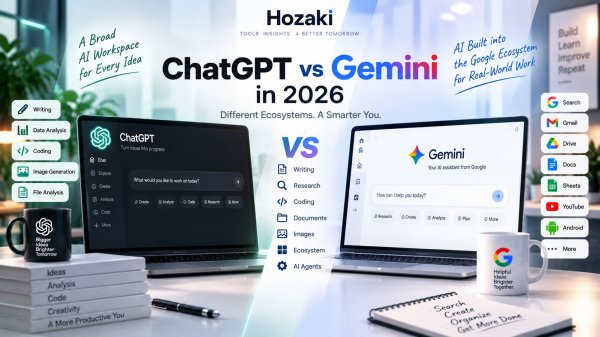
ChatGPT and Gemini are no longer just two chatbots that answer questions in slightly different ways.
Both have grown into much larger AI platforms.
They can help you write, research, analyze files, work with images, solve problems, code, and complete everyday tasks. At the same time, the ecosystems around them are becoming increasingly different.
ChatGPT sits at the center of OpenAI's expanding AI platform.
Gemini has Google's enormous ecosystem behind it, including Search, Gmail, Drive, Workspace, Android, and other Google services.
That means the useful question isn't simply:
Which AI gives better answers?
A better question is:
Which AI fits the way I actually work?
This ChatGPT vs Gemini comparison looks at their differences across everyday use, writing, research, coding, documents, images, ecosystem integration, and more.
If you're considering more than these two assistants, our ChatGPT Alternatives guide covers Claude, Perplexity, Copilot, and other options.
ChatGPT vs Gemini at a Glance
| Area | ChatGPT | Gemini |
|---|---|---|
| General AI assistant | Yes | Yes |
| Writing | Strong | Strong |
| Research | Strong | Strong |
| Coding | Strong | Strong |
| File analysis | Yes | Yes |
| Image understanding | Yes | Yes |
| Image generation | Yes | Yes |
| Deep research | Yes | Yes |
| Google ecosystem | Limited external integration | Major advantage |
| Coding ecosystem | Codex | Gemini developer ecosystem |
| Long-context workflows | Strong | Up to 1M tokens on current Pro/Ultra plans |
| Agentic workflows | Yes | Yes |
| Best fit | Broad standalone AI platform | Google-centric AI workflows |
The table is intentionally not a scorecard.
Both platforms change quickly, and the right choice depends heavily on what you're trying to accomplish.
What Is ChatGPT?
ChatGPT is OpenAI's general-purpose AI assistant.
What began primarily as a conversational interface has expanded into a broader environment for tasks such as:
- Writing
- Research
- Coding
- File analysis
- Data analysis
- Image generation
- Image understanding
- Web research
- Problem solving
- Learning
- Brainstorming
- Software development
This breadth is one reason ChatGPT can work well for users whose AI needs change throughout the day.
You might analyze a spreadsheet in one conversation, research a topic in another, debug Python code later, and create an image after that.
For users who want one broadly capable AI workspace, that flexibility is important.
What Is Google Gemini?
Gemini is Google's general-purpose AI platform.
Like ChatGPT, Gemini has expanded far beyond simple question-and-answer conversations.
It can work across text, files, images, research, coding, and increasingly agentic tasks.
But Gemini's most important differentiator may be everything surrounding the model.
Google already operates:
- Search
- Gmail
- Google Drive
- Docs
- Sheets
- Slides
- YouTube
- Android
- Maps
- Google Cloud
That creates opportunities for Gemini to work closer to information and applications people already use.
Google has pushed this further during 2026 with Gemini Spark, an agent designed to perform ongoing tasks and work across connected applications.
Gemini Spark is a distinct agentic experience with its own eligibility, subscription, account, and regional requirements. Its capabilities should not be interpreted as features available to every Gemini user. Check Google's official Gemini Spark updates before choosing a plan based on Spark-specific functionality.
For someone heavily invested in Google's ecosystem, this integration can be more important than small differences between individual AI responses.
ChatGPT vs Gemini for Everyday Questions
For straightforward everyday questions, the overlap between ChatGPT and Gemini is substantial.
Both can help with things like:
- Explaining concepts
- Brainstorming
- Planning
- Summarizing
- Rewriting text
- Generating ideas
- Comparing options
- Learning new topics
For these tasks, switching between the two can sometimes feel less dramatic than online comparisons suggest.
A simple question such as:
Explain compound interest to a beginner.
is unlikely to reveal the most important differences between the platforms.
Instead, test questions that reflect your actual daily workflow.
For example:
Read these three files, identify the disagreements between them, and turn the findings into an action plan.
That starts testing the surrounding product rather than only the language model.
ChatGPT vs Gemini for Writing
Both ChatGPT and Gemini can help with:
- Emails
- Articles
- Reports
- Rewriting
- Summaries
- Outlines
- Social content
- Product descriptions
- Editing
- Brainstorming
The biggest mistake when comparing AI writing is using only one generic prompt.
For example:
Write a blog post about productivity.
Both systems can produce something plausible.
That doesn't tell you which one fits your work.
A Better Writing Test
Take a real document you wrote.
Ask both assistants:
Improve clarity without changing my tone. Identify repetitive sections first, explain what you would change, then produce a revised version.
Now compare:
- How much of your voice survives
- Whether important details disappear
- How much unnecessary rewriting occurs
- Whether the structure improves
- How much manual editing you still need
The best writing assistant isn't necessarily the one that produces the longest or most polished first draft.
It's the one that saves useful editing time.
ChatGPT vs Gemini for Research
Research has become a major battleground for AI assistants.
Both ChatGPT and Gemini now extend beyond answering from model knowledge and can participate in deeper web research workflows.
Gemini's Deep Research can use Google Search by default and can also incorporate selected sources such as Gmail, Drive, uploaded files, and NotebookLM notebooks when supported and connected.
Google's newer Deep Research systems also support increasingly agentic research workflows, including web research, files, custom data sources, and richer visual outputs in supported products.
What Should You Compare?
Don't compare research systems by asking:
What is quantum computing?
Instead, use a research task such as:
Research the major developments in solid-state batteries over the last 12 months. Identify the primary sources behind each major claim and explain where experts disagree.
Then inspect:
- Source quality
- Citation accuracy
- Freshness
- Depth
- Whether claims match sources
- Whether conflicting evidence is represented
- How easy it is to inspect original material
AI research tools can still misunderstand sources or make unsupported connections.
Always inspect important primary sources yourself.
ChatGPT vs Gemini for Google Search Users
This is where Gemini has a structural advantage.
Google Search is part of the same broader company ecosystem.
That doesn't automatically mean every Gemini answer is more accurate than ChatGPT.
But it does mean Google can build AI experiences around its existing search infrastructure in ways that are difficult to evaluate using ordinary chatbot prompts.
Gemini Deep Research, for example, includes Google Search as a default research source.
If your AI usage is heavily tied to discovering and synthesizing information from Google services, Gemini deserves particular attention.
ChatGPT vs Gemini for Gmail and Google Drive
This is one of the clearest workflow differences.
Gemini can work with connected Google services such as Gmail and Drive in supported configurations.
That means a research task can potentially combine:
the web + your files + information in Google services
rather than forcing you to manually move everything into another application.
Google's current Deep Research documentation specifically allows users to add Gmail and Drive as research sources when the relevant Workspace connection is enabled.
For someone whose company or personal workflow already lives in Google Workspace, this can significantly reduce friction.
If you barely use Google's productivity ecosystem, the advantage becomes much smaller.
What to Verify Before Choosing Gemini for Google Workspace
Gemini's connections to Google services can be useful, but access to Gmail, Drive, Docs, and other Workspace information depends on the product, account, settings, permissions, and available features.
Do not assume that every Google account or Gemini subscription provides the same integrations.
Before choosing Gemini mainly for Google Workspace, check the following.
| Requirement | What to Verify |
|---|---|
| Account type | Are you using a personal Google account or a managed work or school account? |
| Feature availability | Is the specific Gemini feature supported for your account, region, and plan? |
| Workspace permissions | Has your organization allowed the relevant Gemini and Workspace features? |
| Connected services | Which apps and data sources can actually be connected in your configuration? |
| File access | Can Gemini access the specific documents and folders you need? |
| Data controls | What information may be accessed, retained, or used under the applicable settings and terms? |
| Sharing | Does the workflow respect existing document and organization permissions? |
Test the Integration With a Real Task
If your account supports the required features, choose a non-sensitive test document or email workflow.
For example:
"Using the documents I have explicitly made available, summarize the project status, identify unresolved decisions, and cite the source material for each conclusion."
Then verify:
-
Which files or sources were actually used.
-
Whether the summary matches those sources.
-
Whether important documents were omitted.
-
Whether citations or source references are inspectable.
-
Whether the result can be used in your normal workflow.
Repeat a comparable task in ChatGPT using the connections and file features available to your account.
The important distinction: Gemini's relationship with Google's ecosystem is a reason to evaluate it—not proof that every Google-connected workflow will be available or better for every user.
ChatGPT vs Gemini for Long Documents
Long-context work is another important comparison.
Examples include:
- Research papers
- Books
- Large reports
- Multiple PDFs
- Long conversations
- Codebases
- Large sets of notes
Google's current Gemini Apps documentation lists a context window of up to 1 million tokens for Google AI Pro and Ultra, while lower tiers currently receive smaller context windows.
But context-window size shouldn't be treated like a benchmark score.
Being able to technically ingest a large amount of information doesn't guarantee perfect recall of every detail.
Test Long Context Properly
Give the AI a large document you understand.
Then ask questions about details located in different sections.
Ask it to:
- Find contradictions
- Connect distant concepts
- Extract evidence
- Identify exceptions
- Compare multiple sections
- Quote or locate supporting passages
This tells you much more than a context-window number on a pricing page.
ChatGPT vs Gemini for PDFs
Both assistants can be useful for PDF-based workflows.
Typical tasks include:
- Summarizing reports
- Extracting key points
- Explaining technical documents
- Comparing PDFs
- Finding information
- Creating study notes
- Asking questions about documents
But PDF performance can vary dramatically depending on the document.
A clean text-based report is easier than:
- A scanned PDF
- A complex financial report
- A multi-column academic paper
- A document filled with charts
- A PDF with tables and diagrams
When evaluating either platform, use the kind of PDFs you actually work with.
For a closer comparison of tools designed to summarize, question, and analyze documents, see our Best AI Tools for PDFs guide.
ChatGPT vs Gemini for Coding
Both platforms can generate, explain, debug, and reason about code.
But coding is another area where the surrounding ecosystem increasingly matters.
ChatGPT connects to OpenAI's Codex software-development workflow.
Gemini is part of Google's broader developer ecosystem and sits alongside Google's increasingly agent-focused development products.
For occasional tasks such as:
Explain this Python error.
either general-purpose assistant may be sufficient.
For developers working inside repositories all day, dedicated coding tools can make more sense.
Our Best AI Tools for Coding guide compares ChatGPT and Gemini alongside Cursor, GitHub Copilot, Claude, and other developer-focused products.
You can also read Claude or ChatGPT for Coding? for a closer comparison of Claude Code, Codex, and repository-based development workflows.
ChatGPT vs Gemini for Images
Both ecosystems have moved well beyond text.
Users can work with visual inputs and generated media in increasingly sophisticated ways.
Gemini's current platform includes Google's expanding multimodal models and image-generation capabilities, while Google has continued adding personalized and contextual image features to the Gemini app during 2026.
ChatGPT similarly supports image understanding and generation as part of its broader multimodal environment.
What Should You Test?
Instead of asking each tool for one random image, try an actual workflow:
Analyze this product photo, identify the visual style, suggest three advertising concepts, and create an image based on the strongest concept.
That tests whether visual understanding and creation work together.
For dedicated image-generation needs, specialist products may still be worth considering.
For image-heavy work, compare specialist image-generation products separately from general-purpose assistants. Evaluate output consistency, editing controls, commercial-use terms, and the ability to reproduce a visual style across multiple images.
ChatGPT vs Gemini for Students
Both platforms can be useful learning tools.
Students can use them to:
- Explain difficult concepts
- Generate practice questions
- Summarize notes
- Analyze documents
- Brainstorm essays
- Practice languages
- Review arguments
- Study for exams
Gemini may be especially convenient in educational environments already centered on Google tools.
ChatGPT provides its own broad learning and file-based workflows.
But the most important factor isn't the brand.
It's how the student uses AI.
Compare:
Give me the answer.
with:
Ask me questions until I discover where my reasoning went wrong.
The second approach turns the AI into a learning partner rather than an answer generator.
For more practical study workflows and tool recommendations, explore our Best AI Tools for Students guide.
ChatGPT vs Gemini for Work
Workplace AI involves much more than generating text.
A professional may need AI to:
- Analyze documents
- Research competitors
- Work with spreadsheets
- Summarize information
- Draft reports
- Create presentations
- Review data
- Search company information
- Plan projects
- Automate repetitive tasks
This is where ecosystem fit becomes critical.
If your company runs heavily on Google Workspace, Gemini's integration can become highly relevant.
If your work spans many unrelated tools and you want a broadly independent AI workspace, ChatGPT may fit differently.
The correct comparison isn't:
Which chatbot writes the better paragraph?
It's:
Which assistant removes more friction from my actual workday?
ChatGPT vs Gemini for Agentic AI
AI assistants are gradually moving from answering toward doing.
Google made this direction especially visible in 2026 with Gemini Spark, which Google describes as a personal AI agent capable of performing ongoing tasks across supported applications.
Google has expanded Spark with schedules, skills, Google Workspace actions, third-party connected apps, and custom MCP connections in supported regions and plans.
This matters because the future comparison between ChatGPT and Gemini may increasingly involve:
What can the assistant do on your behalf?
rather than:
Which one wrote the nicer answer?
The capabilities, permissions, regional availability, and subscription requirements for agents can change quickly, so always check current availability before choosing a platform based on one agent feature.
ChatGPT vs Gemini for Personalization
Personalization is becoming another major difference between AI ecosystems.
Google has increasingly connected Gemini with information from Google services.
For example, Google expanded Personal Intelligence in 2026, allowing supported users to connect information across services such as Gmail, Photos, and YouTube for more personalized assistance.
This can make an AI assistant more useful because it doesn't need every piece of context repeated manually.
But personalization also creates an important question:
How much access do you want an AI assistant to have?
Users should review:
- Connected apps
- Permissions
- Activity settings
- Data controls
- Workplace policies
before connecting sensitive information.
Convenience and privacy need to be considered together.
ChatGPT vs Gemini Pricing
Both platforms provide multiple access levels, and pricing alone doesn't tell the whole story.
A useful comparison should include:
- Available models
- Usage limits
- Context window
- Research limits
- Image generation
- Agent access
- Storage
- Connected services
- Coding capabilities
Google currently uses compute-based Gemini Apps limits that vary by model, feature, prompt complexity, context length, and subscription tier. Google also notes that limits can change based on capacity.
That is one reason this article avoids hard-coding every usage allowance into a comparison table.
Before paying, check the current plan page and ask:
Which paid features will I actually use every week?
A longer feature list doesn't create value if most of those features never enter your workflow.
ChatGPT vs Gemini: How to Choose
The easiest way to decide is to start with your existing workflow.
Consider ChatGPT if you want:
- A broad standalone AI environment
- Writing, research, data, images, and coding in one place
- OpenAI's wider AI ecosystem
- Codex-based developer workflows
- An assistant that isn't primarily centered around Google products
Consider Gemini if you want:
- Deep integration with Google services
- Google Search-centered research
- Gmail and Drive-connected workflows
- Very large context on supported paid tiers
- Google's expanding agent ecosystem
- AI closely connected to Google Workspace
Test Both if:
Your needs are mostly general-purpose.
Both platforms offer broad AI capabilities, and the best way to compare them is with your own work.
A Simple 30-Minute ChatGPT vs Gemini Test
Before subscribing, create five tasks.
Test 1: Writing
Give both the same poorly written email and ask them to improve it without changing the meaning.
Test 2: Research
Ask both to research a recent topic and provide primary sources.
Test 3: Documents
Upload the same long report and ask five detailed questions about different sections.
Test 4: Reasoning
Give both a complex problem from your actual work.
Test 5: Workflow
Ask each AI to complete a task that involves the ecosystem you already use.
Then compare:
- Accuracy
- Source quality
- Instruction following
- Editing required
- Speed
- Workflow friction
- Integration
- Cost
Don't choose based on which assistant wins one prompt.
Choose based on which one repeatedly helps with the tasks you perform most often.
Record Your ChatGPT vs Gemini Test Results
Use the same source material and task requirements wherever possible. Record the product, plan, enabled features, and test date.
| Test | ChatGPT | Gemini | What to Check |
|---|---|---|---|
| Writing | Pass / Partial / Fail | Pass / Partial / Fail | Meaning preserved, editing effort |
| Research | Pass / Partial / Fail | Pass / Partial / Fail | Source quality and factual support |
| Documents | Pass / Partial / Fail | Pass / Partial / Fail | Correct answers across the document |
| Reasoning | Pass / Partial / Fail | Pass / Partial / Fail | Correct assumptions and logical steps |
| Workflow | Pass / Partial / Fail | Pass / Partial / Fail | Integration, permissions, completion |
Also record any feature that was unavailable under your account or plan.
If one assistant has access to a connected service and the other does not, treat that as a workflow availability difference, not proof that its underlying model is more accurate.
Choose based on repeated results and the amount of work required to verify and correct the output.
This worksheet is for reader testing and does not represent a controlled benchmark performed by Hozaki.
Can You Use ChatGPT and Gemini Together?
Yes.
You don't necessarily have to choose one ecosystem exclusively.
For example:
Gemini → Google Workspace and Search-connected tasks
ChatGPT → general AI, data, creative, or other workflows
Another useful approach is cross-checking important work.
Ask one system to create an analysis and the other to critique it.
But don't assume agreement between two AI systems proves something is correct.
Both can rely on similar public information and both can make mistakes.
For important factual work, verify the original sources.
Frequently Asked Questions
Is Gemini better than ChatGPT?
There isn't a universal answer. Gemini can be particularly useful for users deeply integrated into Google's ecosystem, while ChatGPT provides a broad standalone AI platform. The better fit depends on your workflow and the features you actually use.
Is ChatGPT or Gemini better for research?
Both provide research capabilities. Gemini Deep Research can use Google Search and, in supported configurations, sources such as Gmail, Drive, files, and NotebookLM. The best way to compare them is to inspect source quality and factual support on the same research task.
Is ChatGPT or Gemini better for coding?
Both can assist with programming. Developers who code frequently should also compare dedicated coding environments and agents rather than limiting the decision to general chat assistants.
Can Gemini read Google Drive files?
Gemini supports Drive-connected workflows in supported configurations. Deep Research can include Google Drive as a selected source when the Google Workspace connection is enabled.
Does Gemini have a large context window?
Yes. Google's current documentation lists up to a 1 million-token context window for Gemini Apps on Google AI Pro and Ultra, while other tiers have smaller limits.
Are ChatGPT and Gemini free?
Both ecosystems provide some level of free access, while advanced capabilities and higher limits are available through paid plans. Exact features and limits change, so check the current plan information before subscribing.
Can I use both ChatGPT and Gemini?
Yes. Using both can make sense if they serve different parts of your workflow, although paying for overlapping subscriptions only makes sense if both provide recurring value.
Continue Exploring AI Assistants
ChatGPT Alternatives
Explore ten AI assistants and find alternatives that match your work, budget, and preferred ecosystem.
Looking for a ChatGPT Alternative? 10 AI Assistants Worth Trying in 2026
ChatGPT vs Claude
Compare two general-purpose AI assistants for writing, research, coding, documents, and everyday work.
ChatGPT vs Claude: What's the Difference and Which Fits Your Workflow?
Best AI Tools in 2026
Explore a broader selection of general-purpose and specialist AI products.
Best AI Tools to Try in 2026: 15 Picks for Different Tasks
Best AI Tools for Coding
Compare AI coding assistants, AI-native editors, and coding agents.
Best AI Tools for Coding: 10 Assistants Developers Should Try in 2026
Claude vs ChatGPT for Coding
Explore the developer workflows surrounding Claude Code and Codex.
Claude or ChatGPT for Coding? How Their Developer Workflows Compare
Comments 0