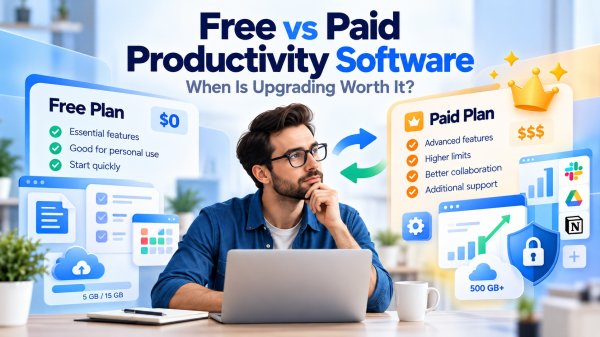
Choosing between free and paid productivity software is not as simple as comparing a $0 plan with a monthly subscription.
Today, free tools can handle many everyday tasks, including writing documents, organizing projects, managing schedules, taking notes, and collaborating with others. For students, freelancers, and small teams, a free plan may provide everything needed to stay productive.
So why do people still pay for productivity software?
The answer usually comes down to what happens when your needs become more demanding.
A free plan might work perfectly until you need additional storage, advanced automation, more collaborators, administrative controls, or reliable access to specialized features. On the other hand, paying for premium software does not automatically make you more productive. Some users subscribe to powerful tools without ever using the features that justify the cost.
That makes the free vs paid productivity software decision a question of value rather than price alone.
The right choice depends on how you work, which limitations affect you, and whether upgrading would solve a meaningful problem.
In this guide, we'll compare free and paid productivity software across the factors that matter most:
-
Features and limitations: What can you accomplish without paying, and which capabilities typically require an upgrade?
-
Collaboration and workflow efficiency: When do premium features make teamwork or complex tasks easier?
-
Pricing and long-term costs: How do subscriptions, licensing models, and hidden expenses affect overall value?
-
Security and data ownership: What should you check before trusting a free or paid provider with important information?
-
Real-world use cases: Which option makes sense for students, freelancers, remote teams, and small businesses?
We'll also explain how to recognize the signs that a free plan is holding you back—and when upgrading would simply add another unnecessary expense.
The goal is not to convince you to pay for software. It's to help you choose the tools that deliver the most practical value for your actual workflow.
What Is Free vs Paid Productivity Software?
Free vs paid productivity software refers to the differences between tools that can be used without a purchase and those that require payment for access to certain features, services, or licensing rights.
Productivity software includes applications designed to help people organize tasks, create documents, manage projects, communicate, schedule activities, and complete work more efficiently.
However, the distinction between free and paid software is not always straightforward.
Some applications are completely free to use. Others provide a free version with optional upgrades. Certain products require a recurring subscription, while others offer a one-time license.
Understanding these models is the first step toward making a cost-effective software decision.
1. Free Software: Useful Tools Without an Upfront Purchase
Free productivity software allows users to access supported features without paying a license or subscription fee.
Depending on the product, free software may include document editors, note-taking applications, task managers, calendars, and basic project management tools.
A free product can be a practical choice when your needs are straightforward and its available features support your workflow.
However, free does not necessarily mean unlimited.
Some providers restrict storage, collaborators, integrations, automation, or technical support. Others offer a fully functional free application but charge for related services.
Before adopting a free tool, check its current terms, supported features, and data export options.
2. Freemium Software: Free Access With Optional Paid Upgrades
Freemium software combines a free plan with one or more paid tiers.
The free version usually provides a set of core capabilities, while premium plans may add features such as advanced automation, additional storage, administrative controls, or expanded collaboration.
For example, Notion and Todoist publish different plan levels for users with varying needs.
The exact features and limits can change, so it is important to review the provider's current plan comparison before upgrading.
Freemium tools are particularly useful when you want to evaluate a product through regular use before deciding whether its premium capabilities are worth paying for.
Key consideration: A free plan is valuable only if its limitations do not interrupt the tasks you need to complete.
3. Open-Source Software: Licensing and Freedom Matter
Open-source software is defined by the rights provided under its license, including access to source code and permission to use, study, modify, and redistribute the software under the applicable terms.
It is not simply another word for free software.
Some open-source applications are available at no cost, while commercial services, hosting, customization, or support may require payment.
A familiar example is LibreOffice, an open-source office productivity suite.
For users who value local document editing, file format support, and control over their software environment, open-source applications can be worth considering.
The Open Source Initiative provides a detailed explanation of the Open Source Definition.
Key consideration: Evaluate the application's features, maintenance, security updates, compatibility, and support options—not just its license.
4. Subscription Software: Paying for Ongoing Access
Subscription-based productivity software requires recurring payments, commonly monthly or annually.
Depending on the product, subscriptions may include:
-
Access to premium application features.
-
Cloud storage or synchronization services.
-
Ongoing feature updates.
-
Team collaboration and administrative capabilities.
-
Customer support and additional services.
For example, Microsoft 365 and Google Workspace offer subscription-based productivity services.
Subscriptions can make sense when ongoing services or regularly updated capabilities are essential to your work.
However, recurring fees can accumulate over time, especially when several tools are used together.
Key consideration: Compare the annual cost against the features you actually use and the alternatives available.
5. One-Time License Software: Paying Once for a Specific Version
Some productivity applications are available through a one-time purchase.
Under this model, users typically pay for a license to use a particular product or version according to its terms.
Unlike a subscription, a one-time license does not necessarily include every future major release, cloud service, or premium feature.
For example, Microsoft offers certain Office products through one-time purchase licensing, separate from Microsoft 365 subscriptions.
You can review the available options on the Microsoft 365 product comparison page.
A one-time purchase may be appealing when you prefer predictable licensing costs and do not need continuously expanding subscription services.
However, you should verify how long the product will receive security updates and whether future upgrades require additional payment.
Key consideration: Paying once does not mean receiving unlimited updates or lifetime support.
Free vs Paid Productivity Software: Pricing Models Compared
| Software Model | How It Works | Potential Advantages | What to Check |
|---|---|---|---|
| Free | Supported features are available without payment | No required purchase for included features | Usage limits, exports, support |
| Freemium | Free core features with optional premium plans | Try the workflow before upgrading | Feature restrictions, upgrade triggers |
| Open-source | Software distributed under an open-source license | Source-code access and licensing freedoms | Maintenance, compatibility, support |
| Subscription | Recurring payment for specified software or services | Ongoing services and premium capabilities | Renewal cost, cancellation, data access |
| One-time license | Single purchase under defined license terms | Potentially predictable upfront cost | Version upgrades, support lifecycle |
These categories are not mutually exclusive. An open-source application may be free, a freemium product may offer subscriptions, and a commercial provider may sell both subscriptions and one-time licenses.
Does Free Software Mean Lower Quality?
No. Price alone is not a reliable measure of software quality.
A free application may be stable, capable, and suitable for demanding work. A paid application may offer features that are unnecessary for your needs.
What matters is whether the software meets your requirements for functionality, reliability, compatibility, security, and ongoing support.
For example, someone who only needs to write documents and manage a simple task list may not benefit from paying for enterprise-level collaboration or administration features.
A growing team, however, might find that premium permissions, shared workflows, or centralized management solve problems that free tools cannot address efficiently.
The difference is not that one group automatically needs better software. It is that the requirements are different.
Key Takeaway
When comparing free and paid productivity software, start by identifying the licensing model and the features included at each level.
Then ask a more useful question:
Does paying for this software solve a problem that the free version cannot solve well enough?
If the answer is no, a free tool may be the better choice. If the answer is yes, the next step is to evaluate whether the additional value justifies the cost.
Free vs Paid Productivity Software: Key Differences
The biggest difference between free vs paid productivity software is not necessarily the quality of the application. It is often the level of access, flexibility, and support available to users.
Free plans can provide everything needed for basic document creation, note-taking, scheduling, and task management. Paid plans may expand those capabilities with advanced features, larger usage allowances, team management tools, or additional services.
However, the differences vary significantly between products.
A free desktop application may offer extensive features without a subscription, while a paid online service may charge primarily for cloud storage, collaboration, or administrative controls.
The following comparison summarizes common patterns rather than rules that apply to every product.
Free vs Paid Productivity Software Comparison Table
| Feature | Free Productivity Software | Paid Productivity Software |
|---|---|---|
| Core features | Often includes essential tools | May include additional or specialized features |
| Usage limits | May restrict storage, projects, or activity | May provide higher limits or additional capacity |
| Collaboration | Basic sharing or limited team features | May offer advanced permissions and team workflows |
| Automation | Basic functionality or restricted usage | May include expanded automation and integrations |
| Security controls | Varies by product and provider | May add centralized administration and advanced controls |
| Customer support | Community resources or standard support | May include priority or dedicated support |
| Long-term cost | No required payment for included features | Subscription, license, or service fees |
Important: Paid software is not automatically more secure, reliable, or capable than free software. Always compare the specific products and plans you are considering.
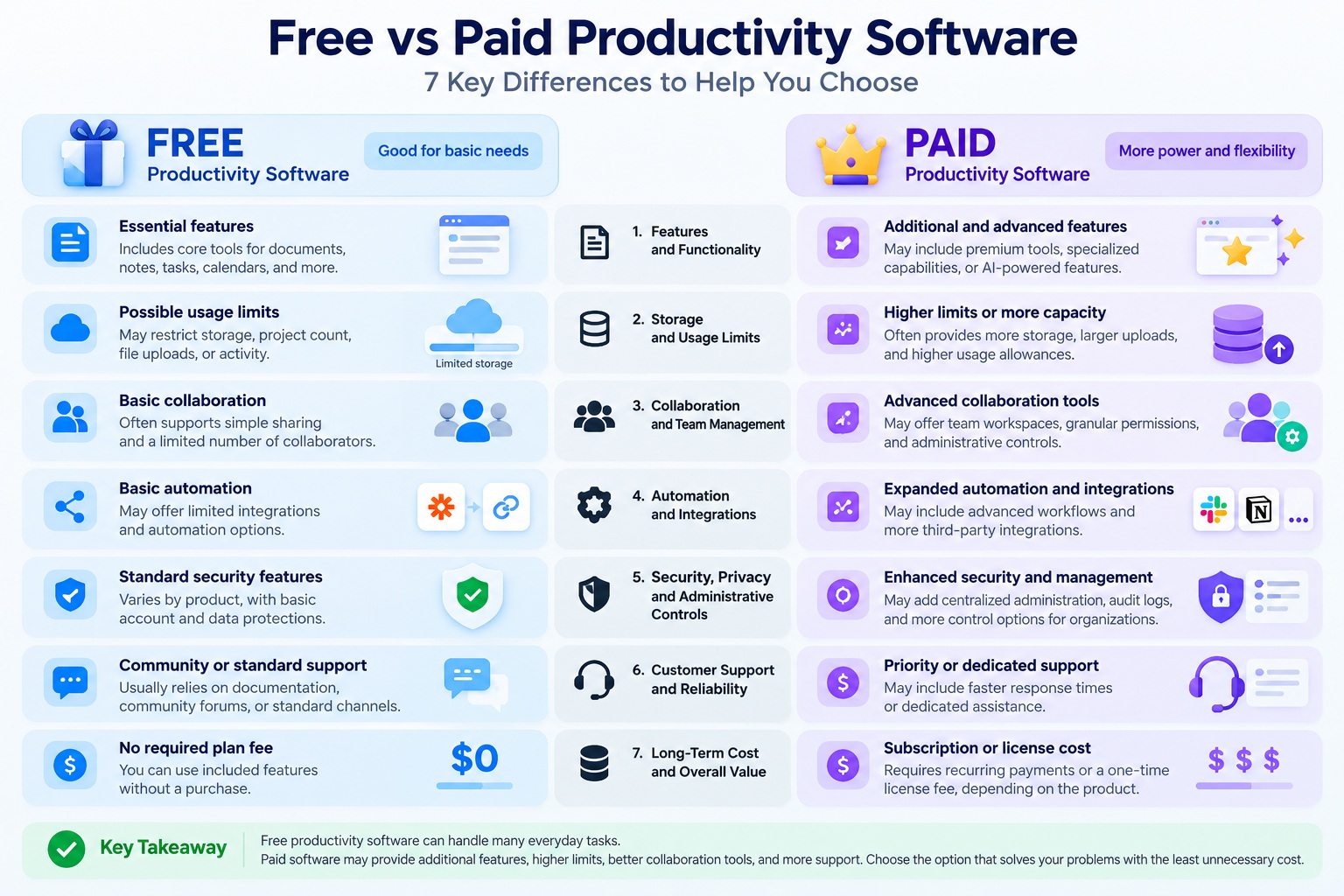
1. Features and Functionality
Free productivity tools commonly include the essential features needed to complete everyday work.
For example, a free note-taking application may support text notes, checklists, and basic organization. A paid plan might add advanced search, larger uploads, additional integrations, or specialized AI capabilities.
Similarly, a free project management tool may provide task lists and boards, while a premium tier may offer advanced reporting, custom permissions, or workflow automation.
These differences can be useful, but only when they address an actual requirement.
Before upgrading, identify the specific feature you need and confirm that it is included in the paid plan.
You can see how features vary across plan levels on the official Notion pricing page and Todoist pricing page.
2. Storage and Usage Limits
Some free productivity applications restrict the amount of cloud storage, number of projects, file uploads, or usage of certain features.
Paid plans may provide higher allowances, although premium tiers can still have limits.
These restrictions matter most when they interrupt regular work.
For example, a small storage allowance may be sufficient for text documents but less suitable for teams working with large media files.
When evaluating a plan, check:
-
Total storage capacity.
-
Individual file upload limits.
-
Project or workspace limits.
-
Restrictions on shared content.
-
Whether unused capacity carries over.
-
What happens when the account reaches its limit.
Do not assume that paying for software guarantees unlimited storage or unrestricted usage.
3. Collaboration and Team Management
Collaboration is one of the areas where paid productivity software can provide meaningful value.
A free application may allow users to share documents or invite collaborators. Paid business plans may add centralized administration, more granular permissions, organizational controls, or additional collaboration capabilities.
These features can become important when multiple people work with sensitive files or shared business processes.
For example, Google Workspace and Microsoft 365 provide business-oriented plans with different collaboration and management capabilities.
However, basic real-time collaboration is not exclusive to paid software.
The key question is whether your team needs more advanced management and control—not simply whether people need to work together.
4. Automation and Integrations
Automation can reduce repetitive work, especially when productivity tools are connected to other applications.
Free plans may offer basic integrations or limited automation. Paid tiers may expand available workflows, usage allowances, or integration options.
For example, a team might use automation to create tasks from submitted forms, send status notifications, or update project records.
These capabilities can be valuable when they replace repetitive manual steps.
However, an automation feature is only useful if it saves meaningful time or reduces errors.
Before upgrading, identify the workflow you want to automate and verify that the paid plan supports it.
Also consider whether the same task could be handled through existing software without an additional subscription.
5. Security, Privacy, and Administrative Controls
Security should never be evaluated solely by whether an application is free or paid.
Both free and paid software can implement encryption, authentication, access controls, and other protections. The availability and configuration of these features depend on the provider and product.
Some business-oriented paid plans add centralized identity management, administrative policies, audit capabilities, or other controls useful to organizations.
However, these features do not guarantee that a product is secure in every environment.
Users should evaluate:
-
Authentication and account protection.
-
Access permissions.
-
Data storage and sharing practices.
-
Security update policies.
-
Backup and recovery options.
-
Administrative controls where required.
The NIST Cybersecurity Framework provides a broader approach to identifying and managing cybersecurity risks.
For privacy considerations, the NIST Privacy Framework offers additional guidance.
The best security choice is the product that meets your requirements and can be configured and maintained appropriately—not simply the most expensive plan.
6. Customer Support and Reliability
Support options can influence the overall value of productivity software.
Free users may rely on documentation, community forums, or standard support channels. Paid plans may provide faster response targets, dedicated assistance, or service commitments.
For an individual managing personal notes, extensive support may be unnecessary.
For a business that depends on software for daily operations, access to timely technical assistance can be more important.
However, support quality varies by provider, and paying for a plan does not automatically guarantee immediate help.
Before purchasing, review the available support channels, service terms, and any applicable response commitments.
Reliability should also be assessed separately from pricing. Free and paid applications can both experience bugs, outages, or compatibility problems.
7. Long-Term Cost and Overall Value
Free software has an obvious advantage: users can access its included features without paying for a license or subscription.
But the total cost of using software can involve more than its advertised price.
Possible considerations include:
-
Time spent working around limitations.
-
Additional storage or integrations.
-
Training and onboarding.
-
Migration between applications.
-
Support and maintenance.
-
Subscription renewals.
Paid software can be worthwhile when its features save enough time, reduce operational problems, or support important work that a free alternative cannot handle adequately.
On the other hand, subscriptions can become wasteful when users pay for overlapping features or rarely use premium capabilities.
For a broader look at available tools, see our guide to the best productivity software for work in 2026.
Which Differences Actually Matter?
Not every premium feature deserves equal attention.
For most users, the decision should start with three questions:
-
What limitation am I experiencing? Identify the exact task, restriction, or workflow problem.
-
Will the paid plan solve it? Verify the feature, allowance, or service in the provider's current documentation.
-
Is the benefit worth the cost? Consider how frequently you will use the feature and whether a free alternative would work.
If your free software already supports your work reliably, upgrading may offer little practical value.
If a paid feature removes a recurring obstacle or enables an essential workflow, the additional cost may be justified.
Key Takeaway
The most important differences between free and paid productivity software are usually related to specific capabilities, usage allowances, collaboration needs, support options, and long-term value.
Paid plans can offer useful advantages, but they should be evaluated against real requirements rather than assumed to be better by default.
Choose the plan that solves your problems with the least unnecessary cost and complexity.
Features That Matter Most When Comparing Free and Paid Tools
When evaluating free vs paid productivity software, the number of available features can be misleading.
A premium plan might advertise dozens of advanced capabilities, but only a handful may be relevant to your daily work. Meanwhile, a free application with fewer features might handle your essential tasks more efficiently.
The most useful approach is to evaluate features according to how they affect your workflow.
Instead of asking, "Which plan offers more features?" ask:
"Which features help me complete important tasks more effectively?"
The following seven areas deserve particular attention.
1. Core Functionality: Does the Free Version Complete the Job?
Start with the tasks you perform most frequently.
For example, if you use productivity software to write documents, organize notes, and manage a personal task list, a free application may already provide the necessary functionality.
Advanced features become more valuable when your work requires capabilities that the free version cannot support.
Before upgrading, identify the exact limitation you encounter.
Ask yourself:
-
Can I complete my essential tasks with the free plan?
-
Are important functions unavailable or restricted?
-
Do I regularly need a workaround?
-
Would the premium feature remove a meaningful obstacle?
If the free version meets your requirements without recurring problems, additional features may offer little practical benefit.
2. Collaboration Features: Do You Need More Than Basic Sharing?
Collaboration features can become important when multiple people work on shared projects.
However, basic collaboration is not exclusive to paid software.
Some free applications already support document sharing, comments, and real-time editing.
Paid plans may become useful when teams need more sophisticated capabilities, such as:
-
Granular access permissions.
-
Centralized workspace administration.
-
Advanced project reporting.
-
Additional collaboration or guest-access options.
-
Organization-wide management features.
For example, Google Workspace and Microsoft 365 Business offer business plans with different collaboration and administrative capabilities.
The important distinction is between simply working together and managing collaboration at scale.
When it matters: Consider upgrading when your team requires specific administrative or collaboration features that its current tools cannot provide.
3. Automation: Will It Reduce Repetitive Work?
Automation can be one of the more valuable reasons to consider a paid productivity plan.
Some applications offer automation features that help users move information between tools, create recurring tasks, or trigger actions based on predefined conditions.
For example, a workflow might automatically:
-
Create a project task when a request is submitted.
-
Send a notification when a deadline changes.
-
Update a shared record after a task is completed.
-
Organize incoming information according to predefined rules.
However, automation should be evaluated carefully.
A feature that saves a few seconds once a month may not justify a recurring subscription. A reliable workflow that eliminates a frequent manual task may offer more meaningful value.
Consider how often the task occurs, how much effort it requires, and whether automation introduces additional maintenance.
When it matters: Upgrade when an available automation solves a recurring problem and the benefit is worth the total cost.
4. Integrations: Can Your Tools Work Together?
Productivity software rarely operates in isolation.
A task manager may need to connect with a calendar. A project management platform may need to exchange information with cloud storage, email, or communication tools.
Free plans sometimes include integrations, while premium tiers may offer additional connections, higher usage allowances, or more advanced integration features.
The value depends on your existing software environment.
Before paying for an integration, check whether:
-
Your current plan already supports the connection.
-
The integration works in the direction you need.
-
Important information transfers accurately.
-
The connection requires another paid service.
-
A simpler workflow could achieve the same result.
A large integration catalog is not automatically valuable if you only need one or two reliable connections.
When it matters: Prioritize integrations that remove duplicate work or make essential information easier to manage.
5. Advanced Search, Organization, and Reporting
As your workload grows, finding information can become more difficult.
Basic productivity applications may provide folders, tags, filters, and standard search.
Premium features may include more sophisticated search options, customizable views, advanced reporting, or expanded organization tools.
These capabilities can be useful for people managing many projects, large document collections, or complex team workflows.
However, their value depends on the amount and complexity of information you handle.
For a simple personal task list, advanced dashboards may add unnecessary complexity.
For a team coordinating multiple projects, useful reporting can make it easier to identify deadlines, workloads, and outstanding tasks.
When it matters: Consider premium organization and reporting features when information is becoming difficult to find, monitor, or manage with your current tools.
6. AI Features: Are They Useful or Just Attractive Add-Ons?
AI-assisted capabilities have become a prominent part of productivity software.
Depending on the application and plan, these features may help users draft text, summarize information, search content, organize notes, or automate selected tasks.
However, AI features differ in quality, availability, privacy controls, and usage limits.
Before paying for an AI-powered upgrade, evaluate:
-
Task relevance: Does the feature help with work you regularly perform?
-
Output quality: Are the results useful enough to reduce manual effort?
-
Verification needs: How much time is required to review and correct outputs?
-
Data handling: What information is processed, stored, or shared?
-
Usage limits: Are there restrictions on requests, credits, or supported features?
-
Additional costs: Is AI included in the plan or billed separately?
An AI feature that produces impressive demonstrations may still provide limited value in your actual workflow.
For important documents or business decisions, generated outputs should be reviewed for accuracy.
When it matters: Pay for AI features when they consistently support useful tasks and their cost, limitations, and data-handling practices are acceptable.
7. Export, Backup, and Data Portability
One of the most overlooked software features is the ability to retrieve your information.
A productivity tool may work well today but become unsuitable as your needs change.
Before relying on a free or paid plan, investigate how easily you can export documents, tasks, notes, and other important data.
Consider:
-
Which export formats are supported?
-
Can you export an entire workspace or only individual items?
-
Are attachments and metadata included?
-
Can exported files be opened in other applications?
-
What happens to your data if you cancel a subscription?
-
Are backup and recovery options available?
For example, Google Takeout provides a way to export data from supported Google services.
Export options vary between providers and products, so always review the specific application's documentation.
When it matters: Data portability should be a priority whenever software stores important information, regardless of whether the plan is free or paid.
Which Premium Features Are Actually Worth Paying For?
The table below provides a practical way to evaluate common premium features.
| Premium Feature | Potential Value | Upgrade Priority |
|---|---|---|
| Essential missing functionality | Enables tasks you cannot currently complete | High when required |
| Team permissions and administration | Supports controlled team workflows | High when needed |
| Workflow automation | Reduces recurring manual work | Depends on frequency |
| Additional integrations | Connects essential applications | Depends on workflow |
| Advanced reporting | Improves visibility into complex work | Higher for complex teams |
| AI assistance | May reduce effort on suitable tasks | Depends on verified usefulness |
| More storage or usage capacity | Removes limits that interrupt work | High when limits are reached |
| Export and backup capabilities | Supports data access and continuity | Essential to evaluate |
These priorities are conditional rather than universal. A feature that is essential for one person may be unnecessary for another.
A Simple Feature-Value Test Before Upgrading
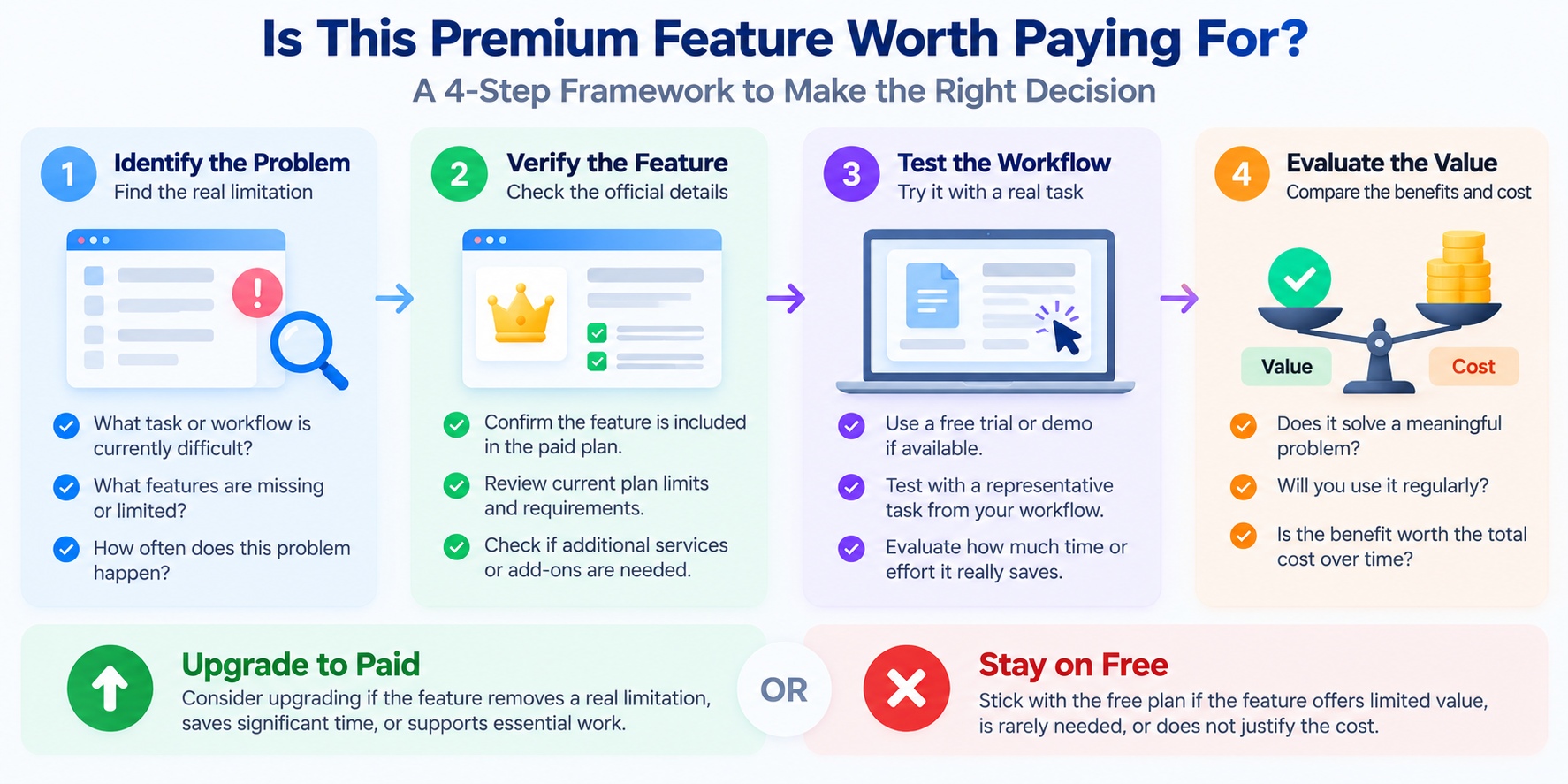
Before purchasing a premium plan, use this four-step evaluation.
Step 1: Identify the problem.
Write down the specific limitation you experience with your current software.
For example: "Our team cannot assign the required access permissions."
Step 2: Confirm the premium solution.
Check the provider's official documentation to verify that the paid plan includes the capability you need.
Step 3: Test the workflow.
If a trial or demonstration is available, use the feature with a representative task.
Do not rely only on marketing descriptions.
Step 4: Compare the benefit with the cost.
Consider the subscription or license fee, any additional services required, and the effort involved in adopting the feature.
If the upgrade does not produce a meaningful improvement, staying with the free plan may be the better decision.
Key Takeaway
The best productivity software is not necessarily the product with the longest feature list.
The most valuable features are the ones that remove real limitations, reduce unnecessary work, or support requirements your current tools cannot meet.
When comparing free and paid plans, prioritize practical functionality over feature quantity.
A focused free setup can be more useful than an expensive collection of premium tools that rarely get used.
What Can Free Productivity Software Do Well?
Free productivity software can support a surprisingly wide range of everyday tasks, from writing documents and organizing schedules to managing projects and collaborating with others.
For many individuals and small teams, paying for premium software is not a requirement for getting meaningful work done.
The important distinction is between what free software can accomplish and which additional capabilities a particular paid plan provides.
A well-chosen free application can be sufficient when it supports your essential tasks, works reliably, and does not impose limitations that regularly interrupt your workflow.
Here are six areas where free productivity tools can provide practical value.
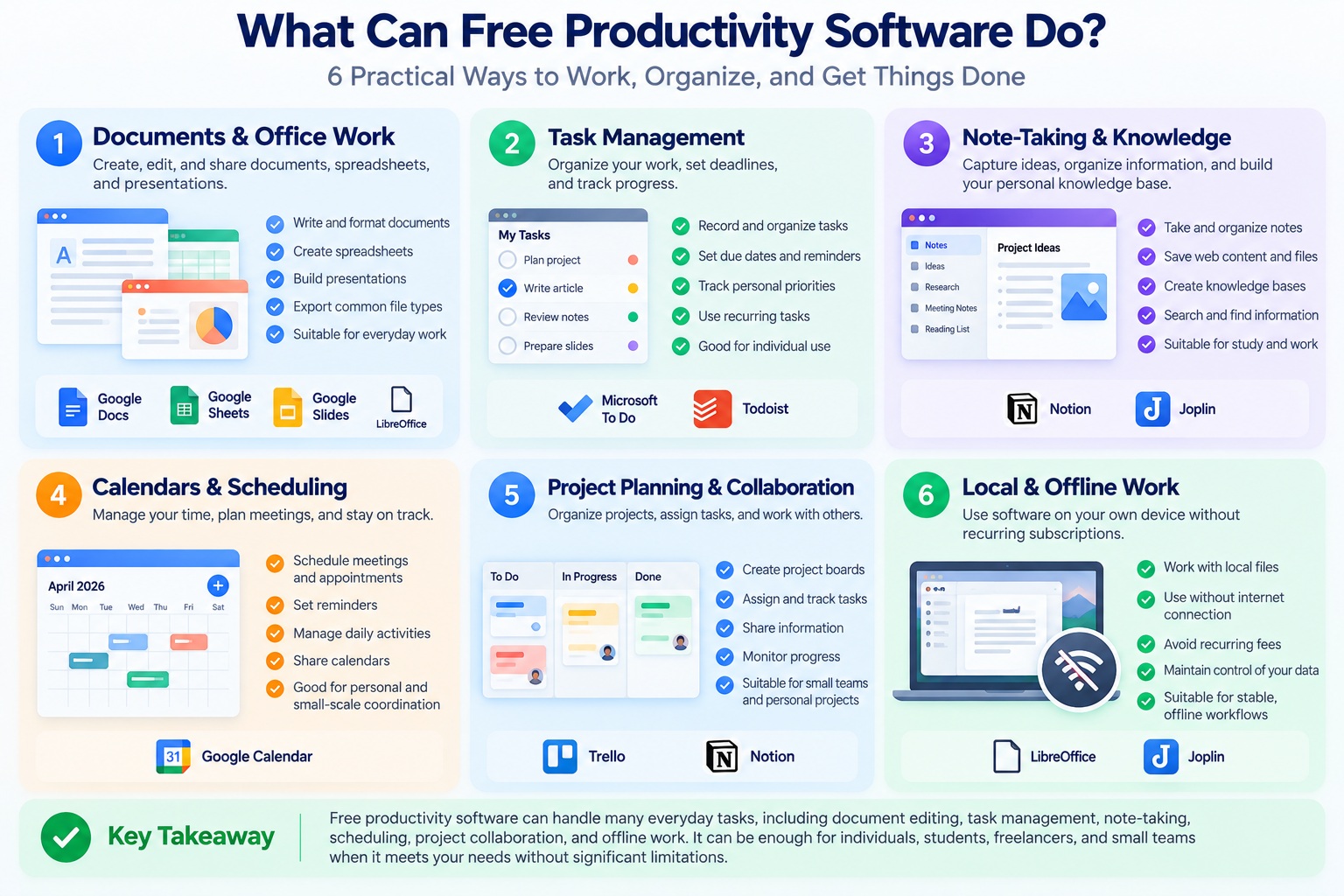
1. Document Writing and Everyday Office Work
Creating and editing documents is one of the most common uses of productivity software.
Free office applications can support tasks such as:
-
Writing reports, letters, and assignments.
-
Creating basic spreadsheets.
-
Preparing presentations.
-
Formatting documents.
-
Exporting or sharing common file types.
For example, LibreOffice provides a free, open-source desktop office suite with applications for documents, spreadsheets, and presentations.
Google Docs also provides document editing capabilities through a Google account, with additional services and administrative features available through paid Workspace plans.
These tools can be suitable for students, personal projects, and everyday office tasks.
However, users working with complex spreadsheets, specialized macros, advanced document formatting, or organization-specific templates should verify compatibility before replacing an existing application.
Best suited for: Students, individual users, freelancers, and anyone whose office work does not depend on specialized premium features.
2. Personal Task Management and To-Do Lists
Many people do not need a sophisticated project management system to stay organized.
A simple task manager can help users:
-
Record important tasks.
-
Set deadlines.
-
Organize personal priorities.
-
Create recurring reminders where supported.
-
Track progress on everyday responsibilities.
For example, Microsoft To Do offers personal task management capabilities, while Todoist provides a free plan alongside paid options.
Free task management tools are often enough when one person is managing a relatively straightforward workload.
The limitations become more relevant when users need advanced reporting, complex automation, expanded project organization, or team-level administration.
Best suited for: Personal planning, study schedules, daily work organization, and simple freelance workflows.
3. Note-Taking and Knowledge Organization
Free note-taking software can help users capture information and organize it for future reference.
Common use cases include:
-
Meeting notes.
-
Research summaries.
-
Personal knowledge bases.
-
Reading lists.
-
Project ideas.
-
Study materials.
For example, Joplin is an open-source note-taking application with local-first capabilities and optional synchronization services.
Notion also offers a free plan that can support note-taking and personal workspace organization, subject to its current plan limits.
These tools demonstrate that useful knowledge management does not always require a premium subscription.
However, users should compare search functionality, supported file formats, synchronization options, storage requirements, and export capabilities.
A free note-taking application is only a good fit if you can reliably retrieve and manage your information.
Best suited for: Students, researchers, writers, independent professionals, and personal knowledge management.
4. Calendars and Basic Scheduling
Scheduling is another area where free tools can provide substantial everyday value.
Calendar applications can help users organize:
-
Meetings and appointments.
-
Personal deadlines.
-
Study schedules.
-
Recurring activities.
-
Reminders.
-
Shared events where supported.
For example, Google Calendar offers calendar functionality through a Google account.
For individuals, these capabilities may be sufficient without purchasing a dedicated scheduling platform.
Premium scheduling software becomes more relevant when workflows require features such as advanced booking rules, organization-wide administration, specialized integrations, or additional business services.
Best suited for: Personal scheduling, individual freelancers, students, and small-scale coordination.
5. Basic Project Planning and Collaboration
Free software can also support project work.
Depending on the product and plan, users may be able to create project boards, assign tasks, organize shared information, and track progress.
For example, Trello offers a free plan with project organization capabilities, while Notion provides workspace features that can support certain collaborative workflows.
For a small project, a basic board or shared task list may be all that is needed.
However, free plans may restrict workspace administration, automation, advanced reporting, or other team-oriented capabilities.
A larger team should evaluate whether the available permissions and management features are appropriate for its requirements.
Best suited for: Personal projects, small collaborative assignments, early-stage teams, and lightweight project coordination.
6. Local Workflows Without Recurring Subscriptions
Not every productivity workflow needs a cloud subscription.
Some free desktop applications allow users to work primarily with files stored on their own devices.
This can be useful for people who:
-
Prefer local document storage.
-
Need to work without a continuous internet connection.
-
Want to avoid recurring application fees.
-
Use relatively stable software requirements.
-
Prefer direct control over their files.
LibreOffice and Joplin are examples of tools that can support local workflows.
However, local storage also creates responsibilities.
Users should maintain backups, install security updates, and understand how their data can be recovered if a device fails.
For a broader discussion of application formats, consider whether browser-based or desktop software better supports your working environment.
Best suited for: Offline-oriented workflows, local document management, and users who prefer software without mandatory recurring subscriptions.
Examples of Free Productivity Software by Use Case
The following examples illustrate different types of free productivity tools. They are not presented as independently tested rankings.
| Productivity Task | Free Software Example | Typical Use |
|---|---|---|
| Documents and spreadsheets | LibreOffice | Local office productivity |
| Online document editing | Google Docs | Document creation and sharing |
| Personal task management | Microsoft To Do | To-do lists and planning |
| Tasks and projects | Todoist | Personal task organization |
| Notes and knowledge | Joplin | Note-taking and local knowledge management |
| Workspace organization | Notion | Notes, documents, and lightweight projects |
| Calendar management | Google Calendar | Scheduling and reminders |
| Project boards | Trello | Visual task and project tracking |
Note: Free-plan features, usage limits, supported platforms, and commercial-use terms vary by provider and may change. Always review the current official documentation before adopting a tool.
Where Free Productivity Software May Fall Short
Free software can be capable, but it is important to recognize its limitations.
Depending on the application, common restrictions may include:
-
Limited cloud storage or upload capacity.
-
Restricted automation or integration features.
-
Fewer administrative controls.
-
Reduced access to advanced reporting.
-
Limited technical support options.
-
Restrictions on certain collaboration features.
-
Usage limits for AI-assisted capabilities.
These limitations are not universal.
A free open-source application may provide extensive local functionality, while a commercial freemium service may reserve specific features for paying customers.
The relevant question is whether a limitation affects your actual work.
For example, a storage restriction is unlikely to matter if you mainly manage short text notes. It may become a serious obstacle if your projects regularly involve large files.
Similarly, advanced team permissions may be unnecessary for personal use but important for an organization handling confidential information.
When Is Free Productivity Software Enough?
Free software may be the right choice when:
-
Your essential tasks are supported without paying.
-
Usage limits do not regularly interrupt your work.
-
Collaboration and sharing features meet your needs.
-
You can access, export, and back up important information.
-
The application's security and maintenance practices are appropriate for your situation.
-
Premium features would provide little additional value.
These conditions matter more than the number of features advertised by a paid plan.
A free application that meets your requirements can be a better investment of your time than a premium product that introduces unnecessary complexity.
For additional software options, explore our guide to the best productivity software for work in 2026.
Key Takeaway
Free productivity software can be sufficient for document editing, task management, note-taking, scheduling, basic collaboration, and many local workflows.
The strongest reason to remain on a free plan is simple: it already allows you to complete your work effectively.
Rather than upgrading because a premium tier exists, evaluate whether your current software has a limitation that genuinely needs to be solved.
If it does not, staying free may be the most practical choice.
What Do You Actually Get With Paid Productivity Software?
Paid productivity software is often marketed as a way to work faster, stay organized, and unlock more powerful features.
But paying for an application does not automatically improve productivity.
The real value of premium software comes from capabilities that solve problems your existing tools cannot handle efficiently.
For some users, this means additional storage or access to specialized features. For others, the value comes from team administration, workflow automation, technical support, or services that are difficult to maintain independently.
The benefits depend on the specific product, plan, and working environment.
Here are six areas where paid productivity software may provide meaningful advantages.
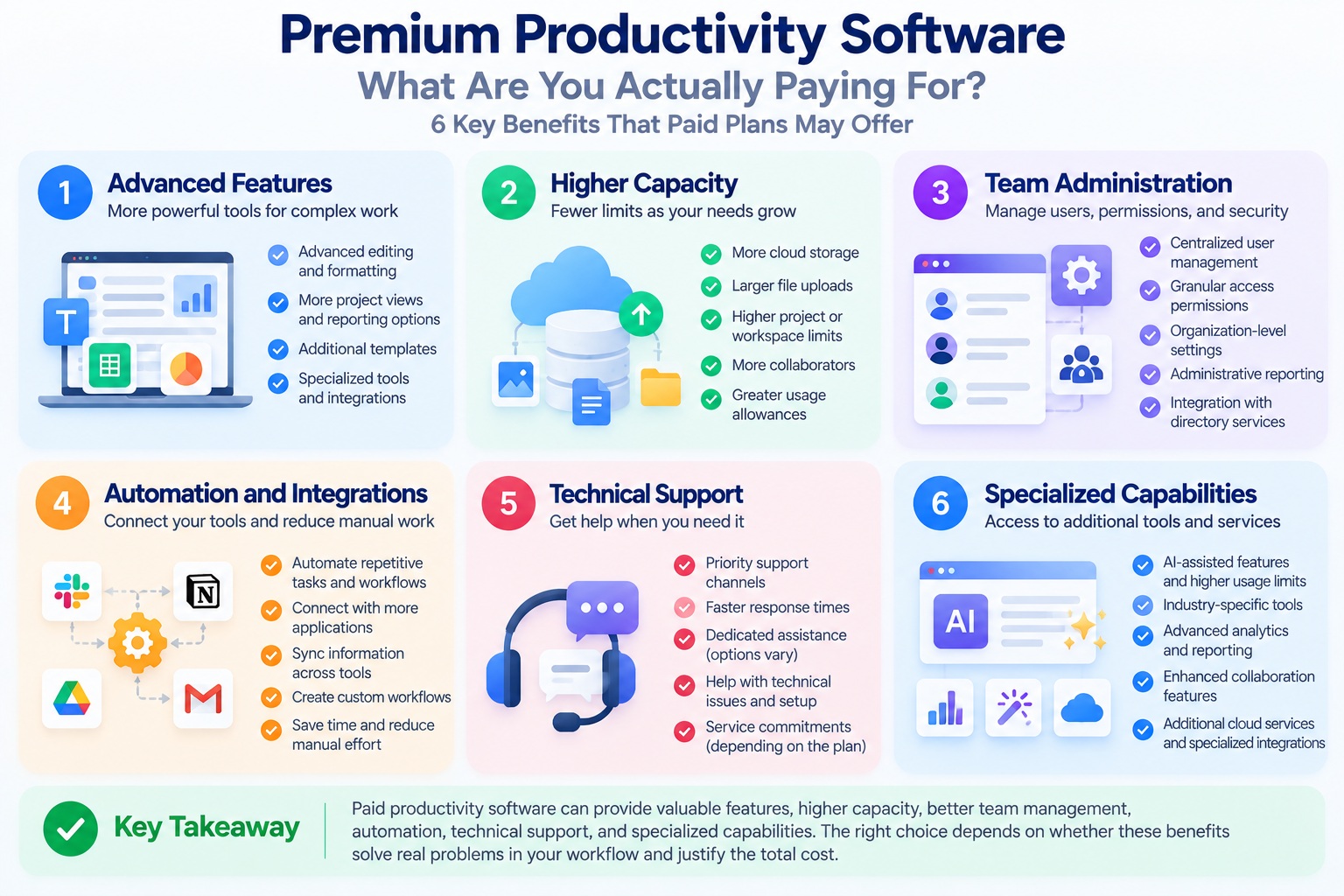
1. Advanced Features for More Complex Work
One of the most obvious benefits of paid software is access to additional functionality.
Depending on the application, premium plans may provide:
-
More advanced document editing or formatting.
-
Expanded project management capabilities.
-
Customizable dashboards and reporting.
-
Additional templates or workflow options.
-
Specialized integrations.
-
Higher usage allowances for selected features.
For example, Todoist offers different plan levels for task management, while Notion provides plans designed for different individual and organizational requirements.
These examples demonstrate how software providers can offer multiple levels of functionality.
However, an advanced feature is only valuable when it supports work you actually perform.
A freelancer managing a few projects may not need the same reporting capabilities as a business coordinating multiple departments.
When paying makes sense: The premium version includes a specific capability that is essential to your work and unavailable through a suitable free alternative.
2. Higher Capacity and Fewer Workflow Restrictions
Some free productivity applications limit storage, uploads, project counts, collaborators, or access to certain services.
Paid plans may increase these allowances.
This can be particularly useful when a growing workload makes the free plan difficult to use.
Consider a professional who manages large project files or a team that needs to organize an expanding collection of shared documents.
If the current plan repeatedly reaches its limits, upgrading may reduce interruptions and eliminate the need for temporary workarounds.
However, premium plans are not necessarily unlimited.
Some products still apply storage quotas, file size restrictions, usage caps, or additional charges.
Before purchasing, verify the exact limits for the plan you are considering.
When paying makes sense: A specific capacity restriction regularly interrupts essential work, and the paid plan provides enough additional capacity to solve the problem.
3. Team Administration and Access Management
For individual users, basic sharing features may be sufficient.
For organizations, managing access to information can become more complicated.
Paid business plans may provide capabilities such as:
-
Centralized user administration.
-
More detailed access permissions.
-
Organization-level configuration.
-
User provisioning or account management integrations.
-
Administrative reporting.
-
Additional controls for shared workspaces.
For example, Google Workspace and Microsoft 365 Business offer business-focused productivity plans with different management capabilities.
The value of these features increases when an organization needs consistent access policies across multiple users.
However, purchasing a business plan does not automatically establish secure administration.
Permissions must still be configured appropriately, accounts must be protected, and administrators need to understand the available controls.
When paying makes sense: Your team requires centralized management or specific administrative capabilities that its current software does not provide.
4. Workflow Automation and Business Integrations
Premium software may provide expanded automation and integration capabilities.
These can help organizations reduce repetitive manual tasks and connect different parts of their workflow.
For example, a business might need to:
-
Create a task automatically when a customer request arrives.
-
Notify a team when a project status changes.
-
Synchronize information between approved systems.
-
Generate recurring reports.
-
Route work to the appropriate team member.
Such workflows may reduce administrative effort when they are designed and maintained properly.
However, automation is not automatically beneficial.
Complex integrations can introduce maintenance requirements, unexpected errors, or additional service costs.
Before upgrading, evaluate the frequency of the task, the reliability of the proposed automation, and the effort required to manage it.
When paying makes sense: A supported premium automation removes a recurring bottleneck or helps maintain an important business process.
5. Technical Support and Service Commitments
Support can be an important consideration when productivity software becomes essential to daily operations.
Free plans may provide documentation, community resources, or standard support.
Depending on the provider, paid plans may include additional support channels, priority assistance, or defined service commitments.
These benefits can matter when software interruptions affect deadlines, collaboration, or business continuity.
For example, a student using a free note-taking tool may be comfortable troubleshooting occasional problems independently.
A company relying on a shared productivity platform may place greater value on access to appropriate technical assistance.
However, support availability and response commitments differ between products and plans.
Users should review the provider's published support terms rather than assuming every paid subscription includes immediate assistance.
When paying makes sense: Reliable access to defined support services is an important operational requirement, and the chosen plan provides those services.
6. Specialized Capabilities and Ongoing Services
Some paid productivity products offer specialized capabilities that are not part of their free versions.
These may include advanced AI assistance, industry-specific tools, expanded cloud services, or features intended for complex organizational workflows.
For example, certain paid plans may provide additional AI usage allowances, advanced document processing, or specialized collaboration functions.
However, these capabilities should be evaluated individually.
An AI-powered feature may help summarize documents or organize information, but its output may still require verification.
A specialized integration may save time, but only if it works reliably with the systems you use.
An ongoing cloud service may provide convenience, but it can also create recurring costs and dependence on the provider.
Before paying, consider the practical benefit, data-handling requirements, service limitations, and available alternatives.
When paying makes sense: The specialized capability supports an important task and delivers enough value to justify its cost and complexity.
Paid Productivity Software: Benefits by User Type
The value of premium software depends heavily on the user.
| User Type | Potential Paid Benefit | Upgrade Consideration |
|---|---|---|
| Students | Specialized features or additional capacity | Is the feature required for coursework? |
| Freelancers | Advanced project organization or integrations | Does it support recurring client work? |
| Remote teams | Shared administration and collaboration controls | Are existing team features insufficient? |
| Small businesses | Centralized management and workflow automation | Does the plan solve an operational problem? |
| Creative professionals | Specialized editing or production capabilities | Does it support required formats and workflows? |
| Larger organizations | Administrative controls, support, and integrations | Does it meet documented organizational requirements? |
These are examples of potential needs, not universal recommendations.
A student may need specialized paid software for a particular course, while a small business may operate effectively with free tools.
The decision should be based on requirements rather than job titles.
What Paid Software Does Not Guarantee
It is equally important to understand what a premium subscription does not automatically provide.
Paying more does not guarantee:
-
Faster performance on every device.
-
Better security in every environment.
-
Unlimited storage or usage.
-
Error-free automation.
-
Immediate technical support.
-
Compatibility with every file format.
-
Higher productivity for every user.
These outcomes depend on the application, plan, configuration, hardware, and actual workload.
A paid product can still have limitations, and a free alternative may perform better for a particular task.
For this reason, users should review official documentation and test essential workflows before making a long-term commitment.
How to Tell Whether a Paid Plan Provides Real Value
Before upgrading, ask four practical questions.
1. What problem will this plan solve?
Identify the exact limitation or missing capability.
2. How frequently does the problem occur?
A recurring obstacle is generally more important than a feature you might use once.
3. Can I verify the benefit?
Review the provider's documentation and test the relevant feature if a trial is available.
4. Is the improvement worth the total cost?
Consider subscription fees, additional services, training, and the effort required to switch tools.
For a broader overview of software options, explore our guide to the best productivity software for work in 2026.
Key Takeaway
The strongest benefits of paid productivity software are not simply more features or a premium label.
They are specific capabilities that remove limitations, support important workflows, improve administration, or provide services that users genuinely need.
If a free application already meets your requirements, paying more may not deliver meaningful additional value.
If a premium plan solves a recurring problem and the benefit justifies the cost, upgrading can be a practical investment.
The goal is not to use the most expensive software. It is to choose the software that provides the right capabilities at a reasonable total cost.
Pricing and Total Cost of Ownership
When comparing free vs paid productivity software, the advertised subscription price is only one part of the financial decision.
A tool that costs nothing to use may still require time for setup, maintenance, training, or workarounds. A paid application may reduce some of those costs, but it can also introduce recurring fees, additional services, and long-term commitments.
This is why software buyers should consider total cost of ownership (TCO) rather than focusing only on the monthly price.
Total cost of ownership describes the overall cost of acquiring, implementing, using, supporting, and eventually replacing a product over a defined period.
For productivity software, that period might be one year, three years, or longer.
1. Understand the Different Software Pricing Models
Productivity software providers use several pricing approaches.
Free plans
Users can access included features without a required subscription or license payment. However, free plans may have usage restrictions or optional paid services.
Monthly subscriptions
Users pay recurring fees for access to specified features or services. Monthly billing may provide flexibility, but the cost continues while the subscription remains active.
Annual subscriptions
Users pay for a defined subscription period, sometimes at a lower effective monthly rate than flexible monthly billing. Cancellation, renewal, and refund terms vary.
Per-user pricing
Organizations pay according to the number of licensed users or seats. Costs can increase as a team grows.
One-time licenses
Users purchase a license under specified terms. Future major upgrades, cloud services, or technical support may require additional payments.
Usage-based pricing
Some products charge according to consumption, such as storage, automation runs, API requests, or AI usage.
These models can overlap. A subscription may include per-user fees and additional usage-based charges.
For examples of current product pricing structures, consult the official Microsoft 365 pricing page, Google Workspace pricing page, and Notion pricing page.
Because prices and plan terms change, always confirm the current rates, billing conditions, and included features directly with the provider.
2. How to Calculate Total Cost of Ownership
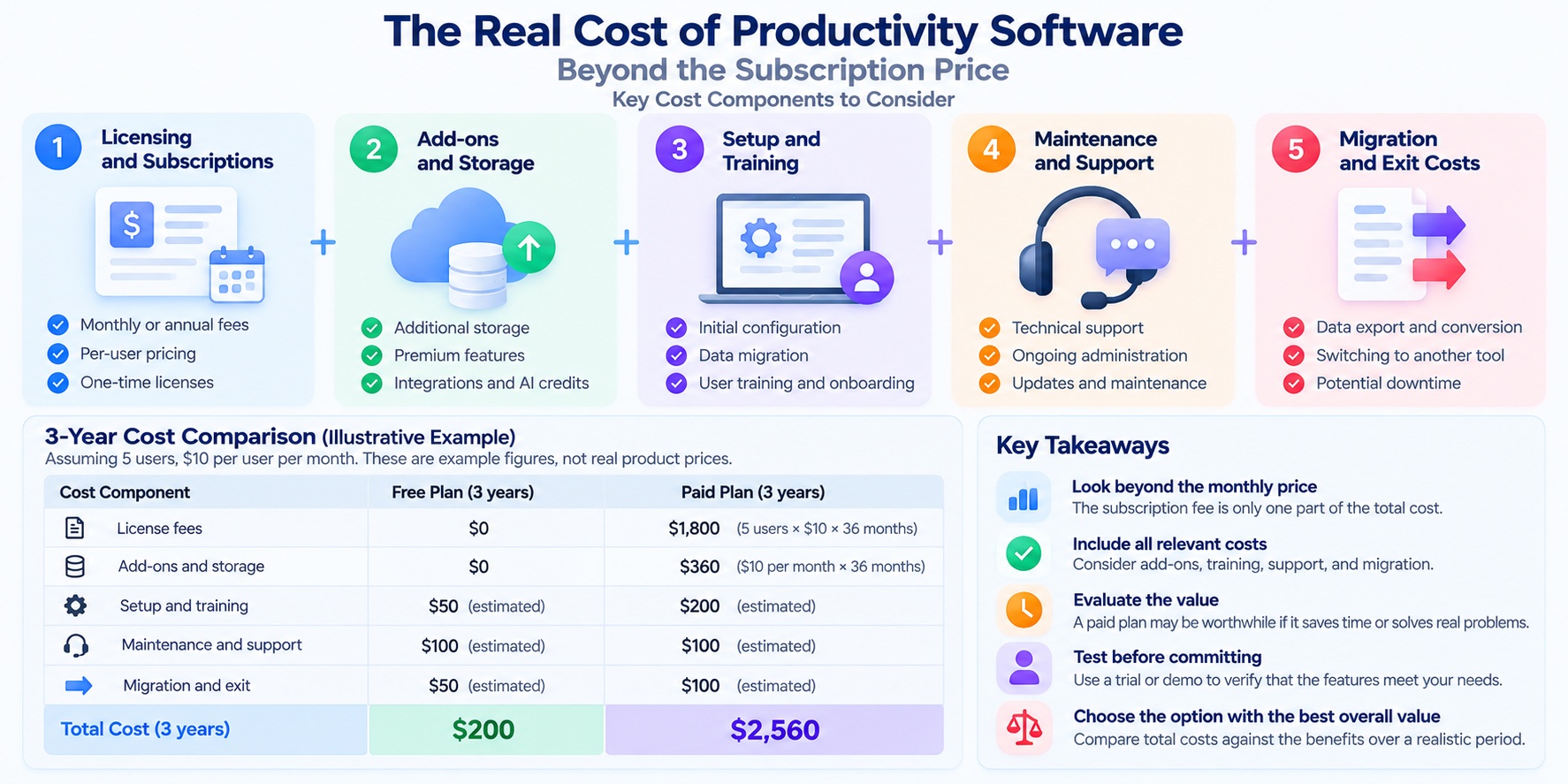
A practical software cost estimate should include more than license payments.
Use the following framework:
Total Cost of Ownership = Licensing + Add-ons + Setup and Training + Maintenance and Support + Migration and Exit Costs
Each component represents a different potential expense.
| Cost Component | What It Includes |
|---|---|
| Licensing | Subscriptions, user seats, or one-time purchases |
| Add-ons | Extra storage, integrations, AI credits, or premium services |
| Setup and training | Initial configuration, onboarding, and employee training |
| Maintenance and support | Administration, troubleshooting, updates, and support services |
| Migration and exit | Data export, file conversion, switching tools, and transition work |
Not every cost applies to every product.
For example, a free local document editor may have no licensing expense but still require time for installation, updates, and backups.
A paid cloud platform may simplify some administrative tasks while introducing recurring subscription and storage costs.
The purpose of this calculation is not to make free software appear expensive or paid software appear economical.
It is to identify the expenses that are relevant to your situation.
3. Example: Free vs Paid Software Over Three Years
Consider a hypothetical five-person team comparing two productivity software options.
Option A is a free plan. Option B is a paid plan priced at an assumed $10 per user per month.
These figures are illustrative assumptions, not verified prices for any specific product.
For this example, assume that subscription prices remain unchanged and that the team maintains five paid seats throughout the three-year period.
| Cost | Free Plan | Paid Plan |
|---|---|---|
| Monthly license cost | $0 | $50 |
| Annual license cost | $0 | $600 |
| Three-year license cost | $0 | $1,800 |
The paid plan costs $1,800 more in licensing fees over three years.
However, licensing costs alone do not establish which option provides better value.
Suppose the free plan requires additional manual work because an essential automation feature is unavailable.
If the paid plan reliably eliminates enough repetitive work, its benefits may justify the subscription.
If the team rarely needs the premium capabilities, the additional $1,800 may provide little practical value.
This example illustrates why the best financial decision depends on both cost and measurable workflow benefits.
4. The Hidden Costs of Free Productivity Software
Free software can be an excellent choice, but users should recognize expenses that may exist outside the purchase price.
Time spent on manual work
A free plan may require manual steps that could otherwise be automated.
Additional applications
Users sometimes combine multiple free tools to replace functionality available in a single product.
Setup and maintenance
Some applications require users to manage updates, backups, synchronization, or technical configuration.
Compatibility work
Converting files or adjusting workflows can create additional effort when applications do not support required formats.
Migration
Switching from one free application to another may require exporting, reorganizing, and validating important information.
These costs should be considered only when they actually occur.
A free tool that works reliably without significant workarounds may have very low total cost.
5. The Hidden Costs of Paid Productivity Software
Premium subscriptions can also create expenses beyond their advertised price.
Common examples include:
-
Additional user licenses as a team grows.
-
Separate charges for storage or advanced features.
-
Paid integrations or third-party services.
-
Training and onboarding.
-
Subscription renewals.
-
Higher pricing when switching billing arrangements.
-
Migration costs when leaving the platform.
Some products also have different pricing for personal, business, and enterprise use.
Before subscribing, check whether the advertised price applies to your account type, billing term, region, and required number of users.
Also review cancellation terms and what happens to stored data or premium functionality when the subscription ends.
6. When Does Paying for Software Become Cost-Effective?
A paid application becomes financially attractive when the value of its additional capabilities justifies its total incremental cost.
One way to estimate that value is to consider time saved.
For example, suppose a premium feature costs an assumed $15 per month and saves two hours of recurring administrative work each month.
If the user's time is valued at an illustrative $20 per hour, the estimated monthly time value is:
2 hours × $20 = $40
Subtracting the $15 subscription fee gives an estimated net benefit of $25 per month.
This is only a simplified example.
It assumes the time savings are real, repeatable, and valuable. It also excludes implementation effort, taxes, and any additional service costs.
Saving time does not automatically create equivalent cash savings. The benefit may instead appear as additional capacity, reduced workload, or more time for other priorities.
The estimate is most useful when users test the feature and measure its effect on a recurring task.
7. How to Avoid Paying for Unnecessary Software
Before purchasing a productivity subscription, review your current tools.
Identify overlapping features
Two applications may provide similar note-taking, scheduling, project management, or document editing capabilities.
Review actual usage
Consider whether premium features are used frequently enough to justify their cost.
Compare annual and monthly commitments
An annual plan may reduce the effective monthly price, but it can also involve a longer financial commitment.
Check seat requirements
For team software, determine which users genuinely need paid access.
Test before committing
Use a trial or demonstration when available, and confirm that the premium capabilities work as expected.
Plan for data portability
Review export options and cancellation conditions before building important workflows around a product.
For a broader comparison of software options, explore our guide to the best productivity software for work in 2026.
Key Takeaway
The true cost of productivity software includes more than its subscription or license price.
Free tools can offer excellent value when they meet your needs without significant workarounds. Paid tools may justify their cost when they remove recurring limitations, reduce administrative effort, or support essential business processes.
The best decision is to compare total costs against verified benefits over a realistic period—not simply choose the plan with the lowest advertised price.
Security, Privacy, and Data Ownership
When comparing free vs paid productivity software, security and privacy should be part of the decision—not an afterthought.
Productivity applications may store documents, schedules, project details, customer information, and other sensitive data. Choosing a tool therefore involves more than evaluating features or subscription costs.
One common assumption is that paid software is automatically safer than free software.
That is not necessarily true.
Both free and paid applications can implement strong security protections. Both can also have vulnerabilities, configuration problems, or privacy practices that do not meet your requirements.
The more useful approach is to evaluate how a specific product protects your information, who can access it, and what happens to your data if you stop using the service.
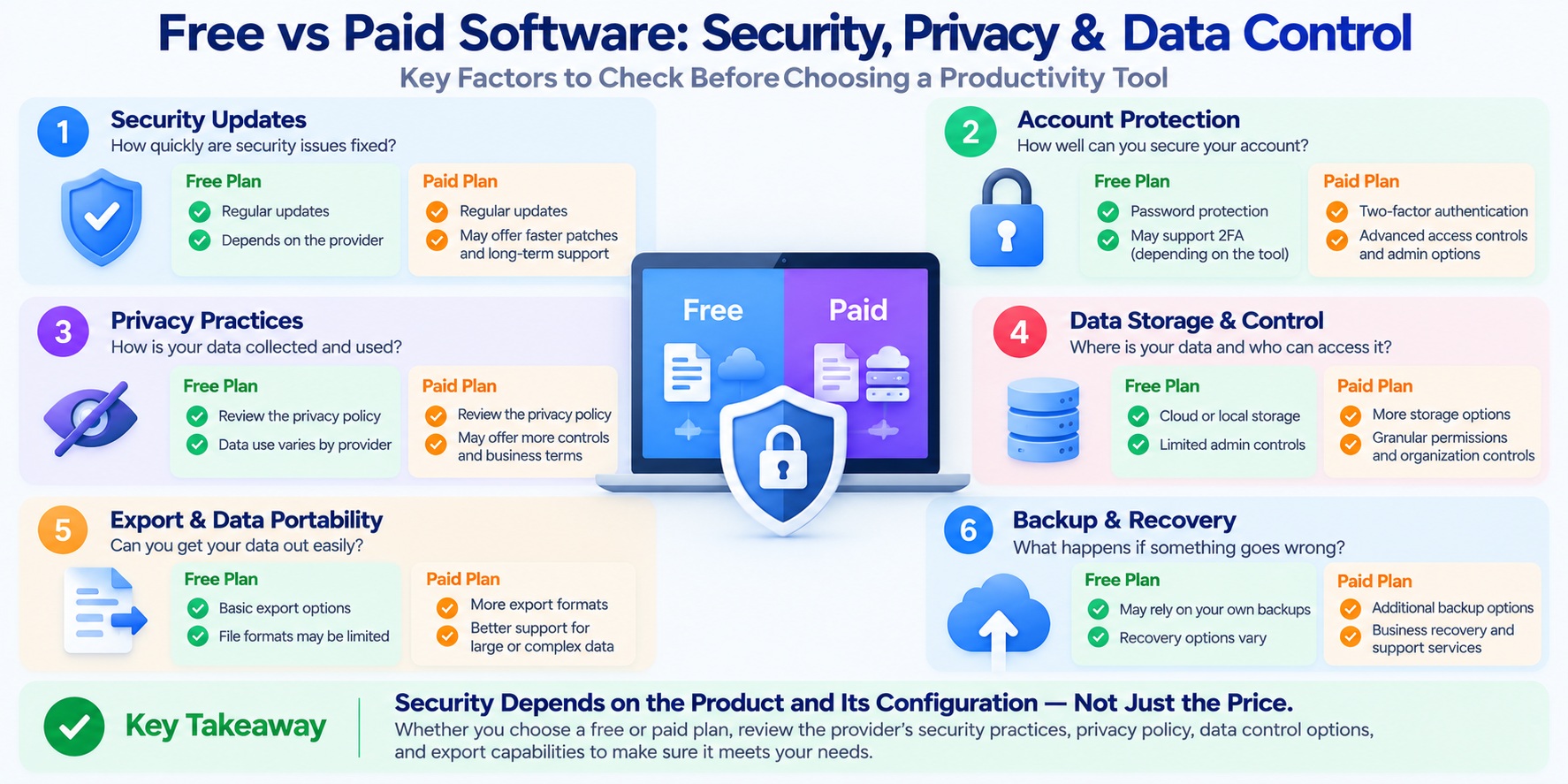
1. Is Paid Productivity Software More Secure Than Free Software?
A higher subscription price does not guarantee stronger security.
Some free applications offer important protections such as encrypted connections, account authentication, and regular security updates. Certain paid business plans provide additional administrative capabilities, but those features do not automatically make every account or deployment secure.
Security depends on several factors:
-
How the application is designed and maintained.
-
Whether vulnerabilities are addressed promptly.
-
Which security controls are available.
-
How accounts and permissions are configured.
-
Whether users follow appropriate security practices.
-
How the provider manages infrastructure and data.
For example, a free application with reliable updates and appropriate access controls may be suitable for personal documents.
A business handling confidential client information may need additional administrative controls, documented security practices, or contractual protections.
The NIST Cybersecurity Framework provides a structured approach to identifying and managing cybersecurity risks.
The key question is not whether software is free or paid, but whether its security capabilities meet your actual requirements.
2. Account Security and Access Permissions
Account security is one of the most important considerations for cloud-based productivity software.
If someone gains unauthorized access to an account, they may be able to view, modify, or delete information stored in the application.
Before choosing a product, check whether it supports appropriate account protections.
Important considerations include:
Multi-factor authentication
Multi-factor authentication adds another verification step beyond a password.
Access permissions
Sharing controls determine who can view, edit, or manage documents and workspaces.
Account recovery
Recovery procedures matter when users lose access to their accounts.
Administrative controls
Organizations may need centralized management of users, permissions, and account access.
Activity monitoring
Some products offer logs or notifications that help administrators investigate account activity.
These capabilities vary by application and plan.
For practical account protection guidance, see CISA's Secure Our World resources.
Users should also avoid sharing passwords and should review access permissions when collaborating on sensitive projects.
3. Privacy Policies: What Happens to Your Data?
Security and privacy are related, but they are not identical.
Security concerns protecting information from unauthorized access, alteration, or loss.
Privacy concerns how personal information is collected, used, shared, retained, and controlled.
A productivity application may provide strong technical security while collecting or processing data in ways that do not align with your preferences.
Before using a free or paid service, review its privacy documentation.
Look for answers to these questions:
-
What personal information does the provider collect?
-
What purposes does the provider describe for using that information?
-
Is data shared with service providers or other third parties?
-
How long is information retained?
-
Can users delete their accounts and associated data?
-
Are privacy settings available?
-
How are AI features permitted to process submitted information?
For a broader framework for managing privacy risks, consult the NIST Privacy Framework.
The Federal Trade Commission's privacy and security resources also provide guidance on protecting personal information.
Do not assume that paying for software automatically means the provider collects less data.
Privacy practices must be evaluated through the specific product's policies, settings, and applicable contractual terms.
4. Data Ownership vs Data Control
The phrase "data ownership" can be misleading when discussing productivity software.
Users may retain rights to the content they create, but that does not necessarily mean they have unrestricted control over every aspect of its storage, processing, or export.
A cloud service may store files on infrastructure managed by the provider.
A local desktop application may store documents directly on the user's device.
Neither arrangement automatically guarantees complete control.
When evaluating software, distinguish between:
Content rights
What rights do you retain over documents, notes, and other materials you create?
Storage location
Where is your information stored, and which parties operate the relevant systems?
Access control
Who can access the information, and which permissions can you manage?
Export capabilities
Can you retrieve your information in useful formats?
Deletion and retention
What happens to stored information after you delete content or close an account?
For business use, these questions may also involve contracts, regulatory requirements, and organizational policies.
Always review the provider's applicable terms rather than relying on general claims about data ownership.
5. Vendor Lock-In: Can You Leave Without Losing Your Work?
Vendor lock-in occurs when moving away from a product becomes difficult because important data, workflows, or integrations depend on that provider.
This risk can affect both free and paid productivity software.
For example, a team may build an extensive project management system using proprietary fields, automation rules, and integrations.
Even if its underlying task data can be exported, recreating the complete workflow elsewhere may require substantial effort.
Before adopting a tool, consider:
-
Which export formats are available?
-
Can you export all important records and attachments?
-
Will the exported files preserve essential structure and metadata?
-
Can another application import the information?
-
What happens to premium features when a subscription expires?
-
How difficult would it be to replace existing integrations?
For example, Google Takeout provides export options for supported Google services.
However, data export does not guarantee that another application can reproduce every feature or workflow.
The best time to evaluate an exit strategy is before your information becomes deeply dependent on a platform.
6. Cloud Storage vs Local Storage: Which Gives You More Control?
Cloud-based and locally installed productivity tools offer different ways to manage information.
Cloud services can make synchronization, collaboration, and access across devices convenient.
Local applications may provide more direct control over files stored on a user's computer.
However, each approach has responsibilities and risks.
| Consideration | Cloud-Based Software | Local Software |
|---|---|---|
| File location | Often stored on provider-managed infrastructure | Often stored on user-managed devices |
| Access across devices | May support synchronization and online access | May require separate synchronization arrangements |
| Backup responsibility | Depends on the provider and service terms | Often depends more directly on the user |
| Security configuration | Shared between provider capabilities and user settings | Depends on the application, device, and user practices |
| Data portability | Depends on export tools and supported formats | Depends on file formats and application compatibility |
| Offline access | Varies by application | Often available for local features |
These are general patterns rather than guarantees.
Some desktop applications use cloud storage, while some browser applications provide offline functionality.
The most appropriate setup depends on the sensitivity of your information, collaboration needs, backup arrangements, and available technical support.
7. Are Free Plans Suitable for Business Data?
Free productivity software can sometimes be appropriate for business use, but the decision requires careful evaluation.
A small business may use free tools for basic scheduling, internal notes, or non-sensitive project planning.
However, software used to process confidential customer information, financial records, employee data, or regulated information may require additional safeguards.
Before adopting a free plan for business use, verify:
-
Whether commercial use is permitted.
-
Whether the provider offers the required security controls.
-
Whether access permissions are suitable.
-
Whether backup and recovery arrangements meet business needs.
-
Whether applicable privacy and contractual requirements can be satisfied.
-
Whether support and administration capabilities are sufficient.
A paid business plan may provide useful additional controls or contractual options.
However, paying for a business plan does not automatically establish regulatory compliance.
Organizations remain responsible for assessing their own legal, contractual, and operational requirements.
8. Security and Privacy Checklist Before Choosing Software
Use the following checklist when evaluating either a free or paid productivity application.
| Evaluation Question | Why It Matters |
|---|---|
| Does the product receive security updates? | Helps address known vulnerabilities |
| Is multi-factor authentication supported? | Adds account protection |
| Can users control sharing permissions? | Reduces unintended access |
| Is the privacy policy understandable? | Clarifies described data practices |
| Are data export options available? | Supports portability |
| Can important data be backed up? | Helps with recovery |
| Are deletion and retention policies documented? | Clarifies what happens to stored information |
| Are business controls available when needed? | Supports organizational requirements |
| Can the product be replaced without major disruption? | Reduces vendor lock-in |
No single checklist can guarantee that a product is secure.
However, asking these questions can reveal important differences that are not obvious from a pricing page.
Key Takeaway
Paid productivity software is not automatically more secure or private than free software.
The right choice depends on the provider's security practices, the application's capabilities, your configuration, and the type of information you need to protect.
For individuals, a well-maintained free application may offer appropriate protections.
For organizations, a paid plan may provide additional administration, contractual options, or support that helps meet specific requirements.
Regardless of price, prioritize account security, transparent privacy practices, reliable backups, data portability, and a realistic exit strategy.
Protecting your information matters more than whether the software carries a free or premium label.
Is Paid Productivity Software Worth It?
Paid productivity software is worth it when the additional features solve a real problem and provide enough value to justify the total cost.
That is the simplest answer.
A premium subscription may be a good investment if it removes a recurring workflow limitation, supports essential collaboration, or gives you access to capabilities that are difficult to replace.
However, upgrading is not automatically the best choice.
If your free software already handles your work effectively, paying for more features may only increase your expenses without improving the results.
The right decision depends on how you use the application, which limitations affect you, and whether the premium plan provides a meaningful improvement.
Here is a practical framework for deciding.
1. Start With the Problem, Not the Premium Features
Software companies often highlight everything included in their paid plans.
But a long feature list does not explain whether upgrading will help you.
Instead, identify the problem you want to solve.
For example:
-
You regularly reach a storage or usage limit.
-
Your team needs access permissions that the free plan does not provide.
-
Repetitive manual tasks consume significant time.
-
An essential integration is unavailable.
-
You need a specialized feature for professional work.
-
Your organization requires specific administrative or support capabilities.
These are concrete reasons to investigate a paid plan.
By contrast, upgrading because a feature looks interesting or because a discount is available may not produce meaningful value.
Decision rule: If you cannot identify a specific problem the premium plan will solve, continue using the free version until a genuine need appears.
2. Evaluate How Often You Will Use the Premium Feature
A feature's value depends partly on how frequently you use it.
Consider two situations.
Scenario A: Occasional use
A premium reporting feature would help you prepare a document once every few months.
If the task is already manageable with your current tools, a recurring subscription may be difficult to justify.
Scenario B: Frequent use
A paid automation feature could simplify a task that your team performs every working day.
If it works reliably, the accumulated benefit may justify the cost.
The difference is not simply that one feature is more advanced.
It is that one addresses a recurring requirement.
Before upgrading, estimate how often you will use the feature and whether it will make those tasks easier, faster, or more reliable.
3. Calculate the Potential Return on Investment
Return on investment, or ROI, can help evaluate a paid software upgrade.
For a simplified productivity software decision, you can use:
Estimated Net Benefit = Value of Benefits − Additional Software Costs
If you want to express the result as a percentage:
Estimated ROI (%) = (Net Benefit ÷ Additional Software Costs) × 100
These calculations are most useful when the benefits can be reasonably estimated.
For example, consider a hypothetical freelancer evaluating a premium task management plan.
Assume:
-
The premium plan costs $12 per month.
-
A useful automation saves one hour of repetitive work each month.
-
The freelancer values that hour at an illustrative $25.
-
There are no additional setup or service costs in this simplified example.
The estimated monthly benefit is:
1 hour × $25 = $25
Subtract the subscription cost:
$25 − $12 = $13 estimated monthly net benefit
The estimated ROI is:
($13 ÷ $12) × 100 ≈ 108%
This example uses hypothetical values, not verified product prices or measured productivity gains.
It also assumes the saved time has a meaningful opportunity value. Time saved does not necessarily translate into additional income or reduced expenses.
The calculation should therefore be treated as a decision aid rather than a guaranteed financial return.
For important purchases, include setup time, training, additional services, and other relevant costs.
4. Check Whether a Free Alternative Can Solve the Same Problem
Before paying for a feature, investigate whether your existing tools or another suitable free application can meet the requirement.
For example, you might discover that:
-
Your current software already supports the necessary export format.
-
A free desktop application can handle a document-editing task.
-
A simpler workflow eliminates the need for advanced automation.
-
Your team can use existing collaboration features without purchasing additional licenses.
However, switching tools also has costs.
You may need to transfer files, learn a new interface, rebuild workflows, or maintain multiple applications.
A free alternative is not automatically the better choice if adopting it creates substantial complexity.
For a broader selection of available tools, see our guide to the best productivity software for work in 2026.
Decision rule: Compare the premium upgrade against the total effort and cost of realistic alternatives, not just their advertised prices.
5. Test the Paid Features Before Making a Long-Term Commitment
Marketing descriptions can explain what a premium feature is intended to do, but they cannot establish how well it will work in your environment.
If the provider offers a trial or demonstration, test the feature using representative tasks.
For example:
-
Import a typical document or project.
-
Test the integration you actually need.
-
Evaluate collaboration with the intended users.
-
Check export formats and data portability.
-
Review any relevant usage limits.
-
Confirm that the feature works on your devices.
Record whether the paid version solves the original problem.
If possible, compare the time or effort required before and after using the feature.
Avoid making a long-term commitment solely because a feature appears useful in a demonstration.
Free vs Paid Productivity Software: Upgrade Decision Matrix
Use the following table to evaluate common situations.
| Your Situation | Recommended Direction | Why |
|---|---|---|
| Free features meet all essential needs | Stay on free | No clear reason to pay |
| You occasionally want a premium feature | Usually stay on free | Limited recurring value |
| You regularly hit an important usage limit | Consider upgrading | Higher allowances may remove interruptions |
| Your team needs unavailable admin controls | Consider upgrading | Required management capabilities may justify cost |
| Premium automation solves frequent manual work | Test the upgrade | Value depends on verified time savings |
| You need a specialized professional feature | Consider upgrading | The capability may be essential |
| The paid plan duplicates tools you already own | Reassess the subscription | Overlapping functionality can waste money |
| You cannot export important data easily | Investigate before committing | Portability and exit risks matter |
This matrix provides general guidance rather than a universal recommendation.
A feature that is optional for one user may be essential for another.
When Is Staying on a Free Plan the Better Choice?
Staying on a free plan can be the smarter decision when your current software:
-
Supports all essential tasks.
-
Provides enough storage and usage capacity.
-
Meets your collaboration requirements.
-
Offers appropriate security and privacy controls.
-
Allows you to access and export important data.
-
Does not create significant recurring workarounds.
In these situations, upgrading may add complexity without producing meaningful benefits.
There is no need to pay for features simply because they are available.
When Is Upgrading the Better Choice?
A premium plan becomes more attractive when several conditions are met:
-
You have identified a recurring problem or essential missing capability.
-
The paid plan clearly includes a suitable solution.
-
The feature works in your actual workflow.
-
The improvement is meaningful and repeatable.
-
The total cost is acceptable.
-
The provider's security, privacy, and data portability practices meet your needs.
These conditions provide a stronger basis for upgrading than marketing claims or feature counts alone.
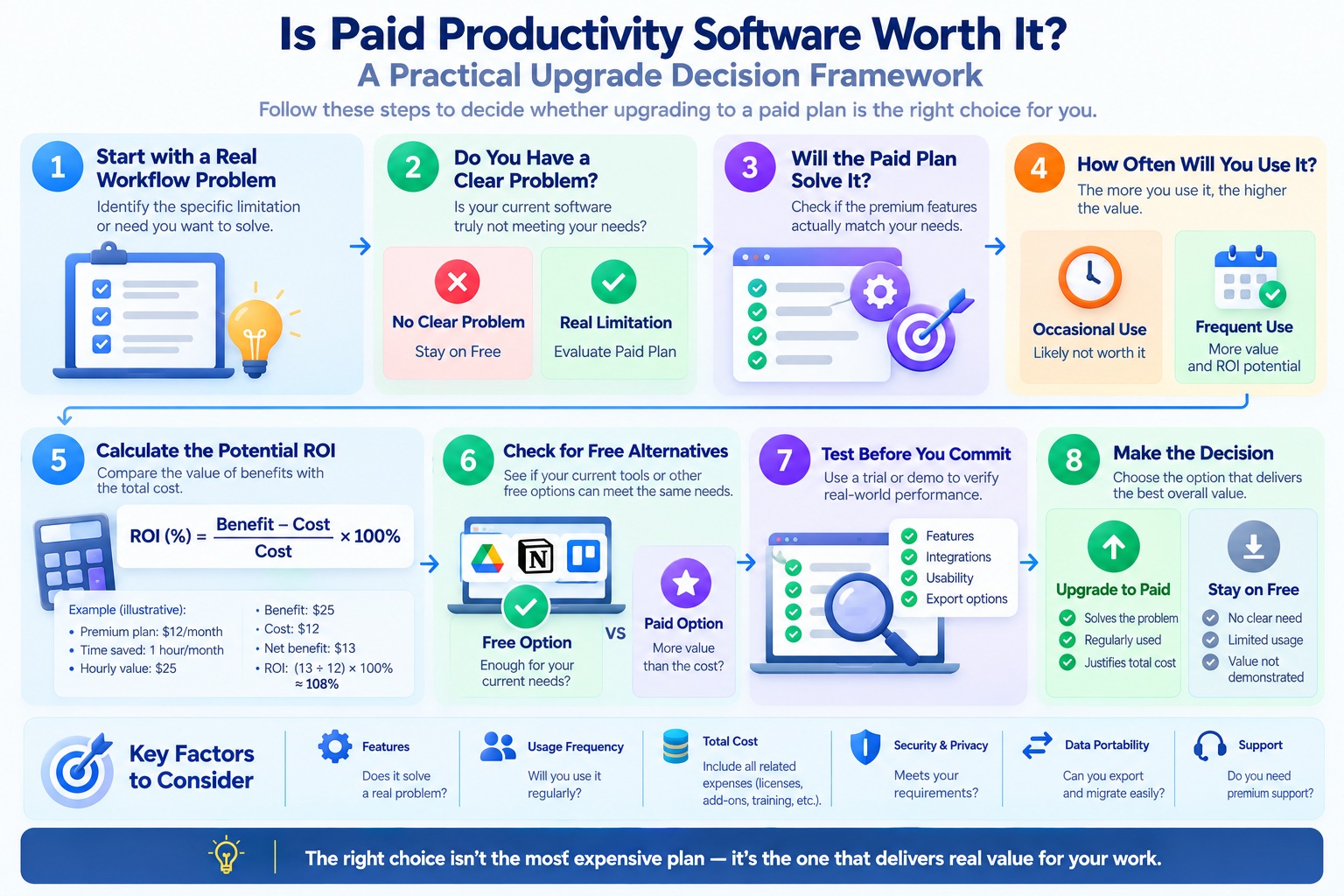
A Five-Minute Upgrade Decision Framework
Before purchasing, answer these five questions:
Question 1: What specific problem am I trying to solve?
If you cannot describe the problem clearly, delay the upgrade.
Question 2: Does the paid plan definitely solve it?
Verify the feature in the provider's current documentation.
Question 3: How often will I benefit?
Frequent, important tasks generally provide a stronger justification than occasional conveniences.
Question 4: Is there a suitable lower-cost alternative?
Consider existing tools, free plans, and the effort required to switch.
Question 5: Is the total cost justified?
Include recurring fees, setup, training, and any additional services.
If the answers demonstrate clear value, upgrading may be worthwhile.
If they do not, continue using the free plan and reconsider when your requirements change.
Key Takeaway
Paid productivity software is worth it when the upgrade provides a verified benefit that matters to your work.
That benefit might be an essential feature, fewer interruptions, better team administration, or reduced repetitive effort.
But premium software is not inherently more productive than free software.
The best approach is to identify your needs, test the relevant capabilities, calculate realistic costs, and choose the option that provides the most practical value.
Upgrade because your workflow requires it—not because the software offers a paid plan.
Best Choice for Students, Freelancers, Teams, and Small Businesses
The best choice between free vs paid productivity software depends on who is using the tools and what they need to accomplish.
A student managing assignments has different requirements from a freelancer coordinating client projects. A remote team may need collaboration features that an individual rarely uses, while a small business may have additional security, administrative, and support requirements.
That means there is no single software plan that makes sense for everyone.
The most practical approach is to start with your everyday tasks, identify any limitations, and choose a plan that provides the necessary capabilities without unnecessary expense.
1. Students: Start With Free Tools Unless Coursework Requires More
For many students, free productivity software is a sensible starting point.
Typical student workflows include writing assignments, preparing presentations, organizing research, managing deadlines, and collaborating on group projects.
These activities can often be handled with free applications.
Examples worth evaluating include:
-
Google Docs for document creation and sharing.
-
LibreOffice for desktop document editing, spreadsheets, and presentations.
-
Microsoft To Do for personal task management.
-
Notion for notes and workspace organization.
The important question is whether the software supports the formats and features required by your school or course.
Some assignments may depend on specialized applications, advanced spreadsheet capabilities, or particular file formats.
Students should also check whether their institution provides access to licensed software or educational plans before purchasing a personal subscription.
When free is enough: You can complete assignments, manage deadlines, and collaborate without important restrictions.
When paid may be worthwhile: A course requires specific premium software, or an essential feature is unavailable through suitable free or institution-provided options.
Recommended approach: Begin with free and school-provided tools, then pay only for capabilities that are genuinely required.
2. Freelancers: Pay for Features That Support Client Work
Freelancers often need productivity software for a wider range of activities.
Depending on their work, they may manage client communications, project deadlines, proposals, documents, research, and recurring administrative tasks.
A free productivity setup can be effective when projects are relatively simple.
For example, a freelancer might combine a document editor, calendar, task manager, and note-taking application without purchasing several premium subscriptions.
However, paid tools may become useful as client work grows more complex.
Potential reasons to upgrade include:
-
Managing a larger number of active projects.
-
Using essential integrations between business tools.
-
Automating repetitive administrative tasks.
-
Accessing advanced organization or reporting features.
-
Supporting specific client collaboration requirements.
For example, Todoist and Trello offer different plan levels that freelancers can evaluate according to their workflow.
The value of a paid plan depends on whether its features help deliver work reliably or reduce recurring administrative effort.
When free is enough: Your current tools support client projects without significant workarounds or missed requirements.
When paid may be worthwhile: A premium feature solves a recurring problem, supports a client requirement, or provides a benefit that justifies its total cost.
Recommended approach: Upgrade selectively. Avoid paying for multiple applications that provide largely overlapping functionality.
3. Remote Teams: Focus on Collaboration and Administration
Remote teams depend on software to coordinate work across people, devices, and locations.
Their requirements may include shared documents, task assignments, project visibility, file permissions, and communication integrations.
Free tools can support many basic collaboration activities.
However, as teams grow, managing access and maintaining consistent workflows can become more complicated.
Paid business plans may provide capabilities such as:
-
Centralized account administration.
-
More granular sharing permissions.
-
Additional collaboration controls.
-
Expanded integration options.
-
Administrative reporting.
-
Defined support services.
For example, Google Workspace and Microsoft 365 Business provide business-oriented productivity services.
Their features and plan limits differ, so teams should compare the specific capabilities they require.
A remote team does not necessarily need paid software simply because several people collaborate.
The decision becomes more compelling when the team needs administration, governance, or workflow features that its current tools cannot adequately provide.
When free is enough: Team members can collaborate effectively, manage permissions appropriately, and complete shared work without recurring limitations.
When paid may be worthwhile: The organization requires additional administrative controls, integrations, capacity, or support.
Recommended approach: Evaluate software at the team level rather than purchasing premium plans independently for every user.
4. Small Businesses: Consider Reliability, Data Protection, and Long-Term Costs
Small businesses often have to balance limited budgets with operational requirements.
Productivity software may support customer communication, document management, scheduling, internal collaboration, and project coordination.
Free tools can be useful during the early stages of a business, particularly for straightforward, low-risk workflows.
However, business requirements may extend beyond the features available in a free plan.
Important considerations include:
Account and access management
Can the business manage access when employees join, change roles, or leave?
Data protection
Does the software provide appropriate controls for the information being processed?
Business continuity
Can important files and workflows be recovered if an account or device becomes unavailable?
Compatibility
Can the software exchange files with customers, suppliers, and business partners?
Support
Are suitable technical assistance and service arrangements available?
Total cost
How much will the software cost as the business adds users, integrations, or storage?
For security planning, the NIST Cybersecurity Framework provides a useful risk-management reference.
The appropriate plan depends on the business's actual needs and obligations.
A paid subscription does not automatically guarantee security, regulatory compliance, or reliable service.
When free is enough: The business can meet its functional, security, support, and operational requirements using free tools.
When paid may be worthwhile: A business plan provides necessary administration, support, capacity, or contractual capabilities.
Recommended approach: Consider long-term operating requirements, not just the lowest monthly price.
Free vs Paid Productivity Software by User Type
The following table summarizes a practical starting point for each group.
| User Type | Suggested Starting Point | Consider Paid Software When |
|---|---|---|
| Students | Free or institution-provided tools | Coursework requires unavailable features |
| Freelancers | Free core tools with selective upgrades | Premium features support recurring client work |
| Remote teams | Free collaboration tools where appropriate | Administration or team requirements exceed free capabilities |
| Small businesses | Free tools for suitable workflows | Operational, security, support, or management needs justify upgrading |
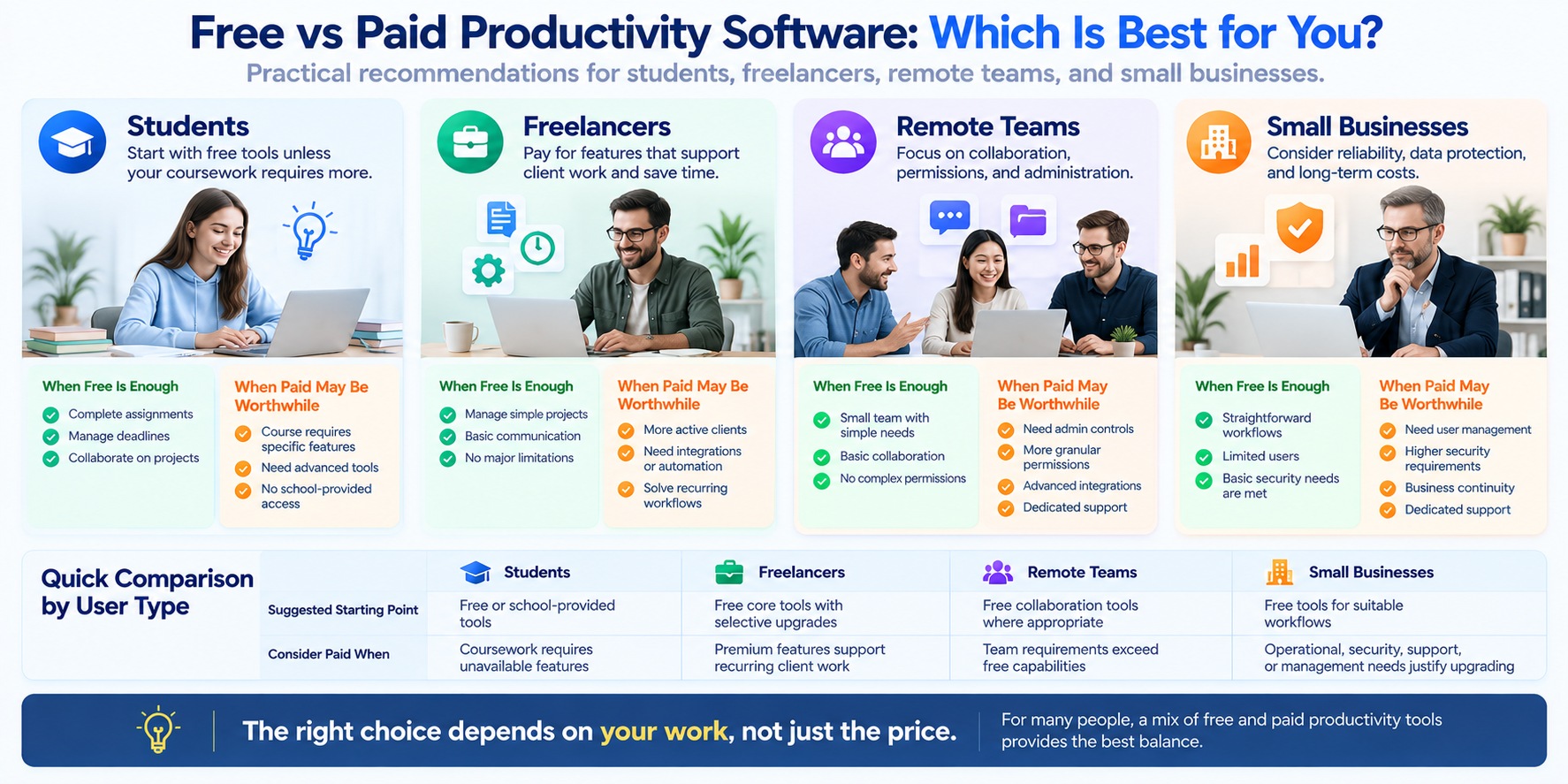
These recommendations are starting points rather than fixed rules.
A student working on advanced technical projects may need specialized paid applications, while a small business with simple requirements may continue using free software effectively.
The correct choice depends on the tasks, information, and workflows involved.
Should You Use a Mix of Free and Paid Productivity Tools?
For many users, the best solution is not exclusively free or paid software.
A hybrid approach allows you to pay for the capabilities that matter while using free tools for simpler tasks.
For example, a freelancer might use a paid application for an essential client workflow while relying on free tools for personal notes and scheduling.
A small team might subscribe to a business platform for centralized collaboration while continuing to use free applications for certain individual tasks.
This approach can help avoid unnecessary subscriptions.
However, combining too many applications can introduce problems of its own.
Potential challenges include:
-
Duplicate information across tools.
-
Inconsistent file versions.
-
Additional account management.
-
Complicated integrations.
-
Difficult data exports.
-
Confusion about where important information is stored.
A hybrid setup works best when each application has a clear purpose.
If you are comparing different software environments, it can also help to understand the differences between browser-based and desktop applications before selecting your tools.
How to Choose the Right Setup for Your Situation
Regardless of whether you are a student, freelancer, team member, or business owner, use the same basic process.
Step 1: List your essential tasks.
Identify the work the software must support.
Step 2: Define your non-negotiable requirements.
These might include file compatibility, collaboration, offline access, data protection, or administrative controls.
Step 3: Evaluate suitable free options.
Determine whether they can handle your actual workload.
Step 4: Identify any remaining limitations.
Focus on problems that affect important work rather than features that merely look appealing.
Step 5: Compare paid solutions and total costs.
Review current plan documentation, required user licenses, add-ons, and potential switching expenses.
Step 6: Test before committing.
Use representative tasks to confirm that the chosen software meets your needs.
For more options across different workflows, explore our guide to the best productivity software for work in 2026.
Key Takeaway
Students, freelancers, remote teams, and small businesses should not automatically choose the same productivity software plan.
Students can often begin with free or institution-provided tools. Freelancers may benefit from selective upgrades that support client work. Remote teams should evaluate collaboration and administration, while small businesses need to consider operational requirements and long-term costs.
For many people, a combination of free and paid applications provides the most practical balance.
The goal is to choose software that fits the work—not to pay for premium features simply because they exist.
When Should You Upgrade From Free to Paid?
The best time to upgrade from free to paid productivity software is when a specific limitation begins affecting important work—and a paid plan can reliably solve it.
You do not need to upgrade simply because your projects are growing, your team is expanding, or a provider is advertising premium features.
A free plan can remain useful for years if it continues to meet your requirements.
On the other hand, waiting too long to upgrade can create unnecessary work when an essential feature, capacity limit, or administrative requirement is holding you back.
The following seven signs can help you recognize when it may be time to consider a paid plan.
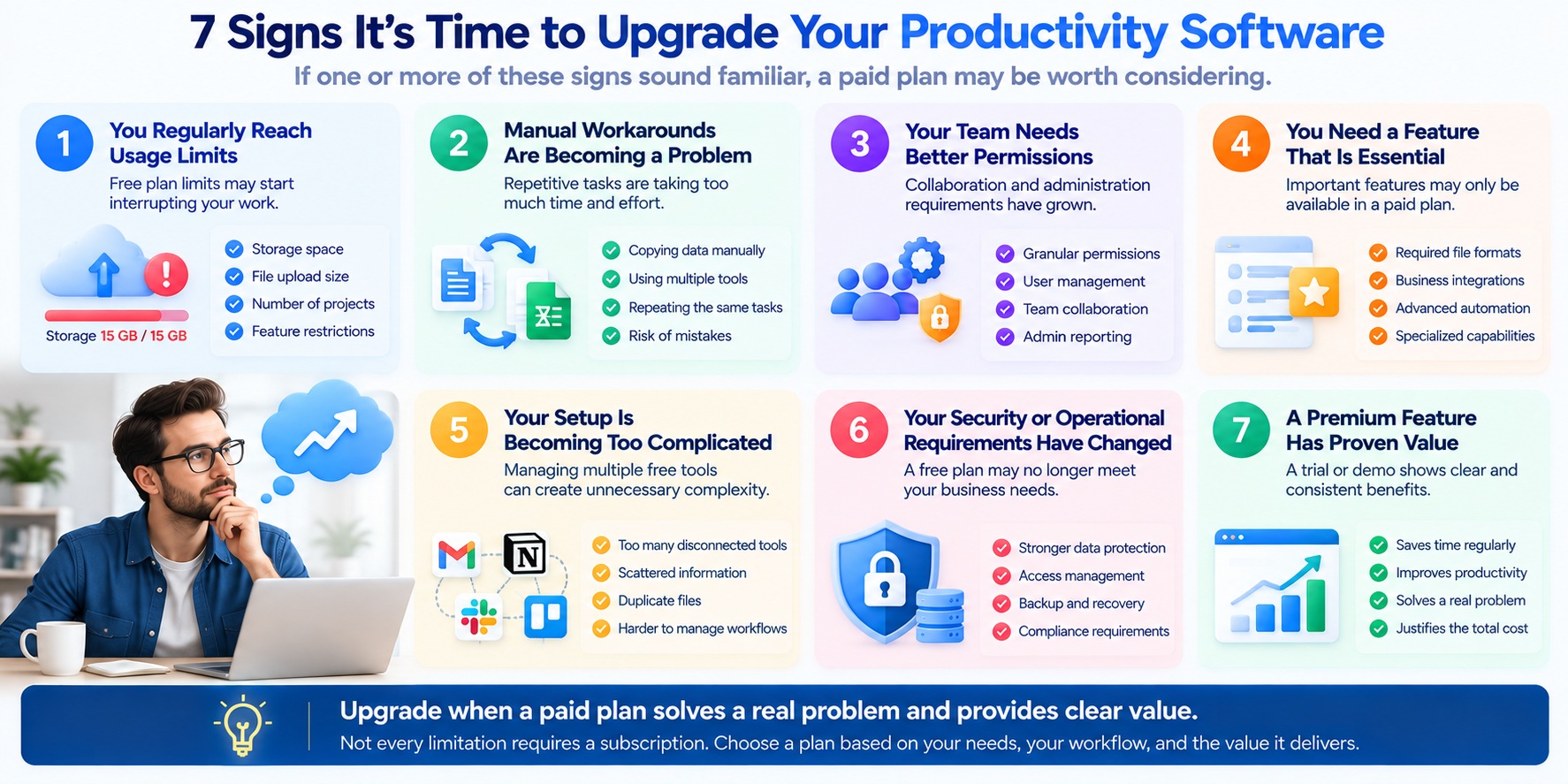
1. You Regularly Reach Important Usage Limits
One of the clearest upgrade signals is repeatedly reaching a limit that interrupts your work.
Depending on the application, free plans may restrict:
-
Cloud storage capacity.
-
File upload sizes.
-
The number of projects or workspaces.
-
Automation usage.
-
Access to certain features.
-
Collaboration or guest access.
However, not every limit is worth paying to remove.
If you reach a restriction only occasionally and can continue working without significant disruption, the free plan may still be sufficient.
Consider upgrading when: The same restriction repeatedly prevents you from completing important tasks, and the paid plan provides enough additional capacity to resolve it.
Before purchasing, verify the exact limits on the provider's current pricing page.
2. Manual Workarounds Are Becoming a Recurring Problem
Free productivity software sometimes requires extra steps to complete tasks that premium features could simplify.
For example, you might repeatedly:
-
Transfer information between applications.
-
Recreate the same project structure.
-
Update several records manually.
-
Prepare reports using separate tools.
-
Reorganize files to work around a limitation.
These tasks may seem manageable individually, but repeated workarounds can become frustrating and time-consuming.
However, not every manual task needs automation.
A paid feature is more compelling when it solves a frequent problem and works reliably.
Consider upgrading when: You can identify a recurring manual process that the premium plan can simplify without introducing excessive setup or maintenance.
3. Your Team Needs Better Permissions or Administration
Basic collaboration may work well for a small group.
As responsibilities become more complex, teams may need additional controls over users, files, and shared workspaces.
Potential requirements include:
-
More granular access permissions.
-
Centralized user management.
-
Organization-wide settings.
-
Additional administrative reporting.
-
Defined support arrangements.
-
More sophisticated collaboration workflows.
For example, Google Workspace and Microsoft 365 Business offer business-oriented plans with different administrative capabilities.
A larger team does not automatically require a paid plan, but organizational requirements can make specific premium features necessary.
Consider upgrading when: Your current software cannot provide the administration or collaboration controls your organization needs.
4. You Need a Feature That Is Essential to Your Work
Some software capabilities are optional conveniences. Others are necessary to complete a particular task.
Examples may include:
-
A required export or file format.
-
A specialized editing capability.
-
A particular business integration.
-
Advanced project reporting.
-
A specific automation feature.
-
Additional administrative functionality.
If a premium feature is essential to a regular workflow, upgrading may be justified even when the application is otherwise usable.
However, first confirm that the feature is genuinely unavailable in your current plan and that a suitable alternative does not already exist.
Consider upgrading when: The missing feature is required for important work, and the paid plan is an appropriate way to obtain it.
5. Your Existing Setup Is Becoming Too Complicated
Using several free applications can be a practical way to avoid unnecessary subscriptions.
But maintaining too many disconnected tools can also create problems.
For example, important information may become scattered across multiple accounts, files may be duplicated, and team members may struggle to identify the correct source of information.
A paid platform might simplify part of the workflow by consolidating relevant features.
However, switching to a single premium product is not automatically better.
You still need to consider compatibility, data migration, training, and the risk of becoming overly dependent on one provider.
Consider upgrading when: A paid solution can meaningfully simplify an inefficient setup, and the benefits outweigh the transition costs.
6. Your Security or Operational Requirements Have Changed
An application that was appropriate for personal use may not meet the requirements of a growing organization.
For example, a business may develop new needs related to:
-
Account administration.
-
Access management.
-
Data retention.
-
Backup and recovery.
-
Technical support.
-
Contractual or compliance obligations.
Certain paid business plans may provide relevant capabilities, but paying does not automatically make software secure or compliant.
The organization must still evaluate the product, configure it correctly, and determine whether it meets applicable requirements.
The NIST Cybersecurity Framework offers guidance for managing cybersecurity risks.
Consider upgrading when: A documented operational or security requirement cannot be met appropriately with the current plan.
7. A Premium Feature Has Demonstrated Consistent Value
Sometimes the strongest reason to upgrade comes from actual experience.
You may have used a trial, tested a premium feature, or evaluated it during a representative project.
If the feature consistently helps you complete important work, that provides a stronger basis for purchasing than marketing claims alone.
For example, a useful automation might reduce repeated manual steps, while an advanced collaboration feature might make a shared process easier to manage.
The improvement should be meaningful in your own workflow.
Consider upgrading when: You have verified that the feature solves a recurring problem and that its benefit justifies the total cost.
When You Should Not Upgrade Yet
Even if a premium plan looks attractive, there are situations where delaying the purchase makes sense.
You may want to remain on the free plan when:
-
Your essential tasks are already supported.
-
You rarely encounter usage restrictions.
-
The premium features are not relevant to your work.
-
You have not tested the capability you want.
-
Your existing applications already provide similar functionality.
-
The total cost is unclear.
-
You are unsure how to export your information if you cancel.
In these situations, waiting can help you avoid paying for capabilities that do not provide meaningful value.
A premium feature is not an urgent requirement simply because it is available.
How to Test a Paid Plan Before Upgrading
If a provider offers a free trial or product demonstration, use it to evaluate the exact workflow that motivated the upgrade.
A practical test can follow five steps.
Step 1: Define the problem.
Write down what your current plan cannot do.
Step 2: Select a representative task.
Choose a task that reflects your normal workload rather than a simplified demonstration.
Step 3: Test the premium capability.
Confirm that the feature works with your files, devices, collaborators, and integrations.
Step 4: Evaluate the improvement.
Compare the effort, reliability, or functionality against your current setup.
Step 5: Review the subscription terms.
Check the price, billing period, renewal conditions, cancellation process, and data access after cancellation.
If the provider does not offer a trial, review its documentation carefully and consider whether a lower-commitment option is available.
Monthly vs Annual Plans: When Should You Commit?
Once you decide that a paid plan is worthwhile, the billing arrangement becomes another important decision.
Monthly billing may be preferable when:
-
You are still evaluating the software.
-
Your workload changes frequently.
-
You need the premium feature for a short project.
-
You want to avoid a longer commitment.
Annual billing may be preferable when:
-
The software is already part of your regular workflow.
-
You have tested its essential capabilities.
-
You expect to use it throughout the subscription period.
-
The total annual cost and renewal terms are acceptable.
Some providers offer different effective prices for monthly and annual commitments, but the exact terms vary.
Do not assume that an annual subscription is always the better deal.
A lower effective monthly rate may not compensate for a commitment that extends beyond your actual needs.
Before purchasing, check whether the plan renews automatically and how cancellation affects future charges and access.
Upgrade Readiness Checklist
Use this checklist before moving from a free plan to a paid subscription.
| Question | What to Confirm |
|---|---|
| Do I have a specific problem? | The limitation affects important work |
| Does the paid plan solve it? | The required feature is included |
| Will I use the feature regularly? | Expected usage supports the cost |
| Have I tested it? | It works in my actual workflow |
| Are there suitable alternatives? | Existing or free tools cannot meet the need as effectively |
| Do I understand the full cost? | Seats, add-ons, renewals, and setup are considered |
| Can I access my data if I cancel? | Export and cancellation terms are clear |
| Does the product meet my security needs? | Relevant controls and policies have been reviewed |
If several answers remain uncertain, gather more information before subscribing.
Key Takeaway
The right time to upgrade productivity software is when a paid feature solves a real, recurring, or essential problem.
Common signals include reaching important usage limits, spending too much effort on workarounds, needing additional team controls, or confirming that a premium capability provides meaningful value.
Before committing, test the feature, review the total cost, compare alternatives, and understand the subscription terms.
If your free software still supports your work effectively, there is no need to rush into a paid plan.
Upgrade when your requirements justify it—not when a promotional offer creates pressure to buy.
Common Mistakes When Choosing Free or Paid Software
Choosing between free and paid productivity software can be difficult when every provider promotes different features, pricing plans, and benefits.
A common mistake is assuming that the cheapest option always provides the best value—or that a premium subscription automatically delivers better results.
Neither assumption is reliable.
The right software should support your actual tasks, fit your budget, protect important information, and remain manageable over time.
Before choosing or upgrading a productivity tool, avoid these nine common mistakes.
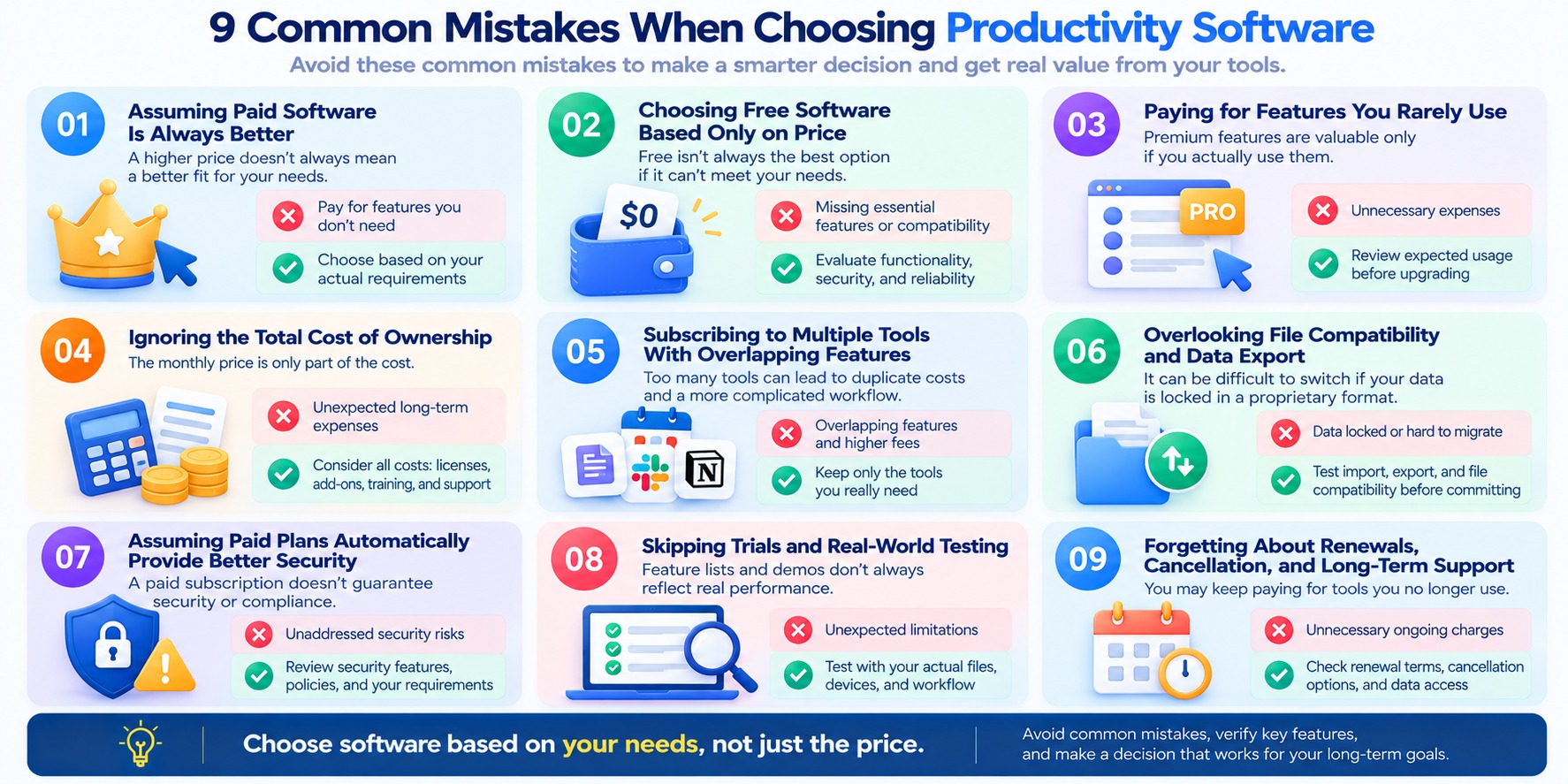
1. Assuming Paid Software Is Always Better
Paid productivity software often provides additional features, but that does not mean it is automatically the best option.
A free application may already support everything you need for document editing, scheduling, task management, or personal organization.
Paying for advanced features that you rarely use can increase expenses without improving your workflow.
How to avoid this mistake:
Start with a list of essential tasks. Compare software based on whether it completes those tasks reliably, rather than how many premium features it advertises.
Upgrade only when the additional capabilities address a real requirement.
2. Choosing Free Software Based Only on Price
Free software can offer excellent value, but the absence of a subscription fee should not be the only reason to choose it.
An application may be unsuitable if it cannot open required file formats, support essential collaboration, provide appropriate data protection, or meet your operational needs.
In some situations, working around these limitations can create additional effort.
However, this does not mean free software necessarily has higher hidden costs.
A well-maintained free application that meets your requirements may remain the most economical option.
How to avoid this mistake:
Evaluate compatibility, reliability, support, security, and data portability alongside price.
For example, LibreOffice may be worth considering for desktop office tasks, but users should test important documents and specialized workflows before switching.
3. Paying for Features You Rarely Use
Premium software often includes advanced reporting, automation, integrations, AI capabilities, and expanded collaboration features.
These can be valuable, but only when they support work you actually perform.
A feature used once during a trial may not justify an ongoing subscription.
Similarly, purchasing a more expensive plan for one attractive feature may be unnecessary if a lower-cost option already meets your needs.
How to avoid this mistake:
Review your expected usage before upgrading.
Identify the specific premium features you need, how frequently you will use them, and whether they provide meaningful benefits.
Where possible, test those features with representative tasks before purchasing.
4. Ignoring the Total Cost of Ownership
A monthly subscription price may look affordable when considered in isolation.
However, costs can increase when a product requires multiple user licenses, additional storage, paid integrations, or other services.
Setup, training, and migration may also create expenses.
A one-time purchase can have additional costs as well, including future version upgrades or support arrangements.
How to avoid this mistake:
Calculate costs over a realistic period, such as one or three years.
Include:
-
Subscription or license fees.
-
Required user seats.
-
Additional services and integrations.
-
Setup and training.
-
Maintenance and support.
-
Potential migration costs.
Check current billing terms on the provider's official pricing page before committing.
5. Subscribing to Multiple Tools With Overlapping Features
Using several productivity applications is not necessarily a problem.
A combination of free and paid tools can work well when each application serves a distinct purpose.
However, subscriptions become wasteful when different products provide similar features that you do not need separately.
For example, someone might pay for multiple applications that all include task management, document collaboration, or note-taking capabilities.
The problem is not the number of applications alone.
It is the lack of a clear reason for using each one.
How to avoid this mistake:
Review your software subscriptions periodically.
Identify duplicate capabilities, check which tools are actually used, and consider whether existing applications can replace unnecessary subscriptions.
Avoid consolidating everything into one platform if doing so would create new compatibility or workflow problems.
6. Overlooking File Compatibility and Data Export
A productivity application may be easy to start using but difficult to leave.
This can happen when important information is stored in proprietary formats or depends on features that do not transfer easily to another product.
Even when a provider offers data export, the exported files may not preserve every attachment, permission, integration, or workflow.
This creates a risk of vendor lock-in.
How to avoid this mistake:
Before adopting software, test whether you can:
-
Import the file formats you regularly use.
-
Export important documents and records.
-
Preserve necessary attachments and metadata.
-
Open exported information in other applications.
-
Retrieve data after changing or canceling a plan.
For example, Google Takeout provides export options for supported Google services.
Remember that exporting data and recreating an entire workflow are not always the same thing.
7. Assuming Paid Plans Automatically Provide Better Security
Security is a critical consideration, especially when productivity software stores confidential or business-related information.
However, a paid subscription does not guarantee that a product is secure.
Both free and paid applications can have vulnerabilities, inappropriate configurations, or privacy practices that do not meet your requirements.
Some paid business plans provide additional administrative controls, but those controls still need to be evaluated and configured correctly.
How to avoid this mistake:
Review the application's security documentation and relevant plan capabilities.
Check for appropriate authentication, access permissions, update practices, backup options, and data-handling policies.
The NIST Cybersecurity Framework provides guidance for managing cybersecurity risks.
For account protection practices, consult CISA's Secure Our World resources.
Choose software based on its security capabilities and your requirements—not its price.
8. Skipping Trials and Real-World Testing
Product demonstrations and feature lists can help explain how software is intended to work.
However, they do not establish whether an application will perform well with your files, devices, team, or existing systems.
A premium feature may look useful but introduce unexpected limitations when applied to a real task.
For example, an integration may not transfer the information you need, or an advanced reporting feature may not support your preferred workflow.
How to avoid this mistake:
When a trial is available, test the software with representative tasks.
Verify essential functionality, compatibility, collaboration, export options, and usage limits.
If no trial is offered, review official documentation and consider the financial commitment carefully.
Do not assume that a successful demonstration guarantees the same result in your environment.
9. Forgetting About Renewals, Cancellation, and Long-Term Support
A subscription that provides good value today may become unnecessary as your needs change.
Users sometimes continue paying for applications they no longer use or forget to review changes in pricing and plan terms.
One-time licenses can also require attention because support periods and future upgrade rights vary.
The ability to cancel a subscription does not necessarily mean every premium feature or service will remain available afterward.
How to avoid this mistake:
Before purchasing, confirm:
-
The billing period and renewal terms.
-
Whether the subscription renews automatically.
-
How to cancel or change plans.
-
What happens to your files after cancellation.
-
Whether important features remain accessible.
-
The product's support and update arrangements.
Set a reminder to review subscriptions before important renewal dates.
For teams, assign responsibility for tracking software licenses and usage.
Common Software Selection Mistakes: Quick Comparison
| Mistake | Potential Consequence | Better Approach |
|---|---|---|
| Assuming paid is always better | Unnecessary spending | Evaluate actual requirements |
| Choosing free solely because of price | Missing essential capabilities | Compare functionality and suitability |
| Paying for unused features | Poor subscription value | Review expected usage |
| Ignoring total cost | Unexpected long-term expenses | Calculate full ownership costs |
| Duplicating subscriptions | Overlapping tools and fees | Audit existing applications |
| Ignoring data export | Difficult migration | Test portability before adoption |
| Assuming paid means secure | Unaddressed security risks | Evaluate specific protections |
| Skipping trials | Workflow incompatibility | Test representative tasks |
| Forgetting renewals | Unnecessary ongoing charges | Review terms and subscriptions |
A Better Way to Choose Productivity Software
A reliable software selection process does not need to be complicated.
Use these five steps.
Step 1: Define your requirements.
List the tasks the software must support and distinguish essential features from optional conveniences.
Step 2: Compare suitable free and paid options.
Evaluate functionality, compatibility, collaboration, security, and support—not just the advertised price.
Step 3: Test critical workflows.
Confirm that the application works with your actual files, devices, and processes.
Step 4: Review total costs and exit options.
Consider recurring fees, additional services, data export, and cancellation conditions.
Step 5: Reevaluate as your needs change.
A free plan may be sufficient today and restrictive later. A premium subscription may be valuable now but unnecessary in the future.
For more software options and comparison ideas, see our guide to the best productivity software for work in 2026.
Key Takeaway
The most common mistakes when choosing free or paid productivity software come from focusing too heavily on price, feature counts, or marketing promises.
The better approach is to evaluate software against real requirements, verify important capabilities, understand long-term costs, and maintain control over your data.
Free software is not automatically inadequate, and paid software is not automatically superior.
Choose the option that supports your work reliably without unnecessary expense or complexity.
Frequently Asked Questions
Here are answers to common questions about free vs paid productivity software, including features, security, business use, subscription costs, and when upgrading makes sense.
1. Is free productivity software good enough for everyday work?
Yes. Free productivity software can be sufficient for writing documents, managing tasks, organizing notes, scheduling activities, and basic collaboration.
The best choice depends on whether the application supports your essential tasks without restrictions that regularly interrupt your workflow.
For example, LibreOffice provides free desktop office applications for common document, spreadsheet, and presentation tasks.
2. Is paid productivity software worth the money?
Paid productivity software can be worth the cost when its additional features solve an important problem, reduce recurring manual work, or support essential collaboration and administration.
However, a premium subscription does not automatically improve productivity.
If your free tools already meet your requirements, upgrading may provide little additional value.
3. What is the main difference between free and paid productivity software?
The main differences often involve feature availability, usage limits, collaboration controls, automation, technical support, and administrative capabilities.
Free plans typically provide a defined set of features, while paid plans may expand access or include additional services.
These differences vary by product, so always compare the specific plans rather than assuming every paid application offers the same advantages.
4. Is free productivity software safe to use?
Free productivity software can be safe to use, but security depends on the specific product, its maintenance practices, available protections, and how users configure it.
A paid subscription does not automatically guarantee better security.
Review security updates, account protection, sharing permissions, backup options, and privacy policies before trusting an application with important information.
For general guidance, see CISA's Secure Our World resources.
5. Can businesses use free productivity software?
Yes, businesses can use free productivity software when the product's license or service terms permit the intended commercial use and its capabilities meet their requirements.
However, businesses should evaluate access management, data protection, compatibility, support, and any applicable contractual or regulatory obligations.
A free plan may work well for simple workflows, while a paid business plan may be necessary for specific administrative or operational needs.
6. When should I upgrade from free to paid productivity software?
Consider upgrading when a recurring limitation affects important work and the paid plan provides a suitable solution.
Common reasons include reaching usage limits, needing essential features, requiring additional team controls, or benefiting from a tested automation.
Before purchasing, confirm the feature, review the total cost, and test the workflow when possible.
7. Are free productivity apps limited compared with paid versions?
Some free productivity apps have restrictions on storage, projects, collaborators, integrations, automation, or other features.
However, these limitations are not universal.
Free and open-source applications may offer extensive functionality without requiring a premium subscription. Check the current documentation for the particular product you are considering.
8. Are annual productivity software subscriptions cheaper than monthly plans?
Some providers offer a lower effective monthly rate when users choose annual billing.
However, annual subscriptions may involve a longer financial commitment, and cancellation or refund conditions vary.
Compare the total amount payable, expected usage period, renewal terms, and flexibility before choosing a billing option.
A lower advertised monthly equivalent does not necessarily make an annual plan the best choice.
9. Can I use free and paid productivity tools together?
Yes. A combination of free and paid productivity tools can be a practical solution.
For example, you might pay for an application that supports an essential business workflow while using free software for personal notes or basic document editing.
The main consideration is avoiding unnecessary duplication, disconnected information, and excessive account management.
Each application should have a clear purpose.
10. What happens to my files if I cancel a paid software subscription?
The result depends on the provider's terms and the specific product.
Some services may allow continued access to certain files or basic features, while others may restrict editing, storage, or premium functionality.
Before canceling, review the provider's documentation, export important information, and verify that the exported files are usable.
For supported Google services, Google Takeout provides data export options.
11. Is open-source productivity software always free?
No. Open-source refers to software licensing rights, not necessarily a zero-dollar price.
Many open-source applications are available without a license fee, but related services such as hosting, support, customization, or managed infrastructure may cost money.
The Open Source Initiative explains the principles behind open-source software licensing.
12. How do I choose the best free or paid productivity software?
Start by listing the tasks the software must support and identifying any essential requirements.
Then compare suitable applications based on functionality, compatibility, collaboration, security, data portability, and total cost.
Test important workflows before making a long-term commitment.
The best productivity software is the option that meets your actual needs reliably without unnecessary expense or complexity.
Conclusion: Choose Value Over Price
When comparing free vs paid productivity software, the most important question is not which option offers more features or costs less.
It is which option helps you complete your work reliably, efficiently, and without unnecessary expense.
Free productivity tools can be excellent choices for document editing, task management, note-taking, scheduling, and many everyday workflows. For students, freelancers, and even some small teams, a free application may provide everything needed.
Paid software becomes more attractive when additional capabilities solve specific problems—such as restrictive usage limits, essential integrations, complex collaboration requirements, or recurring administrative work.
However, a premium subscription does not automatically guarantee better performance, stronger security, or higher productivity.
The right choice depends on your requirements.
Three Practical Ways to Make the Right Decision
Stay with free software when it already works well.
If your current tools support essential tasks, meet your security and compatibility requirements, and do not create significant limitations, there may be no reason to upgrade.
Consider paid software when a real limitation affects your work.
If a premium feature removes a recurring obstacle, supports an essential workflow, or provides necessary administrative capabilities, evaluate whether the benefit justifies the full cost.
Use a combination of free and paid tools when that makes more sense.
You do not have to choose one approach exclusively. A focused mix of applications can provide the capabilities you need without paying for unnecessary premium features.
Your Next Step: Review Your Current Software
Before purchasing another subscription, take a few minutes to review the applications you already use.
Ask yourself:
-
Which tools do I rely on most frequently?
-
Which free-plan limitations actually affect my work?
-
Which premium features would solve those problems?
-
Can I verify the benefits before committing?
-
What will the software cost over the next year?
-
Can I export my data and switch tools if my needs change?
If you cannot identify a meaningful reason to pay, continuing with your current free setup may be the better choice.
If an upgrade clearly solves an important problem, test it and review the subscription terms before making a commitment.
Explore More Productivity Software Guides
Still deciding which applications fit your workflow?
Read our guide to the best productivity software for work in 2026 to explore additional software options and use cases.
You can also browse the Hozaki Software Hub for more practical software guides and comparisons.
Final takeaway: The best productivity software is not necessarily free or paid. It is the software that delivers the capabilities you need at a cost that makes sense for your work.
Choose value over price—and upgrade only when the benefits are clear.
Sources & Methodology
How This Guide Was Prepared
This guide compares free and paid productivity software using publicly available product documentation, official pricing and feature pages, and established security and privacy guidance.
The goal is to help readers understand when free software may be sufficient, when a paid upgrade may provide meaningful value, and which factors should influence a purchasing decision.
The comparison focuses on seven evaluation areas:
-
Core functionality: Whether free and paid plans support essential productivity tasks.
-
Usage limits: Differences in storage, capacity, integrations, and other restrictions.
-
Collaboration and administration: Features for sharing information, coordinating teams, and managing access.
-
Automation and advanced capabilities: Whether additional functionality solves recurring workflow problems.
-
Total cost of ownership: Subscription fees, add-ons, setup, maintenance, and switching costs.
-
Security and privacy: Account protection, data-handling practices, and relevant organizational requirements.
-
Data portability: Export capabilities, file compatibility, and potential vendor lock-in.
These criteria provide a framework for comparing software based on practical requirements rather than feature counts alone.
Official Product Sources
The following official resources provide information about software capabilities, pricing structures, or available plans.
These resources are included to help readers verify product information directly.
Product features, free-plan restrictions, pricing, and subscription conditions may change. Readers should consult the provider's current documentation before making a purchase.
Security, Privacy, and Licensing References
The following resources inform the general security, privacy, and software licensing considerations discussed in this article.
-
NIST Cybersecurity Framework — A framework for understanding and managing cybersecurity risks.
-
NIST Privacy Framework — Guidance for identifying and managing privacy risks.
-
CISA Secure Our World — Practical account and cybersecurity guidance.
-
FTC Privacy and Security Guidance — Resources related to protecting personal information.
-
Open Source Initiative — Open Source Definition — Principles defining open-source software licenses.
These sources provide general guidance. They do not certify or independently validate the security of every productivity application mentioned in this article.
How Cost Examples Were Calculated
The financial examples in this guide are hypothetical illustrations, not quotations or verified prices for particular products.
For example, the three-year subscription comparison uses an assumed monthly price and a fixed number of users to demonstrate how recurring costs accumulate.
The return-on-investment example uses assumed subscription costs, time savings, and an illustrative value of time.
Actual costs and benefits depend on the provider, billing terms, number of users, additional services, implementation effort, and the user's workflow.
Estimated time savings should not be interpreted as guaranteed financial returns.
Testing and Review Limitations
This article is a research-based comparison and decision guide.
It does not claim that Hozaki independently installed, benchmarked, or tested every application discussed.
Product examples are used to illustrate software categories, pricing approaches, and possible use cases. They should not be interpreted as rankings based on original performance tests.
The article does not provide independently measured results for application speed, reliability, security effectiveness, or productivity improvements.
Readers should test critical features with their own files, devices, and workflows whenever possible.
Editorial Independence and Updates
Hozaki aims to provide practical software guidance that distinguishes documented product capabilities from general recommendations and hypothetical examples.
Software plans and services change over time. Important details should be rechecked against official sources, particularly when evaluating a subscription or business deployment.
For more information about our approach to publishing and reviewing content, see the Hozaki Editorial Policy.
This guide is intended for general informational purposes. It is not a substitute for product-specific security assessments, legal advice, or professional procurement review.
Comments 0